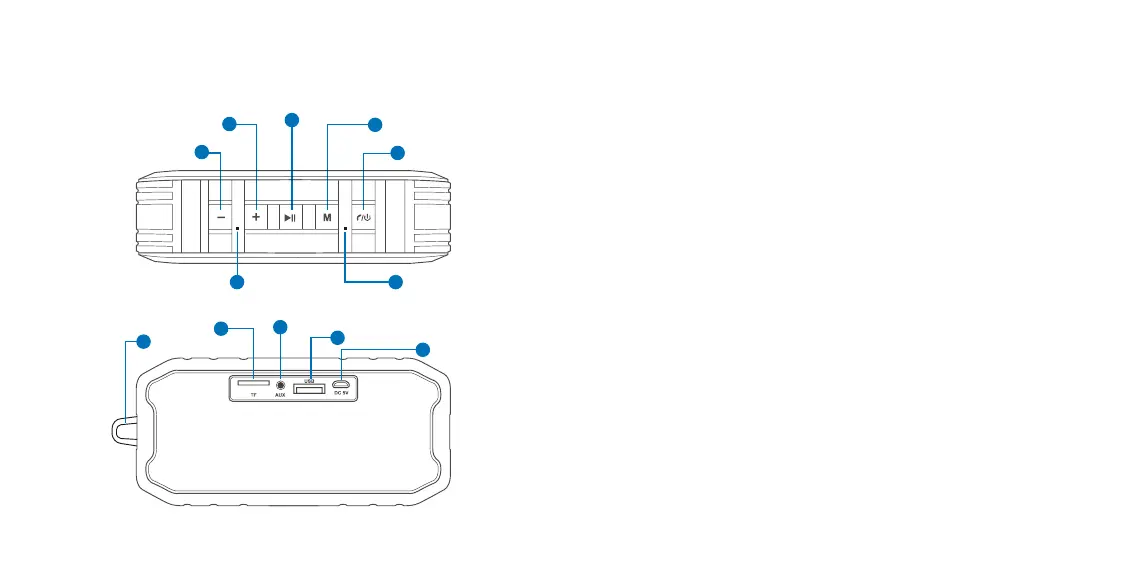
III. Product components
1. Power/Handset button: Press and hold this button to turn the speaker
On/OFF or to connect to the Bluetooth
®
mode. The unit will shut off after
approximately ten minutes of inactivity if it is not connected to the
Bluetooth
®
device. An audible tone will indicate when the speaker has
paired with your smart device or when it has been disconnected.
In Hands-free mode:
a. When the speaker is in Bluetooth
®
mode press this button to answer
and end a call.
b. Press and hold this button if you wish to reject an incoming call.
c. Press it twice to dial the last number called (on supported devices).
2. Mode button: Press this button to cycle through the available input
modes: BT, USB, Micro SD™, Auxiliary-in or FM.
3. Play-Pause: In playback mode, press this button to play or pause your
music. If the speaker was playing music before receiving a call, it will
automatically resume playback after the call has ended.
4. Volume +/Next track: Press this button briefly to play the next track.
Press and hold this button to increase the volume level.
Note: This button is not active in Auxiliary mode.
5
4
3
2
1
7
8
9
10
11
12
6


 To Next Page