The ebro TLC 750 BT and TLC 750 NFC are dual-radio thermometers designed for versatile temperature measurement. These devices combine both infrared (IR) and contact temperature measurement capabilities, allowing users to select the appropriate method for various applications.
Function Description:
The primary function of both the TLC 750 BT and TLC 750 NFC is to accurately measure temperature. They achieve this through two distinct modes:
- Infrared Temperature Measurement: When the penetration probe is folded, the device operates as an infrared thermometer. Two integrated laser pointers assist in aiming at the desired measuring surface, ensuring precise targeting. The temperature of the area between the two laser points is measured.
- Penetration Probe Temperature Measurement: By unfolding the penetration probe, the device switches to contact temperature measurement. The probe needle is inserted into the substance or object to be measured, and the device displays the stabilized temperature.
The TLC 750 BT model incorporates a Bluetooth LE interface for wireless data transmission, enabling seamless integration with other systems for real-time data transfer. It also features a USB interface for wired data transmission and an integrated battery that can be charged via USB or wireless charging technology.
The TLC 750 NFC model builds upon the functionalities of the TLC 750 BT by adding an integrated NFC reader. This allows the device to read NFC tags, expanding its utility in applications requiring tag interaction.
Usage Features:
The thermometers are designed for user-friendly operation with several key features:
- Switching On/Off: The device can be switched on by pressing the "HOLD" button or by unfolding the penetration probe. If the probe is folded, IRT measurement is active; otherwise, core temperature measurement is active. A flashing Bluetooth symbol indicates the device is waiting for a connection, which becomes permanently displayed once connected. The device automatically switches off after 2 minutes of inactivity or immediately when the penetration probe is closed.
- Temperature Measurement:
- Infrared: With the penetration sensor closed, users point the infrared lens at the target and press and hold the "HOLD" button. The two laser points guide the measurement. Releasing the button holds the last measured value.
- Penetration Probe: With the probe unfolded, the needle is positioned at the measurement point. Pressing the "HOLD" button holds the last measured temperature value until it is pressed again.
- Logging Modes:
- AdHoc Logging Mode: This mode facilitates real-time measurement data transmission via Bluetooth LE. Measurement values can also be stored internally for later readout. The device needs to be programmed by host software for this mode. In infrared mode, measurements are taken while the "HOLD" button is pressed. In penetration probe mode, measurements are taken when no key is pressed. When the "HOLD" button is released (infrared) or briefly pressed (penetration probe), the device alternately displays "HOLD" and "SAVE." If Bluetooth is connected, data is transferred wirelessly. For the TLC 750 NFC, pressing down the "HOLD" button initiates a search for NFC tags, and if found, the device displays "TAG" along with "HOLD" and "SAVE." Measurements can be stored by pressing a button, confirmed by "OK," or discarded, confirmed by "CLR." Pressing "HOLD" initiates a new measurement.
- List Logging Mode: This mode offers a guided tour through predefined measuring locations, with location texts displayed on the LCD. These texts are programmable via host software. Users can change measurement locations using the up/down buttons. Temperature measurements are taken similarly to AdHoc mode, with "HOLD" for infrared and no key press for penetration probe. Storing a measurement (confirmed by "OK") automatically advances to the next list location. Measurements can be discarded (confirmed by "CLR"), and "HOLD" initiates a new measurement.
- Settings Menu: The settings menu allows users to configure various device parameters. It is accessed by pressing the up and down buttons, followed by the "HOLD" button for 3 seconds, when the device is switched off. Within the menu, users can navigate entries using the up/down buttons. Pressing "HOLD" displays the next menu entry. If no button is pressed for 3 seconds, the next menu entry is displayed, and after the last entry, the device returns to measure mode. Settings include:
- UNIT: Temperature unit (°C/°F).
- LASR: IRT Laser (ON/OFF).
- EMIS: IRT Emissivity (10-100).
- AHLD: Auto Hold function for penetration probe (ON/OFF).
- LCDR: LCD rotation setting (ON/OFF).
- BLKL: Backlight (ON/OFF).
- BLE: Bluetooth switch off timeout (30s) (ON/OFF).
- NFC (TLC 750 NFC only): NFC reader functionality (ON/OFF).
- Battery Indicator and Charging: The device features a battery indicator to show the charge status (fully charged, charging completed, partially discharged, almost empty, charging active). The battery can be charged via the USB port or wirelessly using a base station (IF 750) or charger (CS 750).
Maintenance Features:
Proper maintenance ensures the longevity and accuracy of the device:
- Cleaning the Lens: Loose particles should be removed with clean compressed air, followed by gentle brushing with a soft brush. Impurities can be wiped with a damp cotton ball moistened with clear water. Solvents should not be used to clean the lens.
- Cleaning the Housing: The device housing can be cleaned with a soap solution and a damp cloth. The device should not be immersed in water, and solvents like acetone should not be used.
- Safety Precautions: Users are advised to read the operating instructions carefully to familiarize themselves with all functions and components, and to understand commissioning and handling details. This helps prevent damage to the device and ensures compliance with statutory rights. Particular attention should be paid to safety instructions, and the manual should be kept in a safe place.
- Disposal: If the device becomes unusable, it must be disposed of in an environmentally appropriate manner, not with household waste. Disposal should follow specific national recycling requirements.

 Need help?
 General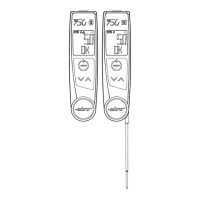

 To Next Page