EasyManua.ls Logo

Yaber Pro V7 - Remote Control Guide

Yaber Pro V7
27 pages
Print Icon
To Next Page IconTo Next Page
To Previous Page IconTo Previous Page
Loading...
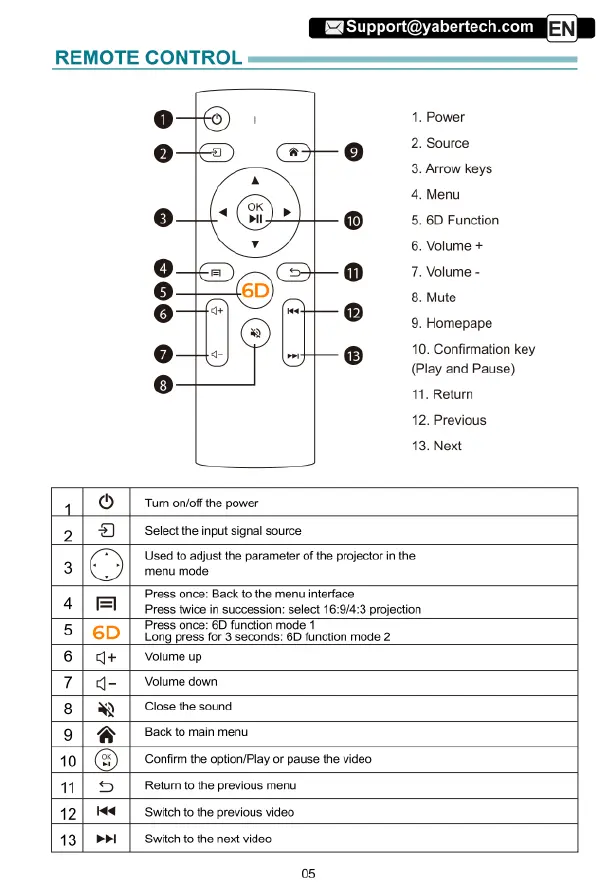
REMOTE
CONTROL
Power
Source
Arrow
keys
Menu
Volume
+
2
3.
4.
5.6D
Function
6.
7.
Volume
-
8.
Mute
9.
Homepape
10.
Confirmation
key
(Play
and
Pause)
11.
Return
12.
Previous
13.
Next
11O
[
Tomonotinesove
2|
@
|
selectine
nputsignai
source
Press
once:
Back
(o
the
menu
interface
Press
twice
in
succession:
select
16:9/4:3
projection
Used
1o
adjust
the
parameter
of
the
projector
in
the
3
menu
mode
=
Press
once:
6D
funclion
mode
1
6D
Long
press
for
3
seconds:
6D
function
mode
2
4
5
6
|
g+
|
Voumeup
7
8
4-
|
Volume
down
)
|
Close
the
sound
9|
@
|
Becktomanmens
10|
(3) |
contim
the
optionPiay
or
pause
the
video
11|
©
|
Retumtothe
previous
menu
12|
M4
|
Switch
to
the
previous
video
13|
PM
|
Switch
tothe
next
video
05

Related product manuals