EasyManua.ls Logo

Yaber U10 - Screen Mirroring for iOS Devices (iOS Cast)

Yaber U10
31 pages
Print Icon
To Next Page IconTo Next Page
To Previous Page IconTo Previous Page
Loading...
ftersales@yabertech.com
3.1.i0S
Cast
(for
iOS
Devices)
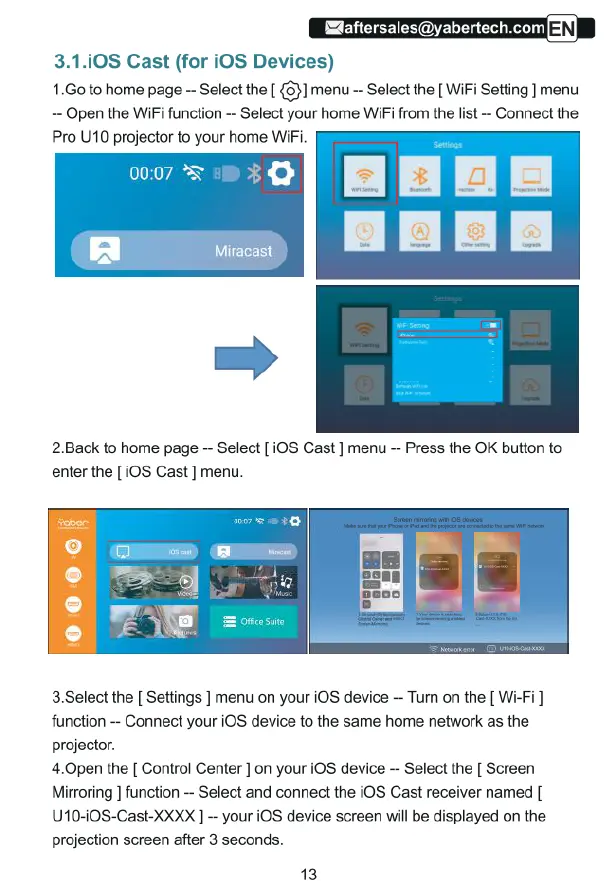
1.Go
to
home
page
-
Select
the
[
{5}]
menu
-
Select
the
[
WiFi
Setting
]
menu
--
Open
the
WiFi
function
--
Select
your
home
WiFi
from
the
list
-
Connect
the
Pro
U10
projector
to
your
home
WiFi.
2Back
to
home
page
Select
[
iOS
Cast
]
menu
Press
the
OK
button
to
enter
the
[0S
Cast
]
menu.
3.Select
the
[
Settings
]
menu
on
your
iOS
device
Tur
on
the
[
Wi-Fi]
function
-
Connect
your
iOS
device
to
the
same
home
network
as
the
projector.
4.0pen
the
[
Control
Center
]
on
your
iOS
device
-
Select
the
[
Screen
Mirroring
]
function
-
Select
and
connect
the
iOS
Cast
receiver
named
[
U10-00S-Cast-XXXX
]
-
your
iOS
device
screen
will
be
displayed
on
the
projection
screen
after
3
seconds.
13

Related product manuals