EasyManua.ls Logo

Yaber U2 - Menu Setting Method; Picture Settings Menu

Yaber U2
27 pages
Print Icon
To Next Page IconTo Next Page
To Previous Page IconTo Previous Page
Loading...
Menu
Setting
Method
aftersale:
1.Press
the
*
"
on
the
remote
controller,
then
the
menu
picture
will
display
on
screen.
2
Press'<,
Time>Setup’
"key,
the
menu
will
move
to
“Picture>Sound>Projection>-
3.Select
the
adjust
interface,use"A/¥"
key
to
choose
the
wanted
item.
4.Press“OK”
or
“4/P"to
adjust
the
item
parameter.
5.Press’
%
to
quit
the
chosen
menu
after
finishing
adjusted,
and
then
can
choose
other
menu
by
pressing
“«
/
PROJECTOR
IMAGE
SETTING
"key.
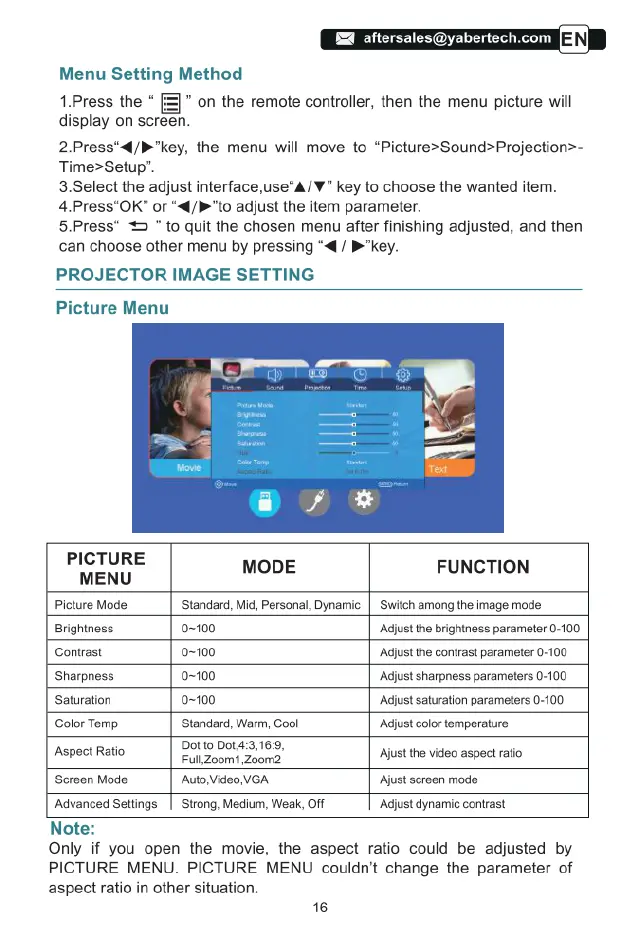
Picture
Menu
PICTURE
MENU
MODE
FUNCTION
Picture
Mode
Standard,
Mid,
Personal,
Dynamic
|
Switch
among
the
image
mode
Brightness
0100
Adjust
the
brightness
parameter
0-100
Contrast
0~100
Adjust
the
contrast
parameter
0-100
Sharpness
0-100
Adst
sharpness
parameters
0-100
Saturation
0-100
‘Adjst
saturation
parameters
0-100
Color
Temp
Standard,
Warm,
Cool
‘Adjstcolor temperature
Aspect
Ratio
‘2;’.‘.';’0‘3‘.“21;23
Ajust
the
video
aspect
ratio
Screen
Mode
‘Auto,Video
VGA
‘Ajust
screen
mode
‘Advanced
Seltings
|
Strong,
Medium,
Weak,
OFf
‘Adjustdynamic
contrast
Note:
Only
if
you
open
the
movie,
the
aspect
ratio
could
be
adjusted
by
PICTURE
MENU.
PICTURE
MENU
couldn't
change
the
parameter
of
aspect
ratio
in
other
situation.
16

Related product manuals