EasyManua.ls Logo

Yaber U2 - Connecting to a DVD Player; Connecting to a Soundbar

Yaber U2
27 pages
Print Icon
To Next Page IconTo Next Page
To Previous Page IconTo Previous Page
Loading...
aftersales@yabertech.com
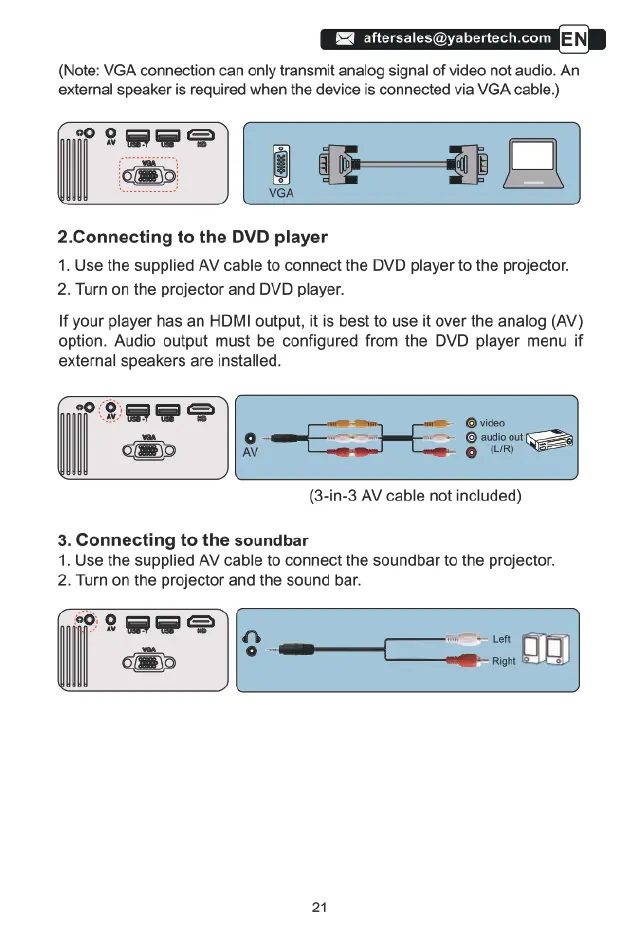
(Note:
VGA
connection
can
only
transmit
analog
signal
of
video
not
audio.
An
external
speaker
is
required
when
the
device
is
connected
via
VGA
cable.)
2.Connecting
to
the
DVD
player
1.
Use
the
supplied
AV
cable
to
connect
the
DVD
player
to
the
projector.
2.
Turn
on
the
projector
and
DVD
player.
If
your
player
has
an
HDMI
output,
it
is
best
to
use
it
over
the
analog
(AV)
option.
Audio
output
must
be
configured
from
the
DVD
player
menu
if
external
speakers
are
installed.
(3-in-3
AV
cable
not
included)
3.
Connecting
to
the
soundbar
1.
Use
the
supplied
AV
cable
to
connect
the
soundbar
to
the
projector.
2.
Turn
on
the
projector
and
the
sound
bar.
21

Related product manuals