EasyManua.ls Logo

Yaber U2 - Page 4

Yaber U2
27 pages
Print Icon
To Next Page IconTo Next Page
To Previous Page IconTo Previous Page
Loading...
aftersale:
Product
Description
0@
@ @
-
__t
®
1
:
“mmflflfl
a
®
2828
[o
®
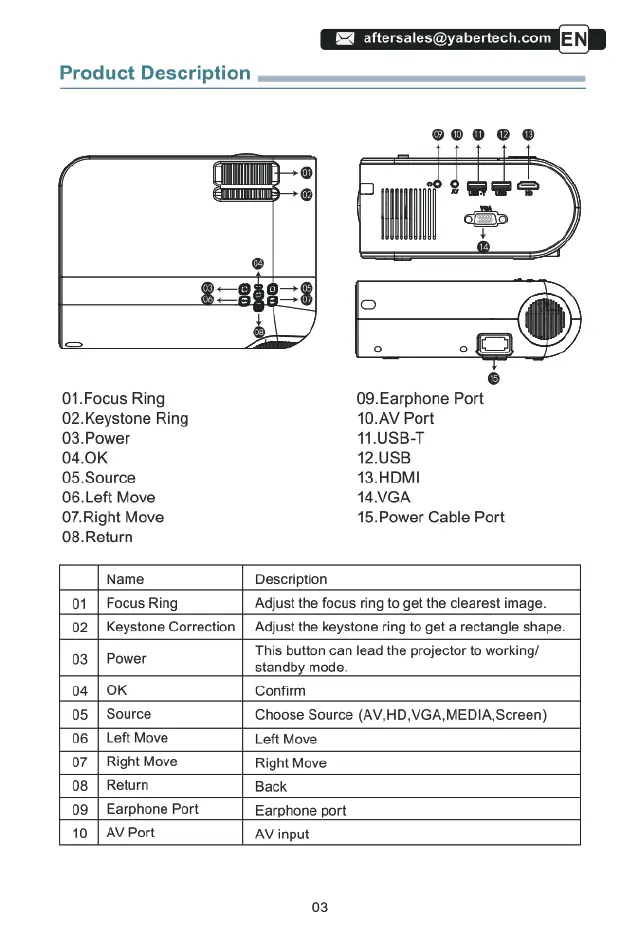
01.Focus
Ring
09.Earphone
Port
02.Keystone
Ring
10.AV
Port
03.Power
11.USB-T
04.0K
12.USB
05.Source
13.HDMI
06.Left
Move
14VGA
07.Right
Move
15.Power
Cable
Port
08.Return
Name
Description
01
|
Focus
Ring
Adjust
the
focus
ring
to
get the
clearest
image.
02
|
Keystone
Correction
|
Adjust
the
keystone
ring
to
get
a
rectangle
shape.
This
button
can
lead
the
projector
to
working/
03
|
Power
standby
mode.
04
|
OK
Confirm
05
|
Source
Choose
Source
(AV,HD
VGA
MEDIA,Screen)
06
|
Left
Move
Left
Move
07
|
Right
Move
Right
Move
08
|
Return
Back
09
|
Earphone
Port
Earphone
port
10
[
AV
Port
AV
input
03

Related product manuals