EasyManua.ls Logo

Yaber U5 - 4.How can I do if the image is blurry or out of shape?; 5.How can I do if the image is up side down?; 6.How can I do if the projection screen is not square or allied horizontally?; 7.How can I do if there is color distortion?

Yaber U5
31 pages
Print Icon
To Next Page IconTo Next Page
To Previous Page IconTo Previous Page
Loading...
e
ENJ
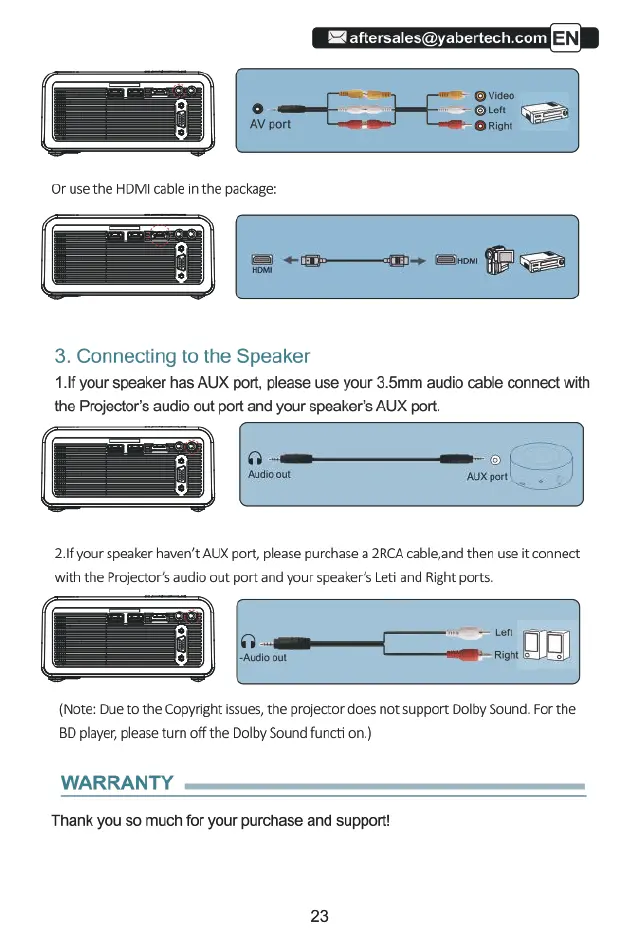
Or
use
the
HDMI
cable
in
the
package:
=
~m——am->
S
G
3.
Connecting
to
the
Speaker
1.If
your
speaker
has
AUX
port,
please
use
your
3.5mm
audio
cable
connect
with
the
Projector’s
audio
out
port
and
your
speaker's
AUX
port.
T
———C
T
A
ot
21f
your
speaker
haven't
AUX
port,
please
purchase
a
2RCA
cable,and
then
use
it
connect
with
the
Projector’s
audio
out
port
and
your
speaker's
Leti
and
Right
ports.
(Note:
Due
to
the
Copyright
issues,
the
projector
does
not
support
Dolby
Sound.
For
the
8D
player,
please
turn
off
the
Dolby
Sound
functi
on.)
WARRANTY
Thank
you
so
much
for
your
purchase
and
support!
23

Related product manuals