EasyManua.ls Logo

Yaber V10 - Bluetooth Audio Connection; Projector Image Settings; Projection Mode Settings

Yaber V10
25 pages
Print Icon
To Next Page IconTo Next Page
To Previous Page IconTo Previous Page
Loading...
=
Support@yabertech.com
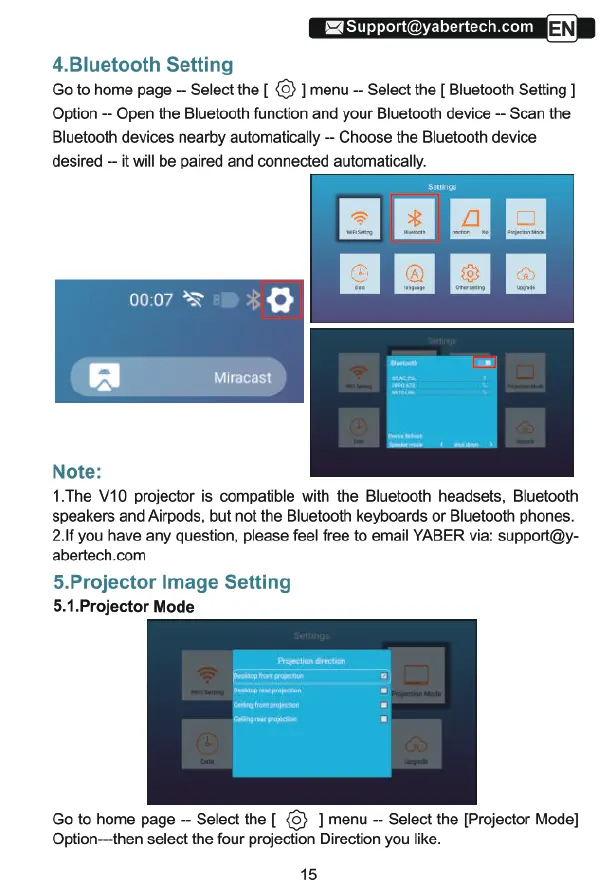
4.Bluetooth
Setting
Go
to
home
page
Select
the
[
3
]
menu
Select
the
[
Bluetooth
Setting
]
Option
-
Open
the
Bluetooth
function
and
your
Bluetooth
device
Scan
the
Blustooth
devices
nearby
automatically
--
Choose
the
Bluetooth
device
desired
-
it
will
be
paired
and
connected
automatically.
Note:
1.The
V10
projector
is
compatible
with
the
Bluetooth
headsets,
Bluetooth
speakers
and
Airpods,
but not the
Bluetooth
keyboards
or
Bluetooth
phones.
2.If
you
have
any question,
please
feel
free
to
email
YABER
via:
support@y-
abertech.com
5.Projector
Image
Setting
5.1.Projector
Mode
Go
to
home
page
--
Select
the
[
(3}
]
menu
Select
the
[Projector
Mode]
Option—then
select
the
four
projection
Direction
you
like.
15

Related product manuals