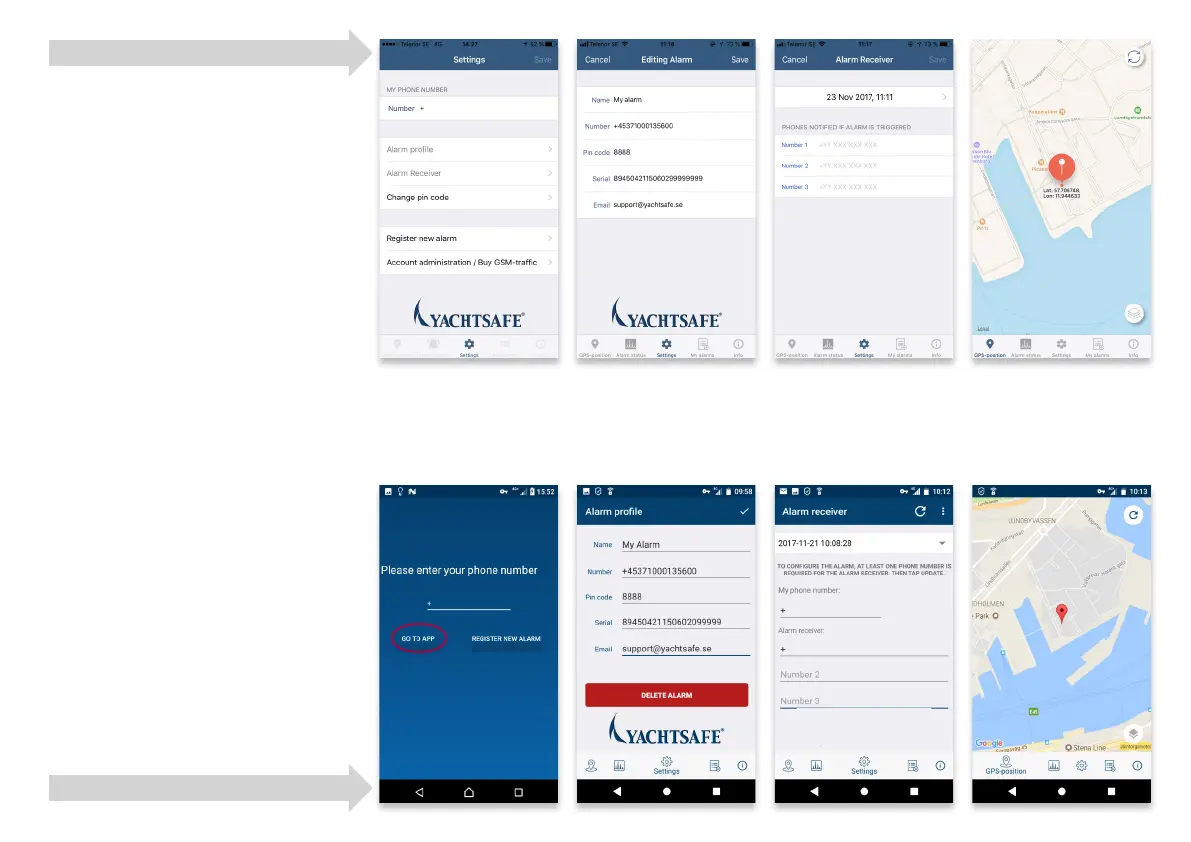
Enter country code fol-
lowed by your phone
number.
Enter the information
about your alarm and
press Save in the top right
corner.
Enter the phone numbers
to contact when the alarm
is triggered and press
Update in the top right
corner.
Activation is complete!
Registration and activation
Thank you for purchasing a YachtSafe GPS
Tracker! First of all you have to register the
alarm and buy the GSM-traffic app.
Please visit our website, www.yachtsafe.eu.
1. Click on the Register alarm tab in the
top menu. Register your product by
filling out the form. Be sure to fill in all
fields with an asterisk (*) correctly.
2. When registration is done:
Click on the: Administer Alarm tab.
Login with the alarm’s serial no. and
your e-mail address. After login – Click
on Web Shop to buy GSM-traffic. You
will receive an order confirmation of
your purchase. Then please wait until you
receive another e-mail including your
alarm’s phone number and PIN code (this
e-mail will arrive within 24 hours).
3. Download the app from App Store or
Google Play Store and follow the steps
shown in the screenshots for iOS and
Android in this manual.
iOS instructions
Android instructions



 To Next Page