Accessories and settings
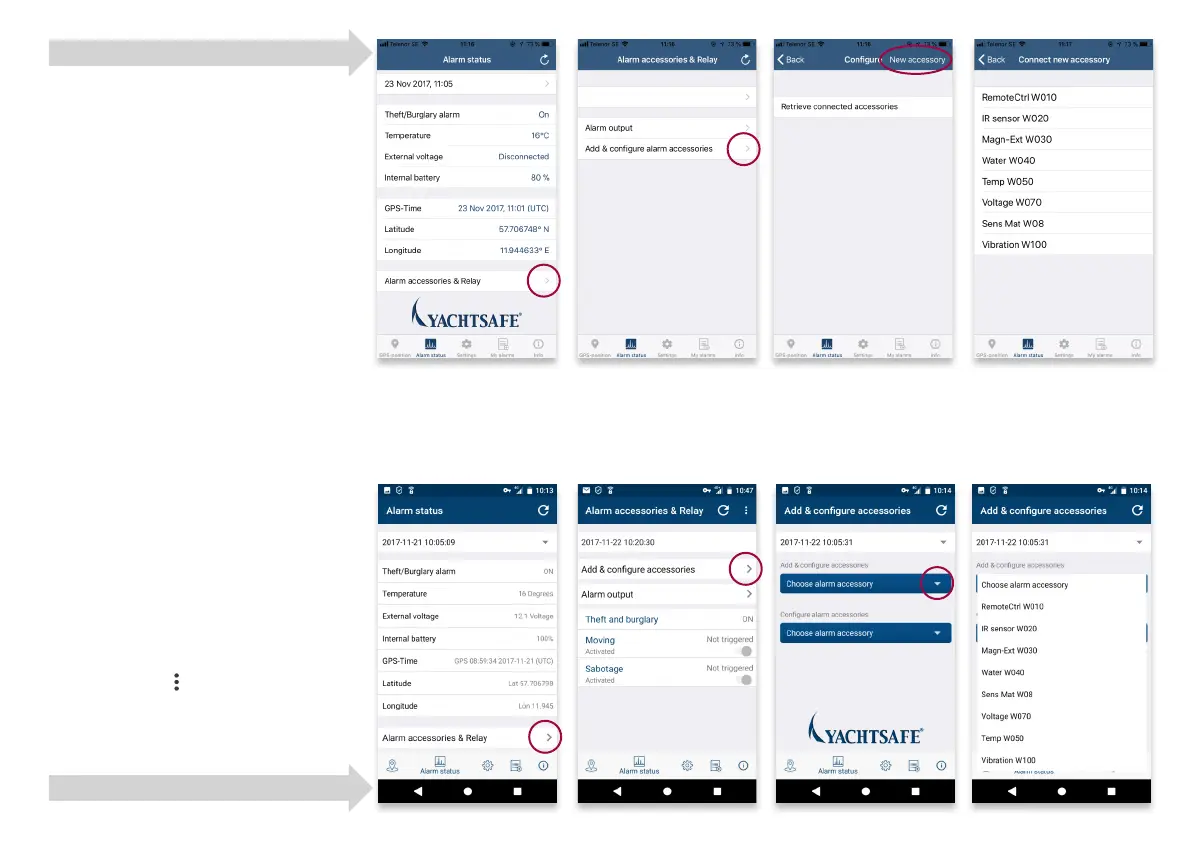
IMAGE 1 Select Alarm accessories & Relay
IMAGE 2 Add & congure accessories
IMAGE 3 iOS: New accessory
Android: Choose alarm accessory
IMAGE 4 Choose the accessory to connect.
Enter a name for the accessory and
then press Connect and follow the
instructions.
iOS: After connection of the
accessory, go to the tab Alarm ac-
cessories & Relay, press Update in
the top right. Choose to activate/
Inactivate the alarm accessory
by the button Edit in the top left.
Choose your setttings and press
Save.
Android: After connection of the
Alarm Accessory, go to the tab
Alarm accessories & Relay, press
Update. Choose to activate/inac-
tivate the alarm accessory by the
symbol
in the top right (press
Edit). Choose your settings and
press Save.
iOS instructions
Android instructions
IMAGE 1 IMAGE 2 IMAGE 3 IMAGE 4



 To Next Page