EasyManua.ls Logo

Yamaha D-85 - Solo Keyboard Functions; Solo Keyboard Tone Colors; Monophonic Nature; Tune and Portamento Controls

Yamaha D-85
36 pages
Print Icon
To Next Page IconTo Next Page
To Previous Page IconTo Previous Page
Loading...
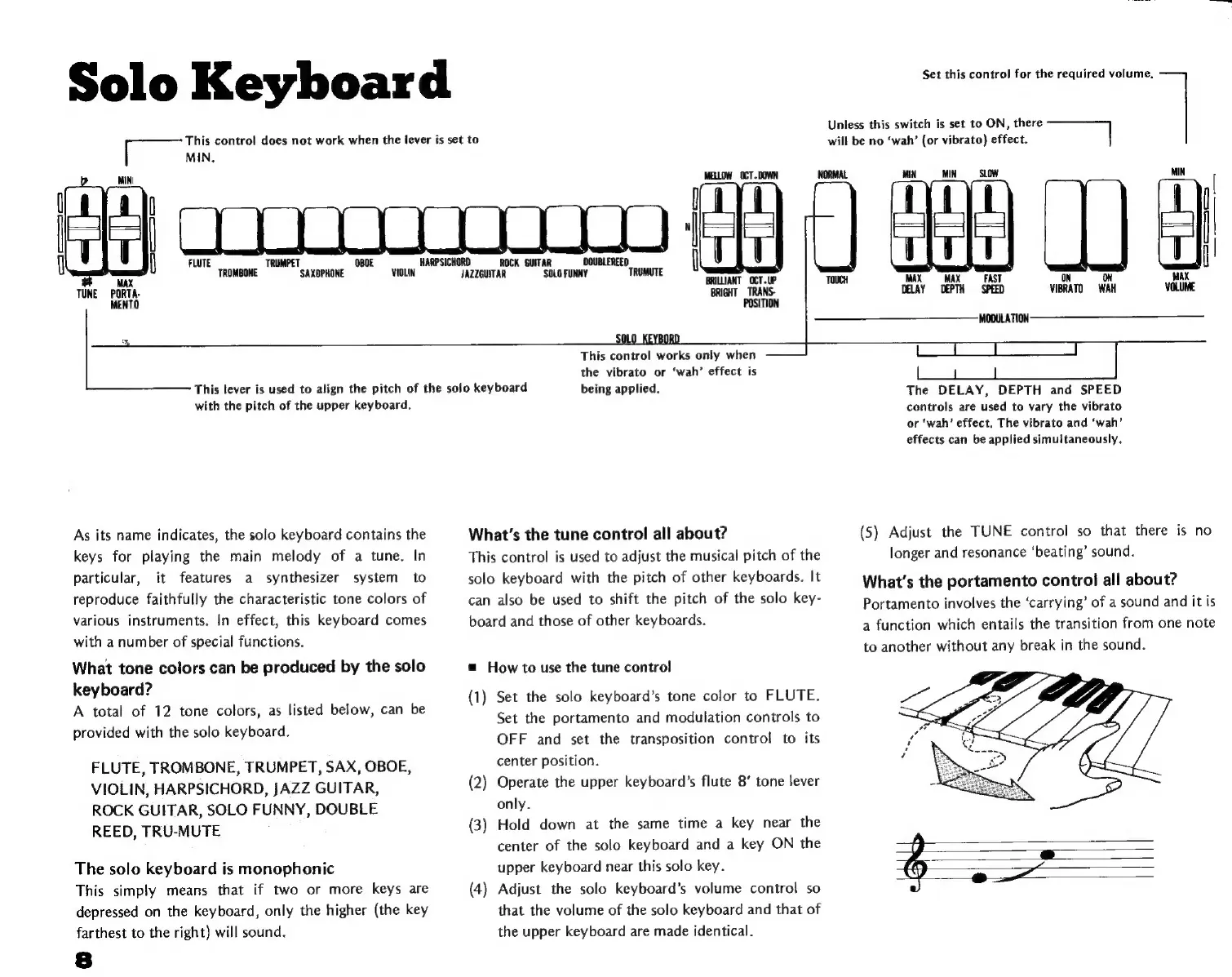
Solo
Keyboard
[ee
MN
control
does
not
work
when
the
lever
is
set
to
MIN.
"
MAX
TUNE
PORTA-
MENTO
Unless
this
switch
is
set
to
ON,
there
will
be
no
‘wah’
(or
vibrato)
effect.
|
MELLOW
OCT.DOWN
NORMAL
JAZ
TRUMUTE
ZGUITAR
SOLO
FUNNY
TOUCH
BRIGHT
TRANS-
POSITION
This
lever
is
used
to
align
the
pitch
of
the
solo
keyboard
with
the
pitch
of
the
upper
keyboard.
As
its
name
indicates,
the
solo
keyboard
contains
the
keys
for
playing
the
main
melody
of
a
tune.
In
particular,
it
features
a
synthesizer
system
to
reproduce
faithfully
the
characteristic
tone
colors
of
various
instruments.
In
effect,
this
keyboard
comes
with
a
number
of
special
functions.
What
tone
colors
can
be
produced
by
the
solo
keyboard?
A
total
of
12
tone
colors,
as
listed
below,
can
be
provided
with
the
solo
keyboard.
FLUTE,
TROMBONE,
TRUMPET,
SAX,
OBOE,
VIOLIN,
HARPSICHORD,
JAZZ
GUITAR,
ROCK
GUITAR,
SOLO
FUNNY,
DOUBLE
REED,
TRU-MUTE
The
solo
keyboard
is
monophonic
This
simply
means
that
if
two
or
more
keys
are
depressed
on
the
keyboard,
only
the
higher
(the
key
farthest
to
the
right)
will
sound.
Set
this
control
for
the
required
volume.
s
MIN
|
MAX
MAX
FAST
ON
ON
MAX
DELAY DEPTH
SPEED
VIBRATO
WAH
VOLUME
MODULATION
This
control
works
only
when
the
vibrato
or
‘wah’
effect
is
being
applied.
What's
the
tune
control
all
about?
This
control
is
used
to
adjust
the
musical
pitch
of
the
solo
keyboard
with
the
pitch
of
other
keyboards.
It
can
also
be
used
to
shift
the
pitch
of
the
solo
key-
board
and
those
of
other
keyboards.
m
How
to
use
the
tune
control
(1)
Set
the
solo
keyboard's
tone
color
to
FLUTE.
Set
the
portamento
and
modulation
controls
to
OFF
and
set
the
transposition
control
to
its
center
position.
(2)
Operate
the
upper
keyboard's
flute
8'
tone
lever
only.
(3)
Hold
down
at
the
same
time
a
key
near
the
center
of
the
solo
keyboard
and
a
key
ON
the
upper
keyboard
near
this
solo
key.
(4)
Adjust
the
solo
keyboard's
volume
control
so
that
the
volume
of
the
solo
keyboard
and
that
of
the
upper
keyboard
are
made
identical.
The
DELAY,
DEPTH
and
SPEED
controls
are
used
to
vary
the
vibrato
or
‘wah’
effect,
The
vibrato
and
‘wah’
effects
can
be
applied
simultaneously.
(5)
Adjust
the
TUNE
control
so
that
there
is
no
longer
and
resonance
‘beating’
sound.
What's
the
portamento
control
all
about?
Portamento
involves
the
‘carrying’
of
a
sound
and
it
is
a
function
which
entails
the
transition
from
one
note
to
another
without
any
break
in
the
sound.