EasyManua.ls Logo

Yamaha D-85 - Special Preset Combinations; Transferring Presets to Lower Keyboard; Mixing Presets with Tone Levers; Special Preset Volume Control

Yamaha D-85
36 pages
Print Icon
To Next Page IconTo Next Page
To Previous Page IconTo Previous Page
Loading...
=m
[f
the
REPEAT
lever
is
operated:
a)
The
repeat
speed
can
be
varied
with
the
banjo,
mandolin
and
marimba
tone
colors
only
and
play
can
be
made
to
suit
the
expression
of
the
music.
(Repeat
effect)
b)
When
a
key
has
been
depressed
for
just
one
note
with
mandolin
or
marimba
tone
colors,
the
repeat
effect
is
produced.
However,
when
keys
are
depressed
for
two
or
more
notes,
the
highest
note
and
the
other
note(s)
are
struck
alternately.
(Twin
mallet
effect)
SLOW
&===
Slow
The
repeat
speed
changes
N
(umm
in
accordance
with
the
position
of
this
lever.
4mm
Fast
FAST
REPEAT
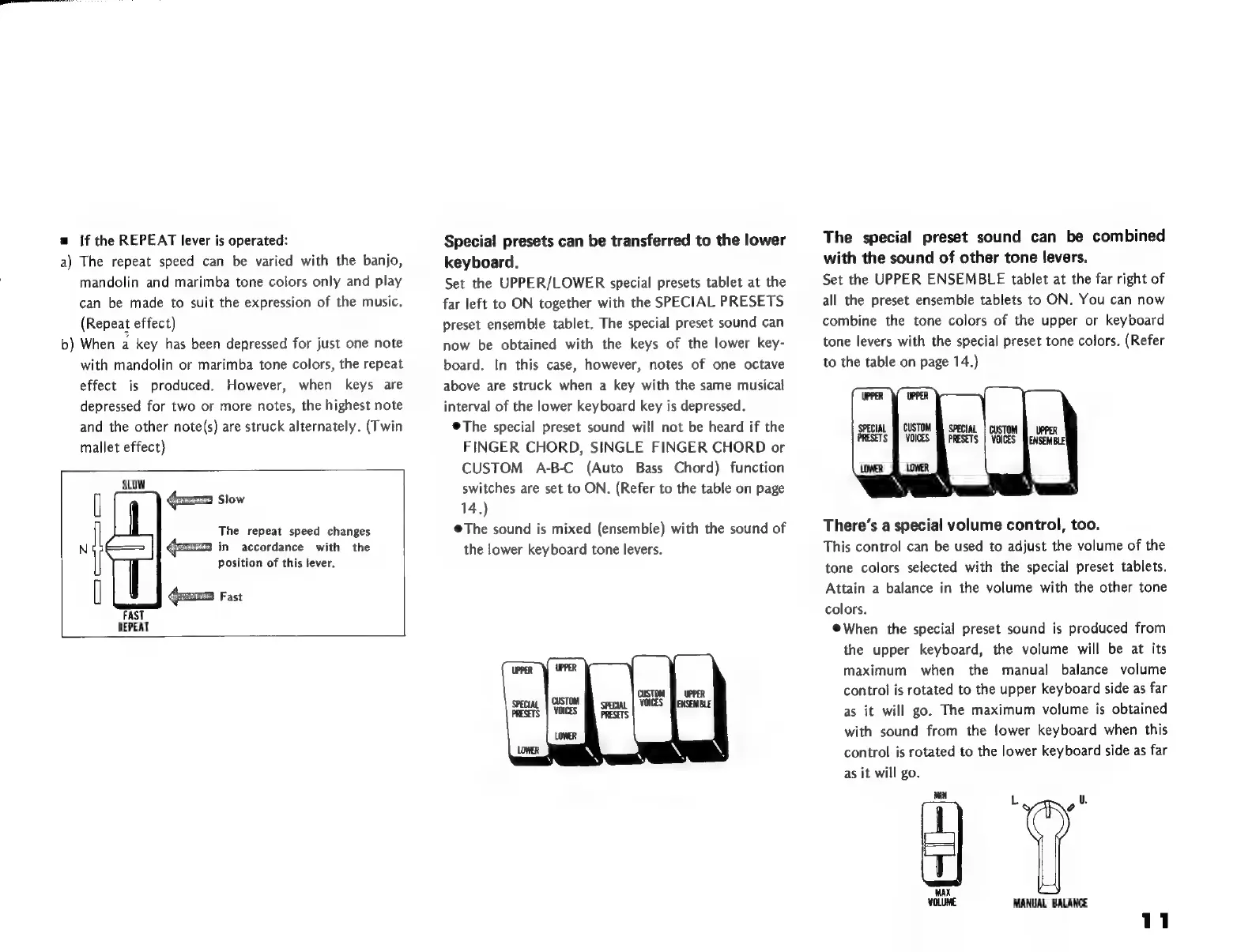
Specia!
presets
can
be
transferred
to
the
lower
keyboard.
Set
the
UPPER/LOWER
special
presets
tablet
at
the
far
left
to
ON
together
with
the
SPECIAL
PRESETS
preset
ensemble
tablet.
The
special
preset
sound
can
now
be
obtained
with
the
keys
of
the
lower
key-
board.
In
this
case,
however,
notes
of
one
octave
above
are
struck
when
a
key
with
the
same
musical
interval
of
the
lower
keyboard
key
is
depressed.
*
The
special
preset
sound
will
not
be
heard
if
the
FINGER
CHORD,
SINGLE
FINGER
CHORD
or
CUSTOM
A-B-C
(Auto
Bass
Chord)
function
switches
are
set
to
ON.
(Refer
to
the
table
on
page
14.)
The
sound
is
mixed
(ensemble)
with
the
sound
of
the
lower
keyboard
tone
levers.
The
special
preset
sound
can
be
combined
with
the
sound
of
other
tone
levers.
Set
the
UPPER
ENSEMBLE
tablet
at
the
far
right
of
all
the
preset
ensemble
tablets
to
ON. You
can
now
combine
the
tone
colors
of
the
upper
or
keyboard
tone
levers
with
the
special
preset
tone
colors.
(Refer
to
the
table
on
page
14.)
UPPER
UPPER
SPECIAL
Jf
CUSTOM
MM
SPECIAL
|
CUSTOM
Ñ
UPPER
PRESETS
M
VOICES
M
PRESETS
|
VOICES
ENSEMBLE!
LOWER
LOWER
N
N
`
\
X
There's
a
special
volume
control,
too.
This
control
can
be
used
to
adjust
the
volume
of
the
tone
colors
selected
with
the
special
preset
tablets.
Attain
a
balance
in
the
volume
with
the
other
tone
colors.
*
When
the
special
preset
sound
is
produced
from
the
upper
keyboard,
the
volume
will
be
at
its
maximum
when
the
manual
balance
volume
control
is
rotated
to
the
upper
keyboard
side
as
far
as
it
will
go.
The
maximum
volume
is
obtained
with
sound
from
the
lower
keyboard
when
this
control
is
rotated
to
the
lower
keyboard
side
as
far
as
it
will
go.
MIN
L
"
MANUAL
BALANCE

Related product manuals