EasyManua.ls Logo

Yamaha D-85 - Custom Voice Tones; Custom Voice Selection; Symphonic Chorus with Custom Voices; Playing Custom Voices

Yamaha D-85
36 pages
Print Icon
To Next Page IconTo Next Page
To Previous Page IconTo Previous Page
Loading...
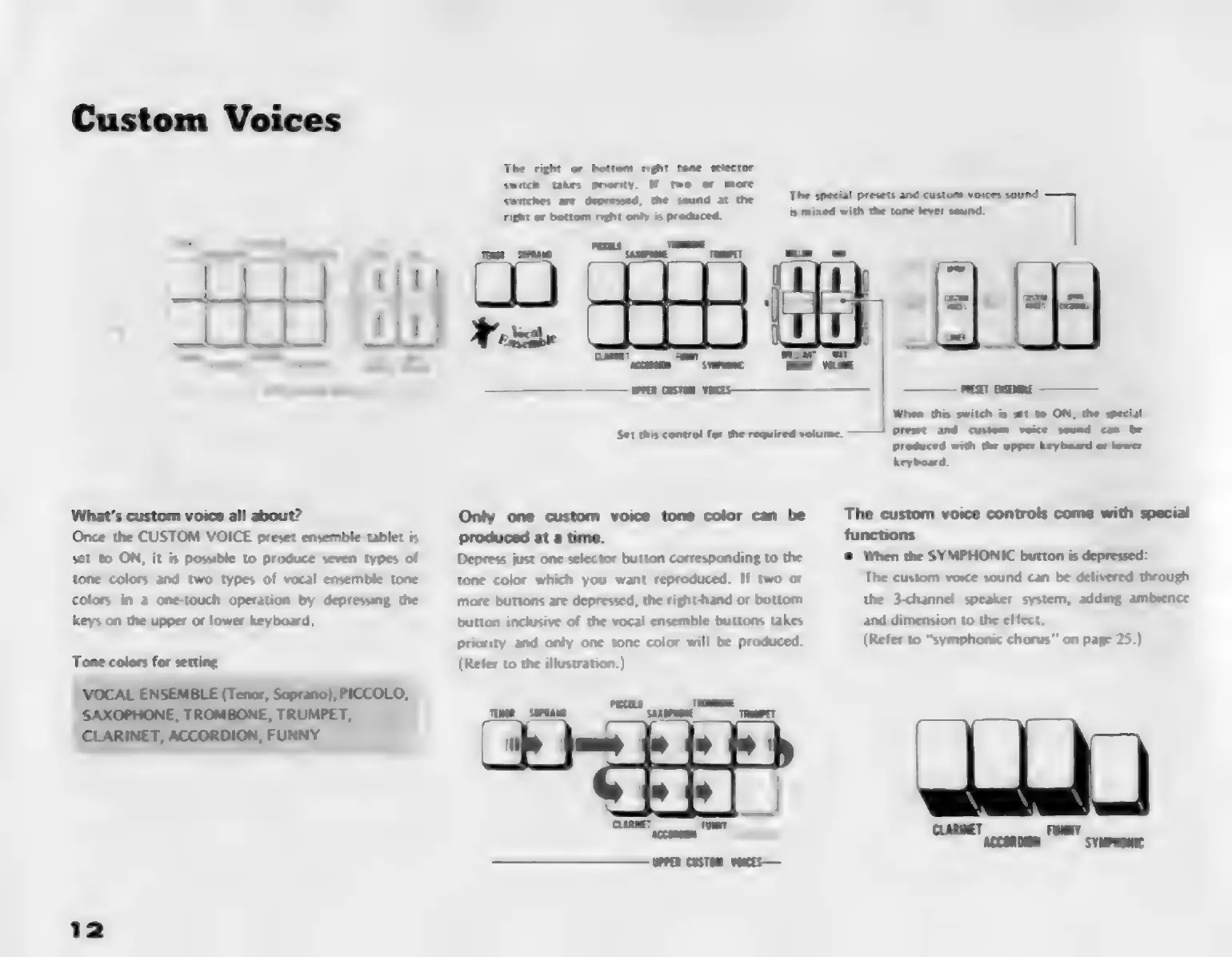
Custom
Voices
What's
custom
voice
all
about?
Once
the
CUSTOM
VOICE
preset
ensemble
tablet
is
set
to
ON,
it
is
possible
to
produce
seven
types
of
tone
colors
and
two
types
of
vocal
ensemble
tone
colors
in
a
one-touch
operation
by
depressing
the
keys
on
the
upper
or
lower
keyboard,
Tone
colors
for
setting
VOCAL
ENSEMBLE
(Tenor,
Soprano),
PICCOLO,
SAXOPHONE,
TROMBONE,
TRUMPET,
CLARINET,
ACCORDION,
FUNNY
Ja
£D
eH
The
right
or
bottom
right
tone
selector
switch
takes
priority.
If
two
or
more
switches
are
depressed,
the
sound
at
the
right
or
bottom
right
only
is
produced.
Toe
"o
ME
CNN
eS
Set
this
control
for
the
required
volume.
Only
one
custom
voice
tone
color
can
be
produced
at
a
time.
Depress
just
one
selector
button
corresponding
to
the
tone
color
which
you
want
reproduced.
If
two
or
more
buttons
are
depressed,
the
right-hand
or
bottom
button
inclusive
of
the
vocal
ensemble
buttons
takes
priority
and
only
one
tone
color
will
be
produced.
(Refer
to
the
illustration.)
The
special
presets
and
custom
voices
l
is
mixed
with
the
tone
lever
sound.
When
this
switch
is
set
to
ON,
the
special
preset
and
custom
woe
sound
can
be
produced
with
the
upper
keyboard
or
lower
keyboard.
The
custom
voice
controls
come
with
special
functions
a
When
the
SYMPHONIC
button
is
depressed:
The
custom
voice
sound
can
be
delivered
through
the
3<hannel
speaker
system,
adding
ambience
and
dimension
to
the
effect.
(Refer
to
“symphonic
chorus”
on
page
25.)

Related product manuals