EasyManua.ls Logo

Yamaha D-85 - Rhythm Sequence Programmer; Programmer Controls and Memory; Programming Rhythm Sequences; Handling Programming Errors

Yamaha D-85
36 pages
Print Icon
To Next Page IconTo Next Page
To Previous Page IconTo Previous Page
Loading...
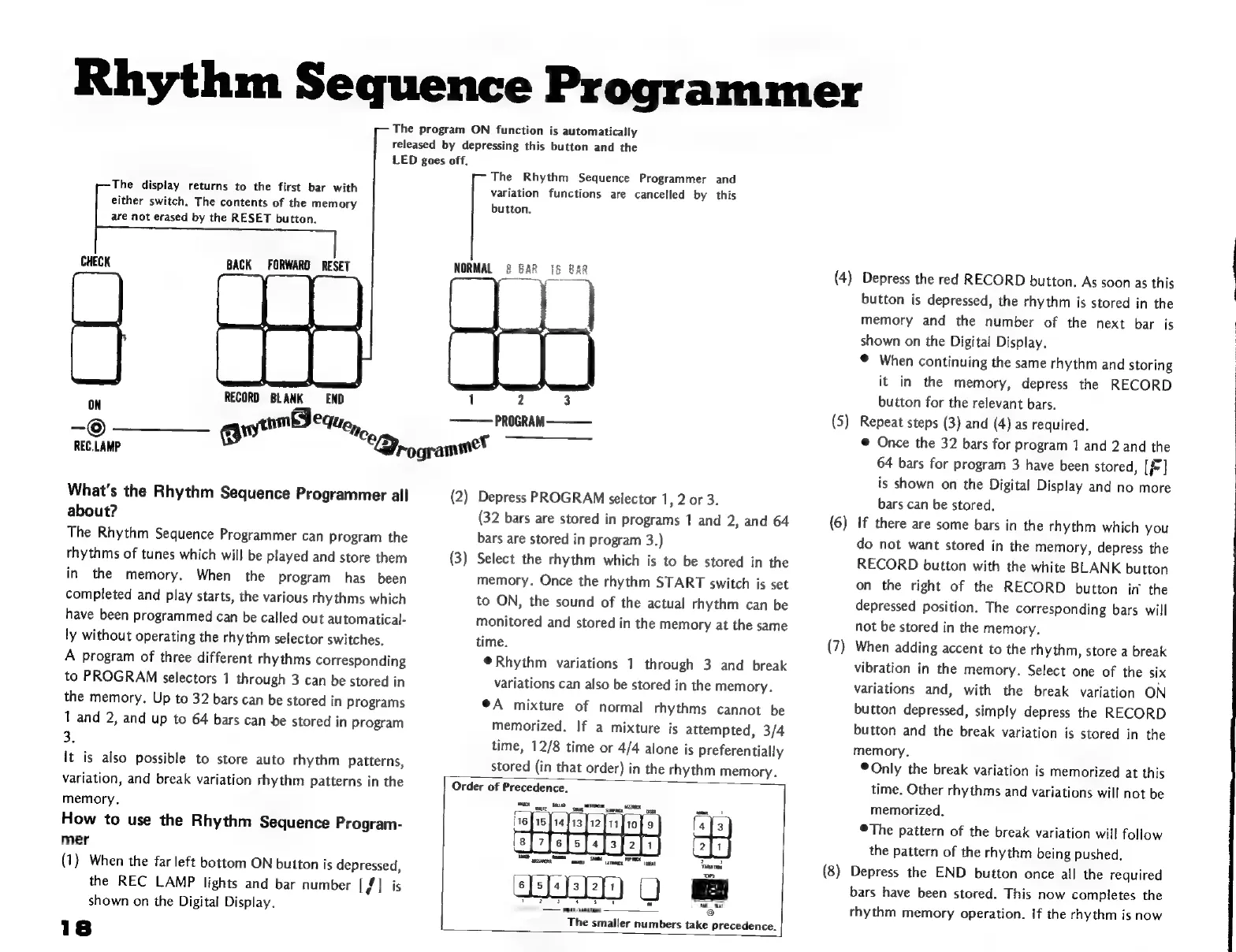
Rhythm
Sequence
Programmer
The
program
ON
function
is
automatically
released
by
depressing
this
button
and
the
LED
goes
off.
The
display
returns
to
the
first
bar
with
either
switch.
The
contents
of
the
memory
are
not
erased
by
the
RESET
button.
CHECK
BACK
FORWARD
RESET
The
Rhythm
Sequence
Programmer
and
variation
functions
are
cancelled
by
this
button.
NORMAL
š
8AR
{5
BAR
EN
RECORD
BLANK
END
1
2
3
E
8
yytomBeque,,
——
PROGRAM
———
REC.LAMP
"C
Sy-o
gramme"
What's
the
Rhythm
Sequence
Programmer
all
about?
The
Rhythm
Sequence
Programmer
can
program
the
rhythms
of
tunes
which
will
be
played
and
store
them
in
the
memory,
When
the
program
has
been
completed
and
play
starts,
the
various
rhythms
which
have
been
programmed
can
be
called
out
automatical-
ly
without
operating
the
rhythm
selector
switches.
A
program
of
three
different
rhythms
corresponding
to
PROGRAM
selectors
1
through
3
can
be
stored
in
the
memory.
Up
to
32
bars
can
be
stored
in
programs
1
and
2,
and
up
to
64
bars
can
be
stored
in
program
3.
It
is
also
possible
to
store
auto
rhythm
patterns,
variation,
and
break
variation
rhythm
patterns
in
the
memory.
How
to
use
the
Rhythm
Sequence
Program-
mer
(1)
When
the
far
left
bottom
ON
button
is
Mer
the
REC
LAMP
lights
and
bar
number
[fi
shown
on
the
Digital
Display.
(2)
Depress
PROGRAM
selector
1,
2
or
3.
(32
bars
are
stored
in
programs
1
and
2,
and
64
bars
are
stored
in
program
3.)
(3)
Select
the
rhythm
which
is
to
be
stored
in
the
memory.
Once
the
rhythm
START
switch
is
set
to
ON,
the
sound
of
the
actual
rhythm
can
be
monitored
and
stored
in
the
memory
at
the
same
time.
*Rhythm
variations
1
through
3
and
break
variations
can
also
be
stored
in
the
memory.
*A
mixture
of
normal
rhythms
cannot
be
memorized.
If
a
mixture
is
attempted,
3/4
time,
12/8
time
or
4/4
alone
is
preferentially
stored
(in
that
order)
in
the
rhythm
memory.
Order
of
edes
16
HS
14113
[12
[3i]
io
f
9
fa]
8
FERE
2
EED
Q
vaaran
aax
vamanta
=
xu
The
smaller
numbers
take
precedence.
(4)
Depress
the red
RECORD
button.
As
soon
as
this
PM
zn
e
S
button
is
depressed,
the
rhythm
is
stored
in
the
memory
and
the
number
of
the
next
bar
is
shown
on
the
Digital
Display.
©
When
continuing
the
same
rhythm
and
storing
it
in
the
memory,
depres
the
RECORD
button
for
the
relevant
bars.
Repeat
steps
(3)
and
(4)
as
required.
*
Once
the
32
bars
for
program
1
and
2
and
the
64
bars
for
program
3
have
been
stored,
[f]
is
shown
on
the
Digital
Display
and
no
more
bars
can
be
stored.
If
there
are
some
bars
in
the
rhythm
which
you
do
not
want
stored
in
the
memory,
depress
the
RECORD
button
with
the
white
BLANK
button
on
the
right
of
the
RECORD
button
in
the
depressed
position.
The
corresponding
bars
will
not
be
stored
in
the
memory.
When
adding
accent
to
the
rhythm,
store
a
break
vibration
in
the
memory.
Select
one
of
the
six
variations
and,
with
the
break
variation
ON
button
depressed,
simply
depress
the
RECORD
button
and
the
break
variation
is
stored
in
the
memory.
*
Only
the
break
variation
is
memorized
at
this
time.
Other
rhythms
and
variations
will
not
be
memorized.
©The
pattern
of
the
break
variation
will
follow
the
pattern
of
the
rhythm
being
pushed.
Depress
the
END
button
once
all
the
required
bars
have
been
stored.
This
now
completes
the
rhythm
memory
operation.
If
the
rhythm
is
now

Related product manuals