EasyManua.ls Logo

Yamaha D-85 - Auto Arpeggio Functionality; Arpeggio Patterns and Voices; Combining Arpeggio with Accompaniment; Arpeggio Rhythm Pattern Changes

Yamaha D-85
36 pages
Print Icon
To Next Page IconTo Next Page
To Previous Page IconTo Previous Page
Loading...
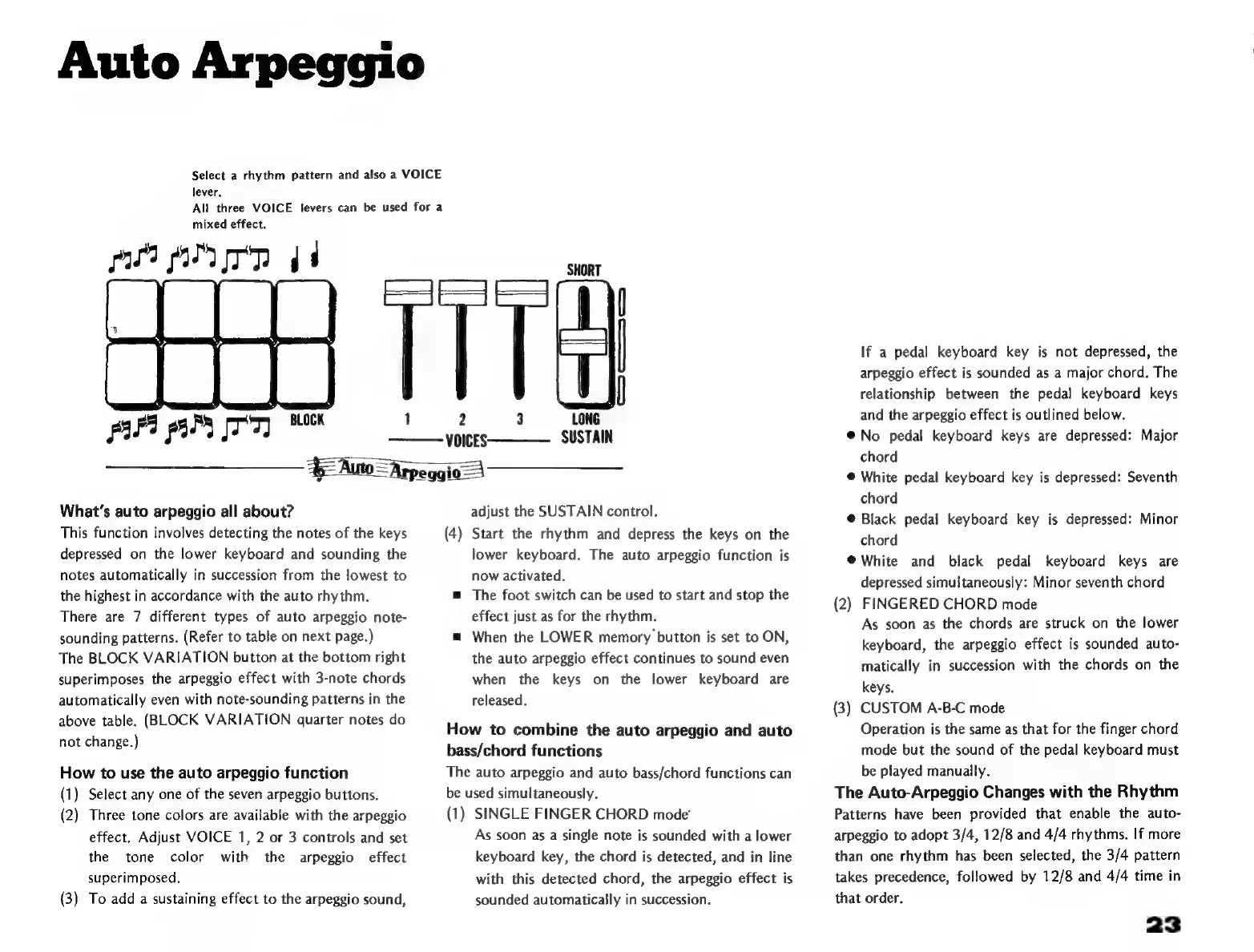
Auto
Arpeggio
Select
a
rhythm
pattern
and
also
a
VOICE
lever.
All
three
VOICE
levers
can
be
used
for
a
mixed
effect.
pur
p
mm
ji
What's
auto
arpeggio
all
about?
This
function
involves
detecting
the
notes
of
the
keys
depressed
on
the
lower
keyboard
and
sounding
the
notes
automatically
in
succession
from
the
lowest
to
the
highest
in
accordance
with
the
auto
rhythm.
There
are
7
different
types
of
auto
arpeggio
note-
sounding
patterns.
(Refer
to
table
on
next
page.)
The
BLOCK
VARIATION
button
at
the
bottom
right
superimposes
the
arpeggio
effect
with
3-note
chords
automatically
even
with
note-sounding
patterns
in
the
above
table.
(BLOCK
VARIATION
quarter
notes
do
not
change.)
How
to
use
the
auto
arpeggio
function
(1)
Select
any
one
of
the
seven
arpeggio
buttons.
(2)
Three
tone
colors
are
available
with
the
arpeggio
effect.
Adjust
VOICE
1,
2
or
3
controls
and
set
the
tone
color
with
the
arpeggio
effect
superimposed,
(3)
To
add
a
sustaining
effect
to
the
arpeggio
sound,
2
5
LONG
VOICES
SUSTAIN
=Arpeggi
adjust
the
SUSTAIN
control.
(4)
Start
the
rhythm
and
depress
the
keys
on
the
lower
keyboard.
The
auto
arpeggio
function
is
now
activated.
m
The
foot
switch
can
be
used
to
start
and
stop
the
effect
just
as
for
the
rhythm.
m
When
the
LOWER
memory
button
is
set
to
ON,
the
auto
arpeggio
effect
continues
to
sound
even
when
the
keys
on
the
lower
keyboard
are
released.
How
to
combine
the
auto
arpeggio
and
auto
bass/chord
functions
The
auto
arpeggio
and
auto
bass/chord
functions
can
be
used
simultaneously.
(1)
SINGLE
FINGER
CHORD
mode’
As
soon
as
a
single
note
is
sounded
with
a
lower
keyboard
key,
the
chord
is
detected,
and
in
line
with
this
detected
chord,
the
arpeggio
effect
is
sounded
automatically
in
succession.
If
a
pedal
keyboard
key
is
not
depressed,
the
arpeggio
effect
is
sounded
as
a
major
chord,
The
relationship
between
the
pedal
keyboard
keys
and
the
arpeggio
effect
is
outlined
below.
No
pedal
keyboard
keys
are
depressed:
Major
chord
*
White
pedal
keyboard
key
is
depressed:
Seventh
chord
Black
pedal
keyboard
key
is
depressed:
Minor
chord
*
White
and
black
pedal
keyboard
keys
are
depressed
simultaneously:
Minor
seventh
chord
(2)
FINGERED
CHORD
mode
As
soon
as
the
chords
are
struck
on
the
lower
keyboard,
the
arpeggio
effect
is
sounded
auto-
matically
in
succession
with
the
chords
on
the
keys.
(3)
CUSTOM
A-B-C
mode
Operation
is
the
same
as
that
for
the
finger
chord
mode
but
the
sound
of
the
pedal
keyboard
must
be
played
manually.
The
Auto-Arpeggio
Changes
with
the
Rhythm
Patterns
have
been
provided
that
enable
the
auto-
arpeggio
to
adopt
3/4,
12/8
and
4/4
rhythms.
If
more
than
one
rhythm
has
been
selected,
the
3/4
pattern
takes
precedence,
followed
by
12/8
and
4/4
time
in
that
order.
23

Related product manuals