EasyManua.ls Logo

Yamaha D-85 - Tone Lever Adjustments; Upper and Lower Keyboard Tones; Pedal Keyboard Tones; Manual Balance Control

Yamaha D-85
36 pages
Print Icon
To Next Page IconTo Next Page
To Previous Page IconTo Previous Page
Loading...
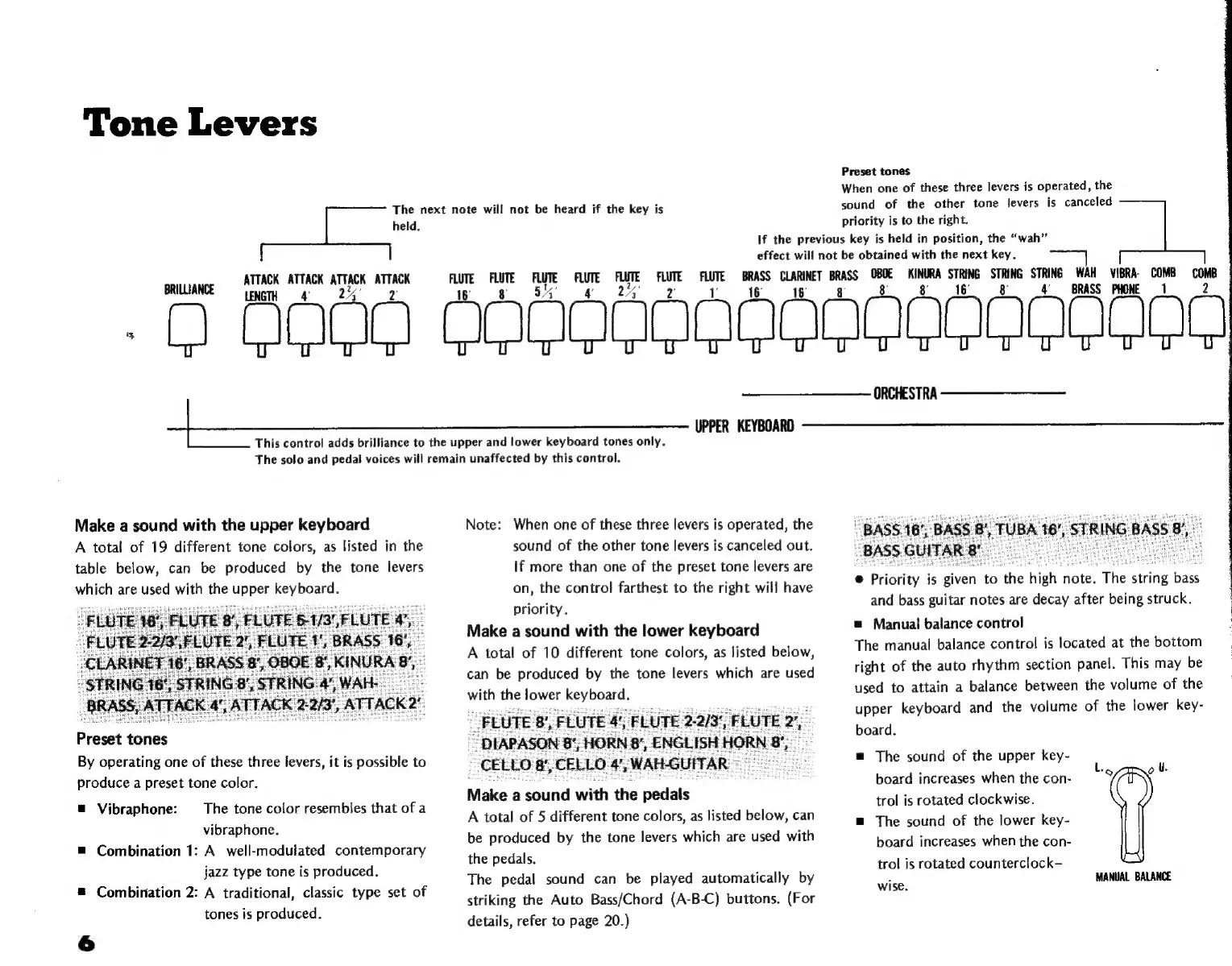
Tone
Levers
The
next
note
will
not
be
heard
if
the
key
is
held.
ATTACK
sig
iiia
aca
BRILLIANCE
LENGTH
Preset
tones
When
one
of
these
three
levers
is
operated,
the
sound
of
the
other
tone
levers
is
canceled
priority
is
to
the
right.
If
the
previous
key
is
held
in
position,
the
“wah”
effect
will
not
be
obtained
with
the
next
key.
FLUTE FLUTE
TE
eg
ae
tae
FLUTE
T
a
BRASS
"E
iod
TN
ui
a
e
Maud
bru
"e
-
D.
QOO.
OOGOGGGOOGOGOO
CQ
Miu
a
=
s=
==
UPPER
KEYBOARD
This
control
adds
brilliance
to
the
upper
and
lower
keyboard
tones
only.
The
solo
and
pedal
voices
will
remain
unaffected
by
this
control.
Make
a
sound
with
the
upper
keyboard
A
total
of
19
different
tone
colors,
as
listed
in
the
table
below,
can
be
produced
by
the
tone
levers
which
are
used
with
the
upper
keyboard.
Preset
tones
By
operating
one
of
these
three
levers,
it
is
possible
to
produce
a
preset
tone
color.
The
tone
color
resembles
that
of
a
vibraphone.
m
Combination
1:
A
well-modulated
contemporary
jazz
type
tone
is
produced.
æ
Combination
2:
A
traditional,
classic
type
set
of
tones
is
produced.
m
Vibraphone:
6
Note:
When
one
of
these
three
levers
is
operated,
the
sound
of
the
other
tone
levers
is
canceled
out.
If
more
than
one
of
the
preset
tone
levers
are
on,
the
control
farthest
to
the
right
will
have
priority.
Make
a
sound
with
the
lower
keyboard
A
total
of
10
different
tone
colors,
as
listed
below,
can
be
produced
by
the
tone
levers
which
are
used
with
the
lower
keyboard.
UTE
8",
FLUTE
4',
FLUTE
2-2/3
IAPASON
8',
HORN
8’,
ENGLISH
HORN
O
8',
CELLO
4",
WAH-GUF
Make:
a
|
sound
with
the
pedals
A
total
of
5
different
tone
colors,
as
listed
below,
can
be
produced
by
the
tone
levers
which
are
used
with
the
pedals.
The
pedal
sound
can
be
played
automatically
by
striking
the
Auto
Bass/Chord
(A-B-C)
buttons.
(For
details,
refer
to
page
20.)
ORCHESTRA
°
Priority
js
given
to
the
high
note.
The
string
bass
and
bass
guitar
notes
are
decay
after
being
struck.
m
Manual
balance
control
The
manual
balance
control
is
located
at
the
bottom
right
of
the
auto
rhythm
section
panel.
This
may
be
used
to
attain
a
balance
between
the
volume
of
the
upper
keyboard
and
the
volume
of
the
lower
key-
board.
m
The
sound
of
the
upper
key-
board
increases
when
the
con-
be
et
trol
is
rotated
clockwise.
m
The
sound
of
the
lower
key-
board
increases
when
the
con-
trol
is
rotated
counterclock-
Wise:
MANUAL
BALANCE

Related product manuals