EasyManua.ls Logo

Yamaha Electone HC-2 - FINGERED CHORD; CUSTOM A.B.C.

Yamaha Electone HC-2
43 pages
Print Icon
To Next Page IconTo Next Page
To Previous Page IconTo Previous Page
Loading...
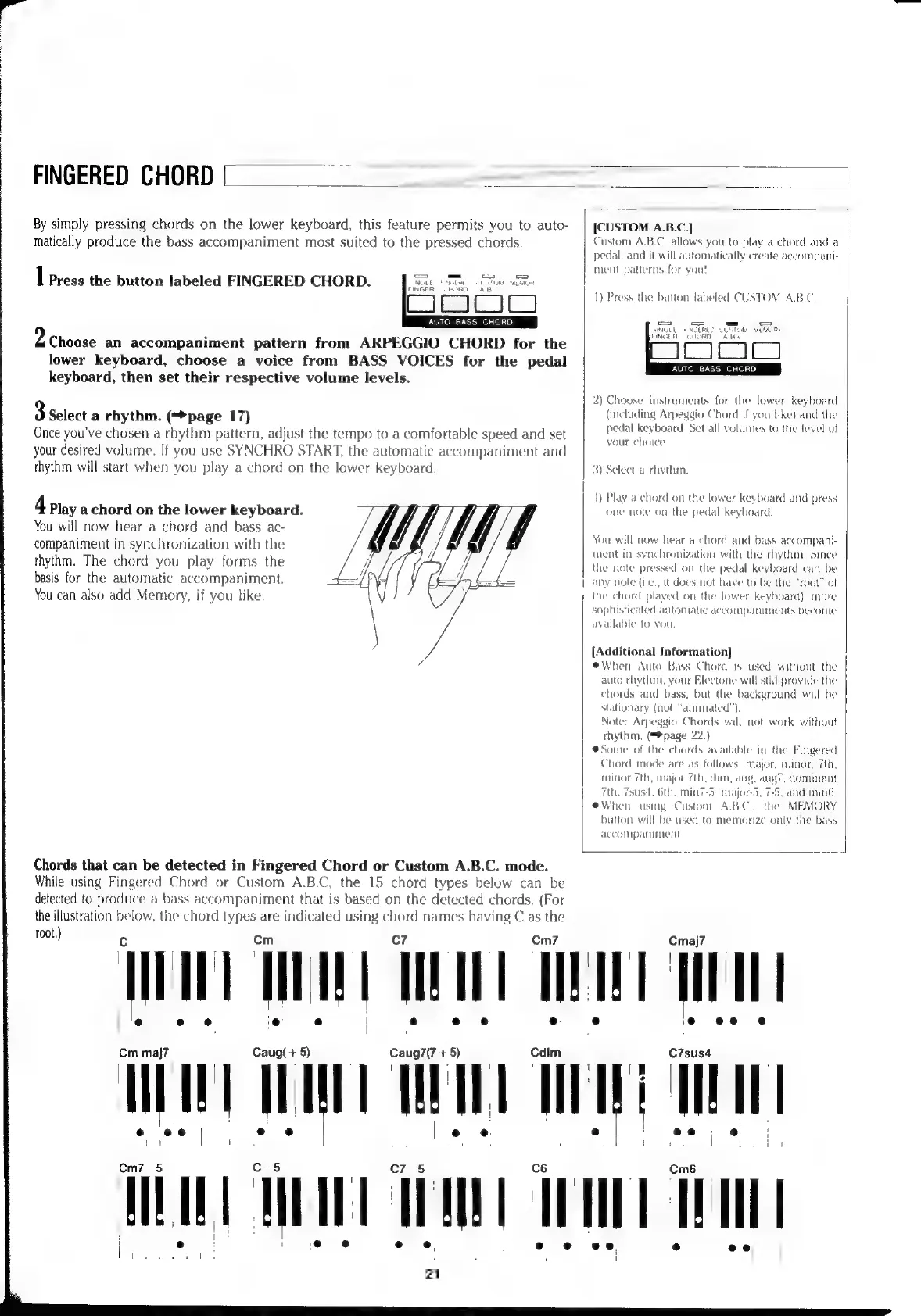
FINGERED
CHORD
co
By
simply
pressing
chords
on
the
lower
keyboard,
this
feature
permits
you
to
auto-
matically
produce
the
bass
accompaniment
most
suited
to
the
pressed
chords.
1
Press
the
button
labeled
FINGERED
CHORD.
рн
А
Fone
ala
AUTO
BASS
CHORD
2
Choose
an
accompaniment
pattern
from
ARPEGGIO
CHORD
for
the
lower
keyboard,
choose
a
voice
from
BASS
VOICES
for
the
pedal
keyboard,
then
set
their
respective
volume
levels.
3
select
a
rhythm.
(page
17)
Once
you've
chosen
a
rhythm
pattern,
adjust
the
tempo
to
a
comfortable
speed
and
set
your
desired
volume.
If
you
use
SYNCHRO
START,
the
automatic
accompaniment
and
rhythm
will
start
when
you
play
a
chord
on
the
lower
keyboard.
4
Play
a
chord
on
the
lower
keyboard.
You
will
now
hear
a
chord
and
bass
ac-
companiment
in
synchronization
with
the
thythm.
The
chord
you
play
forms
the
basis
for
the
automatic
accompaniment.
You
can
also
add
Memory,
if
you
like.
Chords
that
can
be
detected
in
Fingered
Chord
or
Custom
A.B.C.
mode.
While
using
Fingered
Chord
or
Custom
A.B.C,
the
15
chord
types
below
can
be
detected
to
produce
a
bass
accompaniment
that
is
based
on
the
detected
chords.
(For
[CUSTOM
A.B.C.]
Custom
A.B.C.
allows
you
to
play
a
chord
and
a
pedal.
and
it
will
automatically
create
accompani-
ment
patterns
for
vou!
1)
Press
the
button
labeled
CUSTOM
A.B.C.
=
=
_
=
SINGLE
+
NGLHEZ.
CUSTOM:
MECO
FINGER
CHORD
ABE
[Í
JUD)
AUTO BASS
CHORD
2)
Choose
instruments
for
the
lower
keyboard
(including
Arpeggio
Chord
if
you
like)
and
the
pedal
keyboard.
Set
all
volumes
to
the
level
of
your
choice
3)
Select
a
rhythm.
1)
Play
a
chord
on
the
lower
keyboard
and
press
one
note
on
the
pedal
keyboard.
You
will
now
hear
a
chord
and
bass
accompani-
ment
in
synchronization
with
the
туйип.
Since
the
note
pressed
on
the
pedal
keyboard
can
be
|
any
note
(Le.,
it
does
not
have
to
be
the
“root”
of
the
chord
plaved
on
the
lower
keyboard).
more
sophisticated
automatic
accompaniments
become
available
to
vou.
[Additional
Information]
eWhen
Auto
Bass
Chord
is
used
without
the
auto
rhythm,
your
Electone
will
still
provide
the
chords
and
bass,
but
the
background
will
be
stationary
(not
“animated”.
Note:
Arpeggio
Chords
will
not
work
without
rhythm.
(page
22.)
e
Some
of
the
chords
available
in
the
Fingered
Chord
mode
are
as
follows:
major.
minor,
7th,
minor
7th,
major
7th,
dim,
aug,
aug?,
dominant
th.
75051.
6th.
min
7-5.
majors,
7-5,
and
min’
eWhen
using
Custom
A.B.C..
the
MEMORY
button
will
be
used
to
memorize
only
the
bass
accompaniment
the
illustration
below,
the
chord
types
are
indicated
using
chord
names
having
C
as
the
root.)
с
ст
c7
Cm7
Cmaj7
T
1
;
i š
|
I
i
Wn
HI
HHI
HHI
III
|
°
ө
е
е
|
°
e
s
e
ө
e
өө
ө.
Ст
maj7
Сац
+
5)
Caug7(7
+
5)
Cdim
C7sus4
|
|
:
?
I
Я
!
i
I
u
!
|
;
і
i
+
|
|
W“
|
|
|
|
|
e
өө
|
^.
ө
|
°
e°
e.
2
ne
.
I
1
1
t
£
1
i
i
.
i
i
. +
1
1
Ст7—5
C7-5
Cm6
C-5
!
|
үз
i:
i
po:
i
e
EE:
Lom
ag
CM
I
i
i
i
:
i
|
|
|
е
e °
e
j
21
C6
e
ө
өө