EasyManua.ls Logo

Yamaha Electone HC-2 - THE BASIC FEATURES; First, Lets Produce Some Sounds; Registrations for Beginners

Yamaha Electone HC-2
43 pages
Print Icon
To Next Page IconTo Next Page
To Previous Page IconTo Previous Page
Loading...
THE
BASIC
FEATURES
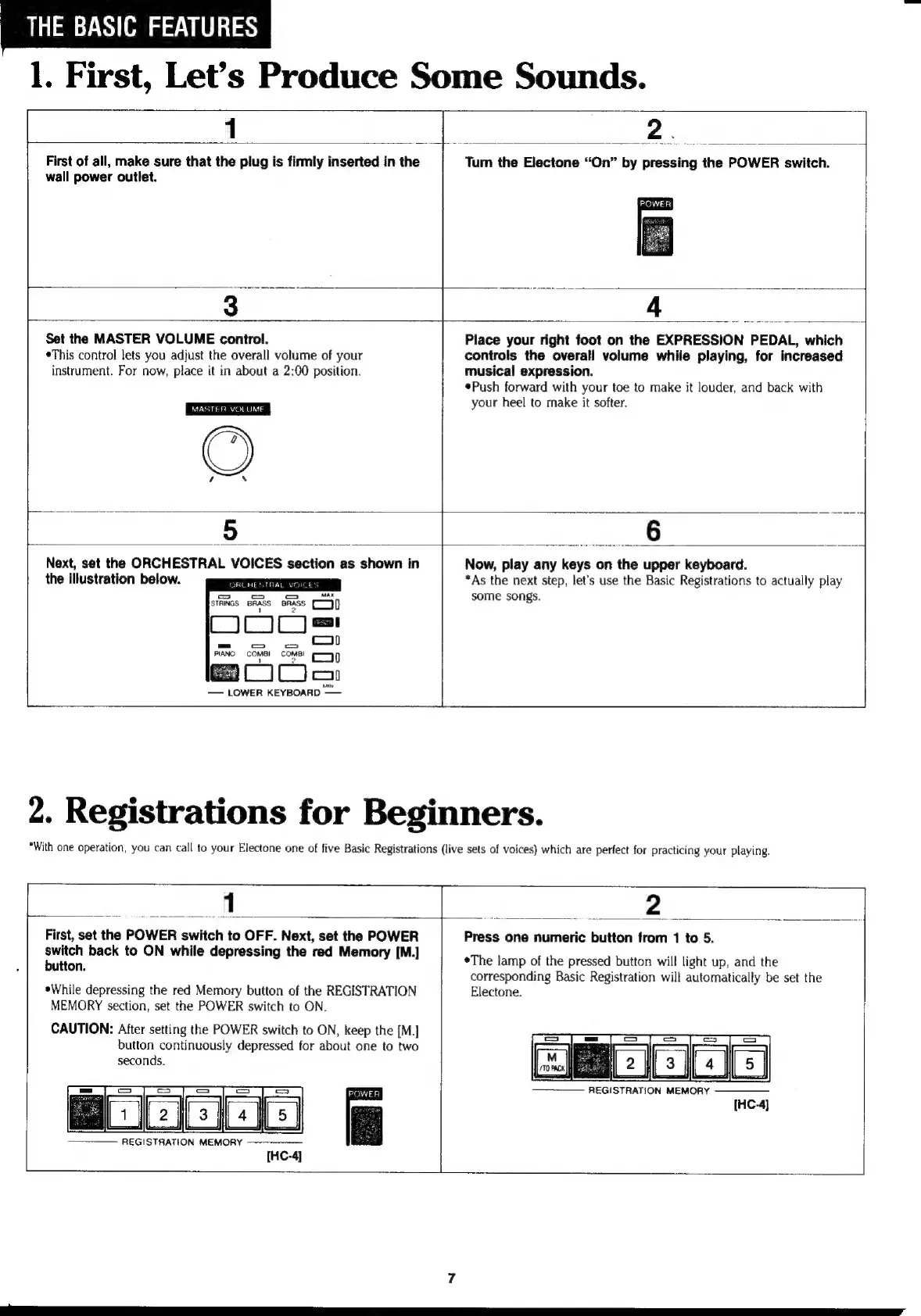
1.
First,
Let’s
Produce
Some
Sounds.
1
First
of
all,
make
sure
that
the
plug
is
firmly
inserted
in
the
wall
power
outlet.
2.
Tum
the
Electone
“On”
by
pressing
the
POWER
switch.
Set the
MASTER
VOLUME
control.
eThis
control
lets
you
adjust
the
overall
volume
of
your
instrument.
For
now,
place
it
in
about
a
2:00
position.
MASTER
VOLUME
Place
your
right
foot
on
the
EXPRESSION
PEDAL,
which
controls
the
overall
volume
while
playing,
for
increased
musical
expression.
«Push
forward
with
your
toe
to
make
it
louder,
and
back
with
your
heel
to
make
it
softer.
6
Next,
set
the
ORCHESTRAL
VOICES
section
as
shown
in
the
illustration
below.
aC
1С
Jen
—
LOWER
KEYBOARD
——
Now,
play
any
keys
on
the
upper
keyboard.
*As
the
next
step,
let's
use
the
Basic
Registrations
to
actually
play
some
songs.
2.
Registrations
for
Beginners.
*With
one
operation,
you
can
call
to
your
Electone
one
of
five
Basic
Registrations
(live
sets
of
voices)
which
are
perfect
for
practicing
your
playing.
1
Zu;
E
m
2
First,
set
the
POWER
switch
to
OFF.
Next,
set
the
POWER
Switch
back
to
ON
while
depressing
the
red
Memory
[M.]
button.
*While
depressing
the
red
Memory
button
of
the
REGISTRATION
MEMORY
section,
set
the
POWER
switch
to
ON.
CAUTION:
After
setting
the
POWER
switch
to
ON,
keep
the
[M.]
button
continuously
depressed
for
about
one
to
two
seconds.
REGISTRATION
MEMORY
———————
Ë
Press
one
numeric
button
from
1
to
5.
*Тһе
lamp
of
the
pressed
button
will
light
up,
and
the
corresponding
Basic
Registration
will
automatically
be
set
the
Electone.
REGISTRATION
MEMORY
[HC-4]