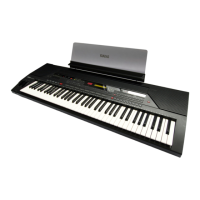
Need help?
Do you have a question about the Yamaha Protatone PSR-6700 and is the answer not in the manual?
Comprehensive safety guidelines covering product usage, power, environment, and maintenance.
Identification of controls for power, voice selection, and orchestration modes.
Controls for harmony, sustain effect, and keyboard velocity sensitivity.
Controls for LCD display, tempo setting, and style selection.
Controls for initiating accompaniment, variations, and rhythm.
Controls for modulation wheel and general effects on accompaniment/orchestra sounds.
Controls for reverberation effects and Orchestra 2 hold function.
Steps for powering on, adjusting initial volume, and resetting to factory settings.
Instructions for connecting power and setting the master volume.
Explanation of the three orchestration modes: ORCH. 1, ORCH. 2+1, and ORCH. 2|1.
Guide to selecting individual voices from the 100 available options.
How to select desired voices and store them in memory.
Guide to choosing accompaniment styles and adjusting the tempo.
Methods for starting accompaniment: direct, intro, or synchronized.
How to manually select accompaniment variations like Verse and Chorus.
How to use fill-ins to transition between accompaniment variations.
Steps to activate ABC mode and select styles/tempo.
Starting accompaniment with ABC mode active.
How the PSR-6700 recognizes and plays chords entered in the left hand.
Using manual buttons to change variations and fills.
How to enable Interactive Accompaniment for dynamic style changes.
Explanation of how solo variations activate automatically.
Using key velocity for dynamic response and sustain effect.
 General
| Brand | Yamaha |
|---|---|
| Model | Protatone PSR-6700 |
| Category | Electronic Keyboard |
| Language | English |


 To Next Page