Synth Arp & Drum Pad Owner’s Manual 6
internal: Playback is synchronized to the internal
clock.
NOTE
When the MIDI Type is set to “wireless,” only “internal” is available.
• MIDI Clock Out
When this is set to On, F8 tempo clock messages are
transmitted by this application.
• MIDI Type
Determines the connection method between the iPad
and MIDI instrument.
cable: Should be selected when connected via the
i-MX1.
wireless: Should be selected when connected via
wireless Network MIDI.
NOTE
When set to “wireless,” make the Wi-Fi setup in Settings > Wi-Fi in
your iPad.
• MIDI Port
When the MIDI Type is set to “wireless:”
You can select the MIDI port of the instrument
connected to the iPad via wireless.
When the MIDI Type is set to “cable:”
You can select the MIDI port of the instrument
connected to the iPad via a cable or of another
application which is working in the background.
• Virtual MIDI Port
By setting the Virtual MIDI Port to On, you can transmit
MIDI messages from another application to this
application, and vice versa.
• MIDI Echo Back
When the parameter is set to On, this application
“echoes” any received data.
• Send Local Control
Transmits the Local On/Off MIDI message to the
specific instruments which are indicated in the
window.
• Local Control Device Number
Determines the Device Number of the Send Local
Control.
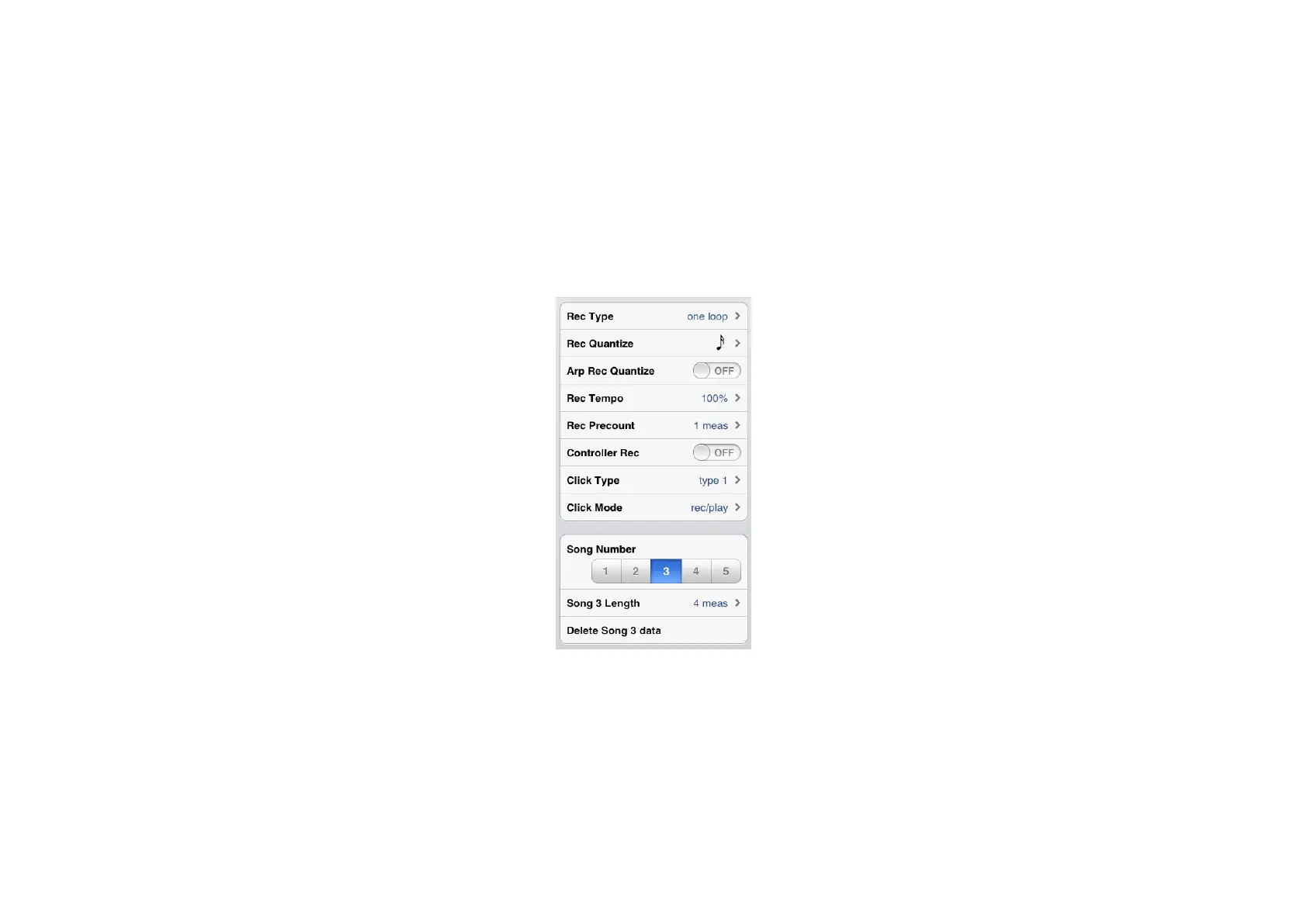
Recording setting parameters
• Rec Type
Determines the recording type.
normal: Repeatedly executes overdub (looped)
recording for the specified measures until manually
stopped.
one loop: Executes recording for the specified
measures in one single pass, then stops.
• Rec Quantize
Determines the quantize resolution for recording.
• Arp Rec Quantize
When this is set to On, the Quantize (specified via
Rec Quantize) is applied to the recording of Arpeggio
playback.
• Rec Tempo
Determines the recording tempo as a ratio of the
Tempo value in the Keyboard and Pad display.
• Rec Precount
Sets the precount before starting the recording
operation.
• Controller Rec
When this is set to Off, control change and pitch bend
data are not recorded.
• Click Type
Determines the Tempo click sound.
• Click Mode
rec: Click sounds in Song recording.
rec/play: Click sounds both in Song recording and
playback.
• Song Number
Selects the Song number as target for recording,
Song Length, and Delete Song data.
• Song Length
Determines the measure amount of a Song specified
via the Song Number.
• Delete Song data
Deletes the Song specified via the Song Number.












 To Next Page