4
Part 4 : Adjustments
2 Rotate the truss rod nut with the screw driver. (Fig. )
* The curvature of the neck should be slightly concave.
* Make any adjustments gradually.
1 Loosen two screws of the truss rod cover with the Phillips head
screw driver. (Fig. )
■ String height adjustment
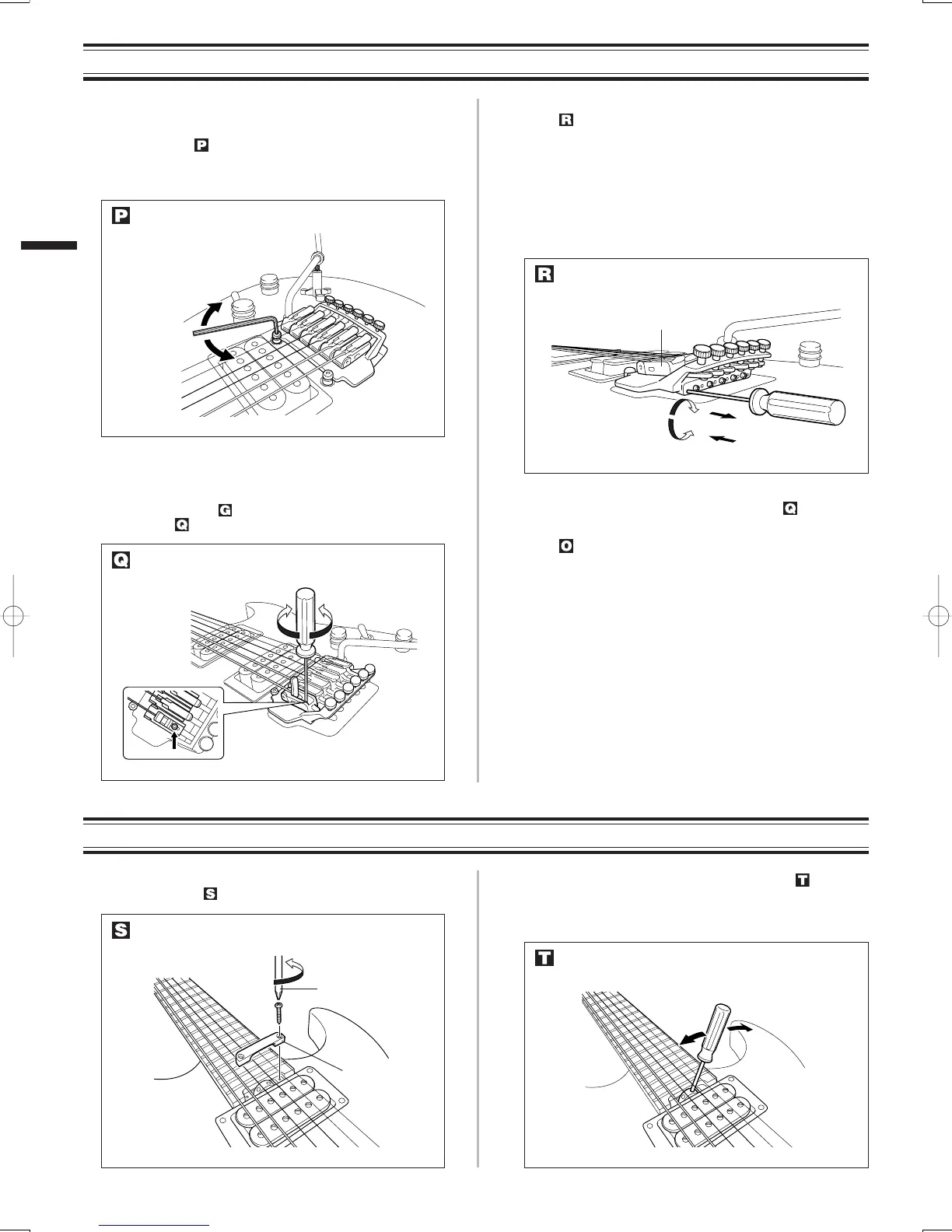
To adjust the string height (string action), rotate the two bolts with hex-
agonal wrench. (Fig. )
* All the string heights can be set properly by adjusting the
two bolts.
■ Intonation adjustment
1 To adjust the intonation of each string, pull up the locking lever of
the FC tremolo (Fig. ) and loosen the screw inside the bridge
saddle. (Fig. )
2 Adjust the location of the bridge saddle with the hexagonal wrench.
(Fig. )
a) If the fretted tone at the 12th fret is higher in pitch than
the harmonic tone at the 12th fret, rotate the intonation
screw clockwise to move the bridge saddle backwards.
b) If the fretted tone at the 12th fret is lower in pitch than
the harmonic tone at the 12th fret, rotate the intonation
screw counter-clockwise to move the bridge saddle for-
wards.
Part 5 : Adjusting the Truss Rod
3 Tighten the screw inside the bridge saddle. (Fig. )
4 Return the locking lever of the FC tremolo to the original position.
(Fig. )
English
b) Forward
a) Backward
Tighten
Loosen
Higher action
Lower action
If too much
concave bow
If too much
convex bend
Screw driver
Truss rod cover
Bridge Saddle
Adjust string height
Unlock the bridge saddle
Move the bridge saddle
Adjust the neck
Remove the truss rod cover
FCmulti3 04.11.30, 11:21 AMPage 4 AdobePageMaker6.0J/PPC



 To Previous Page