6
The function of the XP series pads varies according to which trigger input jack on the Drum Trigger
Module the pad is connected.
Refer to the following website for its function in relation to trigger input jacks.
http://dtxdrums.yamaha.com/support/pad_compatibility/
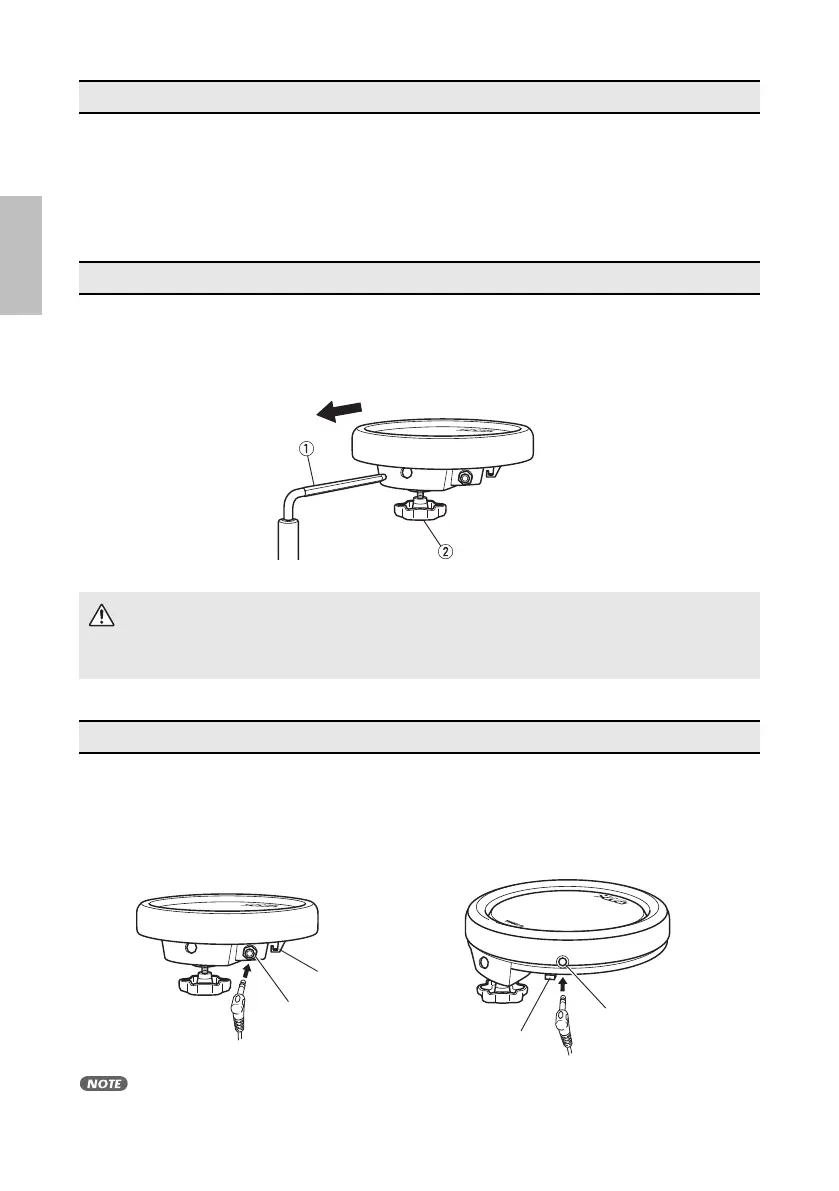
After setting up your rack system (Yamaha RS series, etc.) or a standard tom stand (Yamaha WS series,
etc.), attach the pad as shown in the illustration. Insert the tom holder (hexagonal bar) q on your rack or
tom stand into the pad, and firmly tighten the clamp bolt w to secure.
Use the supplied stereo phone cable to connect the output jack on the XP series pad to the input jack
on the DTX Series drum Trigger Module. Insert the L-shaped connector into the output jack (OUTPUT)
on the XP series pad.
• In order to protect the cable and connector, be sure to hook the cable around the Cord Clip.
Pad & Trigger Input Jacks
Setting Up
CAUTION
• Make sure that the pad is securely attached to the rack or stand. If the bolt is not tightened
securely, the pad may slip or fall down, causing injury. Also, if the rack or stand is placed on
an unstable surface, etc., the rack or stand may fall over, resulting in injury.
Connections
OUTPUT
OUTPUT
XP70 XP80
Cord Clip
Cord Clip
xp70_80_en_om.fm Page 6 Friday, November 5, 2010 10:59 AM



 To Next Page