This document provides a comprehensive overview of a compact dehumidifier, model CS10Z, detailing its structure, technical specifications, usage instructions, troubleshooting, and environmental considerations.
Function Description
The CS10Z is a compact dehumidifier designed to reduce humidity in small areas. Its primary function is to extract moisture from the air, collecting it in a removable water tank. The device features an automatic shut-off mechanism that activates when the water tank is full, indicated by a red light, to prevent overflow. It is suitable for use in environments where the temperature is above 15°C and humidity is above 45%, as these are the optimal conditions for its operation. The dehumidifier is designed for ease of use, with simple power controls and clear indicators for its operational status and water tank level.
Important Technical Specifications
- Model: CS10Z
- Voltage: 220V~
- Power: 25W
- Dehumidification Capacity: 200-300ml/24h (milliliters per 24 hours)
- Movable Water Tank Capacity: 800ml
- Dehumidification Area: < 20 m² (square meters)
- Optimal Working Environment: Temperature > 15°C, Relative Humidity > 45%
- Body Volume (Dimensions): 160mm (width) x 145mm (depth) x 230mm (height)
- Water Level Sensor: Automatically turns off the machine and illuminates a red indicator light when the water tank is full.
Usage Features
The dehumidifier is designed for straightforward operation:
- Initial Setup: Ensure the water receiving box is properly inserted into the dehumidifier.
- Power On: Plug the power cord into an indoor AC power socket and turn on the dehumidifier switch.
- Operation Indicator: When operating correctly, the indicator light will be blue, and air will blow out from the upper air outlet.
- Water Tank Not Installed Properly: If the indicator light is red under normal circumstances, it signifies that the water receiving box is not installed correctly.
- Automatic Shut-off: The dehumidifier will automatically stop working when the water in the receiving box reaches a certain level, and a red light will illuminate.
- Water Disposal:
- First, cut off the power supply to the dehumidifier.
- Remove the water receiving box from the dehumidifier.
- Pull out the black water receiving box (presumably a stopper or inner container).
- Pour out the accumulated water.
- Re-plug the black water receiving box.
- Dry both the dehumidifier and the water receiving box before reinserting the box to resume dehumidification.
- Important Note: When removing the water receiving box, do not tilt it to prevent accumulated water from spilling.
- Placement: The dehumidifier should be placed on a horizontal surface during operation to ensure proper functioning of the water level sensor and prevent overflow.
- Airflow: Do not block the air inlet at the back or the air outlet at the top of the dehumidifier. Avoid inserting foreign objects into the air outlets to prevent damage to internal components.
- Transformer Placement: If an external transformer is used, it should be placed in a dry, well-ventilated area.
- Post-Use: After each use, turn off the machine.
- Clearance: Maintain approximately 10cm of clear space around the product to ensure proper ventilation.
Maintenance Features
- Cleaning: After prolonged periods of non-use, it is recommended to remove accumulated water from the water receiving box to prevent peculiar smells that can develop over time.
- Troubleshooting (Common Faults and Solutions):
- Red Light On After Powering On (Dehumidifier Not Working):
- Possible Reason 1: Water receiving tank is full.
- Solution: Empty the water from the receiving box and reinsert it.
- Possible Reason 2: Floating ball of the water receiving box is stuck.
- Solution: Press the floating ball down and reinsert the water receiving box.
* Dehumidifier Not Working (No Lights/No Operation):
- Possible Reason 1: Power supply was cut off.
- Solution: Check if the power plug is properly inserted.
- Possible Reason 2: Switch not on.
- Solution: Turn on the power switch.
- Possible Reason 3: The vent is blocked.
- Solution: Ensure there is approximately 10cm of clear space around the product.
- Repair: If the power cord is damaged, it must be handed over to the manufacturer or its designated professional for repair. The product should only be repaired at the company's designated service centers to prevent unsafe factors. In case of any other failure, unplug the device immediately and do not operate the defective product.
- Accessory Use: Do not use accessories not approved by the manufacturer. Using unauthorized accessories will void the warranty if the machine fails as a result.
- Inspection: After unpacking, check for any damage and ensure all accessories are complete.
Environmental Protection
This product is manufactured using high-quality, recyclable materials and components. Users are encouraged to dispose of the product according to local regulations, not as ordinary household waste. Proper disposal helps to mitigate negative impacts on the environment and human health. Professional recycling companies can recycle the product's materials to enhance reusability at the end of its life cycle.
Safety Precautions
- All contents related to safety must be strictly followed by the user.
- The device is not intended for use by individuals (including children) with physical, sensory, or mental impairments, or those lacking experience and knowledge, unless they are supervised or instructed by a person responsible for their safety.

 Need help?
 General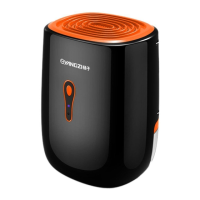

 To Next Page