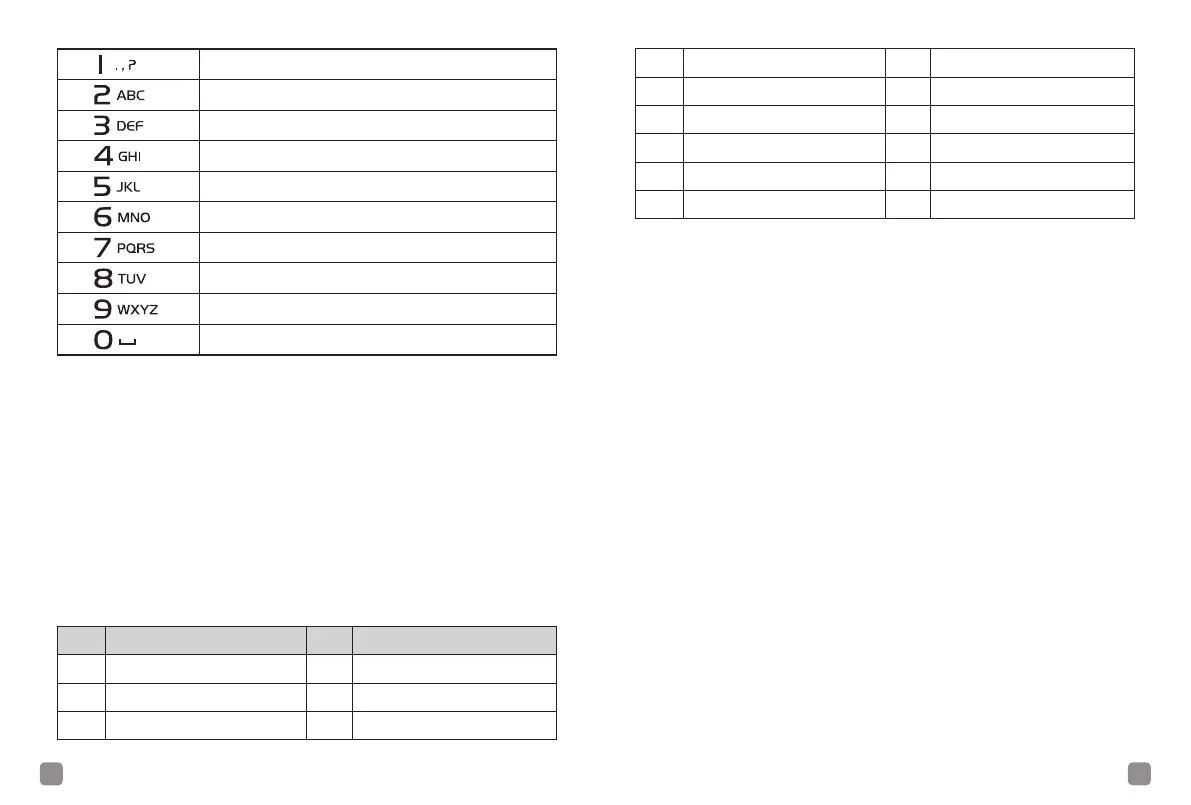
5 6
. , ? ! @ & % - : * # 1
A B C 2
D E F 3
G H I 4
J K L 5
M N O 6
P Q R S 7
T U V 8
W X Y Z 9
SPACE 0
Side Button PF1/PF2/PF3
These side buttons PF1/PF2/PF3 can be allocated for certain
functionalities by software. The functions features that can be
programmed are listed below, you can active/deactivate the func-
tion by short press or long press once your denite the key in ad-
vanced.
Short Press –
Pressing and releasing rapidly.
Long Press –
Pressing and holding for the programmed duration.
Side Button PF1/PF2/PF3 –
Programmed Side Buttons Functions
(PF Button).
No. Feature No. Feature
1 Radio Enable 10 VOX
2 Radio Check 11 One Access 1
3 Radio Disable 12 One Access 2
4 High/Low Power 13 One Access 3
5 Monitor 14 One Access 4
6 Emergency Mode ON 15 One Access 5
7 Emergency Mode OFF 16 Bit Error Rate
8 Zone Selection 17 Repeater/Talk Around
9 Scan ON/OFF
LCD Display Icon
Received Signal Strength Indicator
The number of bars displayed represents the radio signal strength.
Four bars indicate the strongest signal. This icon is only displayed
while receiving.
Power Level
Radio is set at Low power or High power.
Battery
The number of bars (0-4) shown indicates the charge remaining in
the battery. Blinks show battery is low.
Monitor
Selected channel is being monitored.
Emergency
Radio is in Emergency mode.
Scan
Scan feature is enabled.
Unread Message
Selected channel is being monitored.
Full Message
The test message has already full.
Date
Show the date.
Time
Show the time.



 To Next Page