2
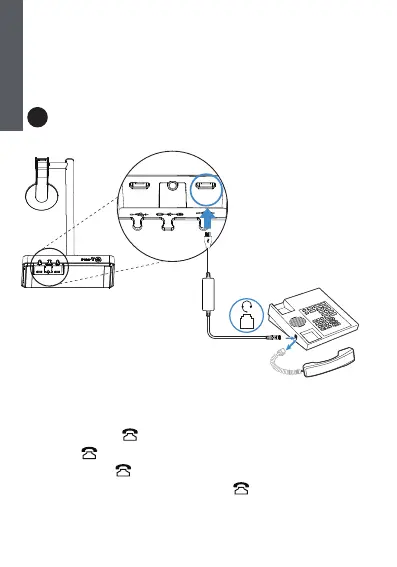
Connect the IP Phone and Headset
A Mitel & Unify
Phone
You need to do the following on the WH62/WH63:
-
Before a call, p
ress the button on the base to enable the
audio channel
.
The LED
indicator of
the button turns solid green.
-
After a call, p
ress the button on the base again or dock the headset to the base to
disable the audio channel. The LED indicator of the button turns off.
- The call can only be controlled on the IP phone.
The WH62/WH63 headset version must be 104.434.0.15 or later.
You can check out the headset version via Yealink USB Connect (PC)
Download: https://www.yealink.com/product/yuc.
Handset Port
E
N
G
L
I
S
H
PC
PC
DC5V
Yealink WH62/WH63
Phone Port



 To Next Page