3
B
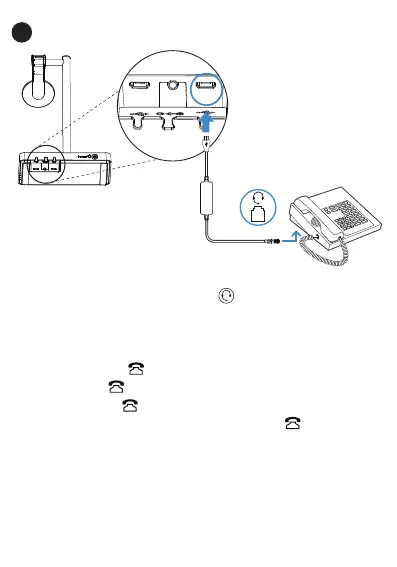
Avaya/Poly/GS/Fanvil/Snom IP Phone
You need to do the following
:
Step 1
: For IP Phones, you need to press the button on the phone
to set the
audio device as a headset
. The call can only be controlled on the IP phone.
Step 2
:
For WH62/WH63:
-
Before a call, press the button on the base to enable the audio channel. The
LED indicator of the button turns solid green.
- After a call, press the button on the base again or dock the headset to the
base to disable the
audio channel
. The LED indicator of the button turns off.
Headset Port
PC
PC
DC5V
Yealink WH62/WH63
Phone Port



 To Next Page