Need help?
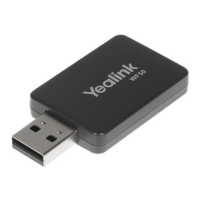
Do you have a question about the Yealink WF40 and is the answer not in the manual?
Ensure the Ethernet cable is removed and the Wi-Fi USB dongle is functional.
Verify network security, password, gateway/router settings, and restart phone Wi-Fi.
Ensure phone and router are within range with minimal interference.
 General
| Internal | No |
|---|---|
| Component for | IP Phone |
| Product color | Black |
| Interface | WLAN |
| USB version | 2.0 |
| Connectivity technology | Wireless |
| Wi-Fi | Yes |
| Bandwidth | 2.4 GHz |
| Wi-Fi standards | 802.11b, 802.11g, Wi-Fi 4 (802.11n) |
| Top Wi-Fi standard | Wi-Fi 4 (802.11n) |
| Security algorithms | 64-bit WEP, 128-bit WEP, 152-bit WEP, WPA2-PSK |
| Networking standards | IEEE 802.11b, IEEE 802.11g, IEEE 802.11n |
| Maximum data transfer rate | 150 Mbit/s |
| Harmonized System (HS) code | 85176990 |
| Storage temperature (T-T) | -40 - 85 °C |
| Operating temperature (T-T) | 0 - 50 °C |
 Weight and Dimensions
| Depth | 26.9 mm |
|---|---|
| Width | 18 mm |
| Height | 8 mm |


 To Next Page