iXm Getting Started.
Yellowtec 10
-
2009.
Page
2
of
6
Switch on
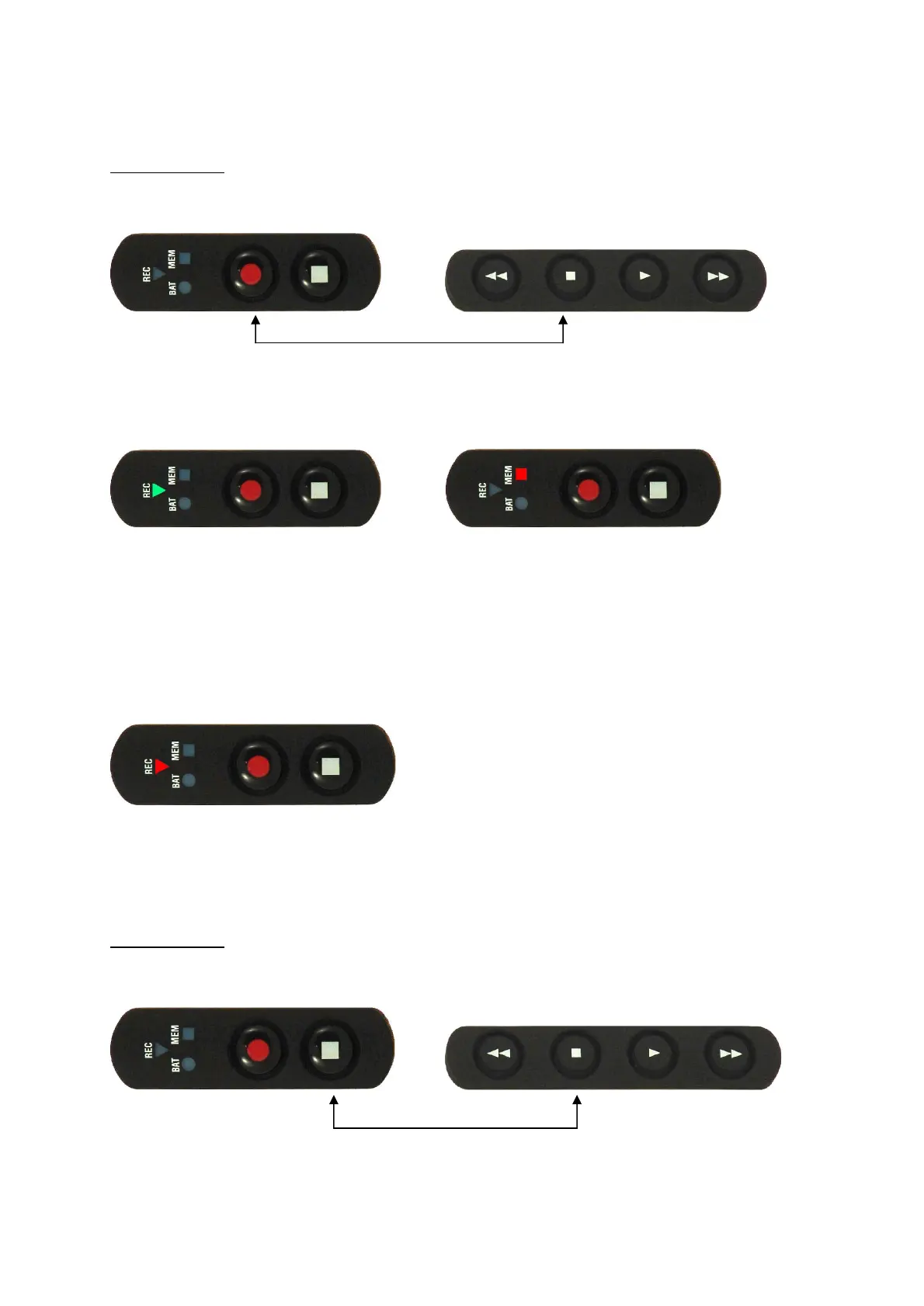
Press and hold
the Stop button on the playback keypad and the Record button on the record
keypad simultaneously for about 1 second.
Record Keypad
Playback Keypad
iX
m
will start
booting
.
The boot process is
indicat
ed by a fast
green
blinking
REC
i
ndicator
.
When
booting
is com
pleted
,
iX
m will perform a
memory check
indica
ted by a fast red
blinking M
EM
indicator
.
No
te
:
a
successful
ly completed
memory check will cause
the
MEM i
ndicator
to
stop blinking.
I
f the
M
EM
LED
does not
stop
blinking
after a few seconds, the SD
m
emory
c
ard is not
read
correctly
.
Please make
sure that the
c
ard is inserted properly.
The
d
evice is now
ready f
or record
indicated by a
red
flashing
REC
indicator
every
2
seconds.
Switch off
Press and hold
the Stop buttons on record and playback keypad simultaneously. The device
will switch off immediately. All indicators will shut off.
Record Keypad
Playback Keypad


 To Next Page