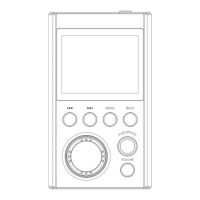
select the file browsing menu, short press the “MENU” button to
enter all song lists, rotate the circular wheel encoder switch to
select the desired music file, press the “PLAY/PAUSE” button.
You can play it.
In the main menu state, press the “ ” or “ ” button to
select the equalizer menu, press the “MENU” button to enter,
respectively, turn off, rock, pop, soft, jazz, classical, electronic
music, select the desired sound. Press the “MENU” button to
confirm the selection.
Note: Music with a sampling rate above 48KHz does not support
sound adjustment for lossless audio! This device only supports
the sound adjustment of the sampling rate below 48KHz!


 To Next Page