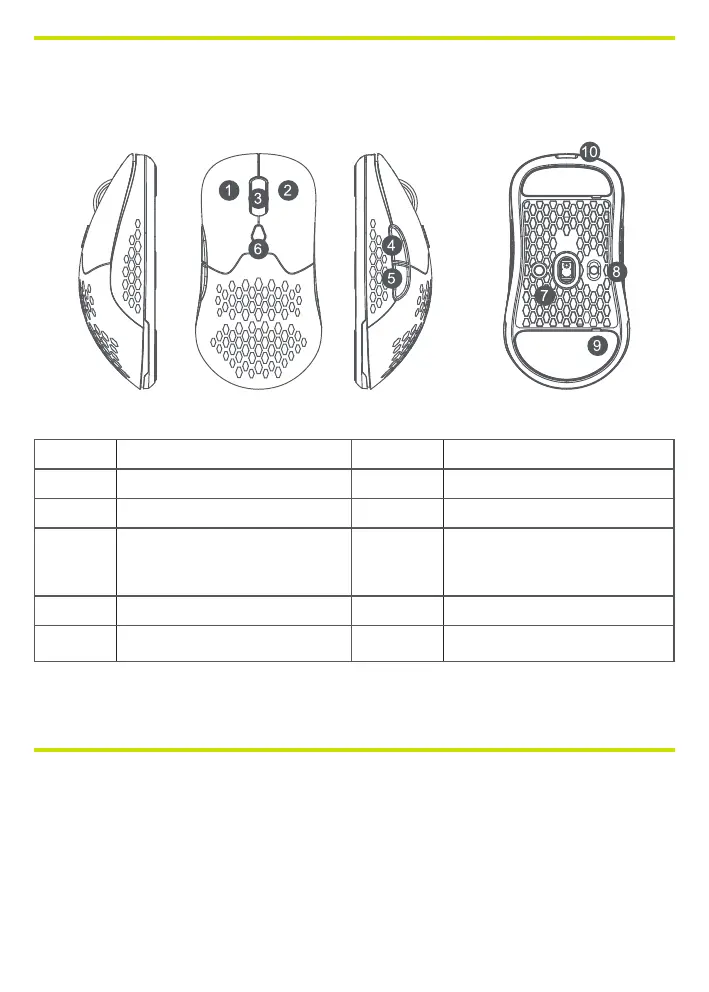
BUTTON DESCRIPTION
Number Button description Number Button description
1 Left mouse button 6 DPI cycle button
2 Right-click the mouse 7 2.4G/BT Mode button
3 Roller and middle button 8
Power switch:
power OFF/power ON LED ON/
power ON LED OFF
4 Forward button 9 Teon mouse foot
5 Back button 10 Type-C port/charging port
*Supporting System: Windows 2000/XP/VISTA/7/8/10/11/Mac OS
*Bluetooth only support BLE
CONNECT THE MOUSE
WIRED CONNECTION
1. Take out the USB to USB-C cable and connect the mouse to the computer.
2. Slide the power switch to the LED On or No LED On state.
3. The computer will automatically recognize and congure the mouse.
4. When the conguration is complete, the mouse is ready for use.



 To Next Page