EasyManua.ls Logo

YIHUA 3005D-II - User Manual

YIHUA 3005D-II
5 pages
Print Icon
To Next Page IconTo Next Page
Loading...
Thank you for choosing this type of DC power supply. Please read the user guide thoroughly
before using, and keep it in a safe place for future reference.
Statement: The company reserves the right to improve and upgrade products, product specica-
tions and design are subject to change without notice.
English
INSTRUCTION MANUAL
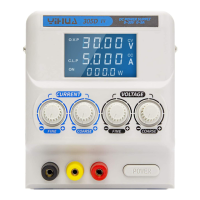
Dual Adjustable
DC Power Supply
3005D-II
Question and Answer IconNeed help?

Do you have a question about the YIHUA 3005D-II and is the answer not in the manual?

Summary

Safety Guidelines for DC Power Supply

Important Safety Tips

Essential instructions to reduce electrical shock hazard and ensure safe operation.

Safety Requirements and Testing

Details safety standards, high-pressure, and insulation testing.

DC Power Supply Features and Specifications

Product Features Overview

Highlights the key features of the dual adjustable DC power supply.

Technical Performance Specifications

Lists output characteristics, power effect, load effect, and ripple noise.

Operating Modes Specifications

Details specifications for independent, series, and parallel tracking modes.

Rated Operating Conditions

Specifies supply voltage, temperature range, and dimensions.

Operating the Dual Adjustable Power Supply

Operational Precautions and Tips

Key warnings and recommendations for safe and effective operation.

Current Limiting and CV;CC Operation

Guide to setting current limit and understanding CV/CC automatic conversion.

Advanced Operation Modes

Instructions for stand-alone, series, and parallel tracking modes.

Installation, Maintenance, and Troubleshooting

Power Supply Installation Guide

Instructions for proper installation, grounding, and connection.

Fuse Replacement and Care

Procedure for replacing a blown fuse and general maintenance advice.

Product Certification and Warranty

Warranty Terms and Service

Details the warranty policy, service conditions, and claims process.

Maintenance Records

Log for recording repair history and service dates.

Summary

Safety Guidelines for DC Power Supply

Important Safety Tips

Essential instructions to reduce electrical shock hazard and ensure safe operation.

Safety Requirements and Testing

Details safety standards, high-pressure, and insulation testing.

DC Power Supply Features and Specifications

Product Features Overview

Highlights the key features of the dual adjustable DC power supply.

Technical Performance Specifications

Lists output characteristics, power effect, load effect, and ripple noise.

Operating Modes Specifications

Details specifications for independent, series, and parallel tracking modes.

Rated Operating Conditions

Specifies supply voltage, temperature range, and dimensions.

Operating the Dual Adjustable Power Supply

Operational Precautions and Tips

Key warnings and recommendations for safe and effective operation.

Current Limiting and CV;CC Operation

Guide to setting current limit and understanding CV/CC automatic conversion.

Advanced Operation Modes

Instructions for stand-alone, series, and parallel tracking modes.

Installation, Maintenance, and Troubleshooting

Power Supply Installation Guide

Instructions for proper installation, grounding, and connection.

Fuse Replacement and Care

Procedure for replacing a blown fuse and general maintenance advice.

Product Certification and Warranty

Warranty Terms and Service

Details the warranty policy, service conditions, and claims process.

Maintenance Records

Log for recording repair history and service dates.

Overview

This document describes the Dual Adjustable DC Power Supply, model 3005D-II. It is a versatile power supply designed for various applications including technology product development, laboratory work, teaching, electronics production lines, and as an essential instrument in the communications industry.

Function Description

The 3005D-II is a dual DC power supply that offers continuously adjustable voltage and current. It features a large-screen LCD display with backlighting and a built-in knob structure to minimize operator error. The device can operate independently, or in self-dual tracking series and parallel modes. Additionally, it provides a third fixed output with selectable voltages of 2.5V, 3.3V, or 5V (±0.1V) at 3A.

The power supply is designed with automatic conversion between constant voltage (CV) and constant current (CC) operating characteristics. When operating in constant pressure mode, the output voltage remains stable until the pre-set current limit is reached. Once the current limit is met, the output current remains stable, and the output voltage decreases with further increases in load. This transition is indicated by front panel LEDs (CV and CC indicators).

Current Limiting Set: To set the current limit, ensure the machine is powered off. Temporarily short the output "+" and "-" terminals. Rotate the voltage knob until the CC indicator lights up. Adjust the current knob to the desired current value. Once the current value is set (and overload conditions are handled), do not change the current knob. Finally, remove the short line to enter the working state.

Intelligent Fan Control: The device incorporates an intelligent fan control system. The fan automatically starts when the internal temperature of the main power device reaches 45°C and stops when the temperature drops below 45°C.

Overheat Protection: The power supply includes an improved thermal protection function to safeguard itself and user equipment from non-normal operating conditions. If the internal power supply transformer overheats, the AC input current voltage will automatically be cut off. If internal power supply devices overheat, the power output will be cut. Once the temperature inside the power supply returns to the normal range, the power will restore to its default state.

Important Technical Specifications

Rated Operating Conditions and Dimensions:

  • Supply voltage: 220V ± 10% 50Hz (customizable to 110V ± 10% 60Hz).
  • Operating Temperature range: 0°C - 40°C, Relative humidity <80%.
  • Storage Temperature: -20°C ~ 80°C, Relative humidity <80%.
  • Work: CV/CC.
  • Buck limiting protection: Short circuit protection, over temperature protection.
  • Radiating: Air-cooled heat.
  • Dimensions: L370 x W250 × H160mm.
  • Rated output power: 315W.

Output Characteristics (I, II Independent Mode):

  • Continuously adjustable output voltage: Between 0-30V.
  • Output current continuously adjustable: Between 0-5A.

General Specifications:

  • Power effect (CV): ≤0.01% + 1mV.
  • Power effect (CC): ≤0.2% + 1mA.
  • Load effect (CV, I≤3A): ≤0.01% + 5mV.
  • Load effect (CC, I≤3A): ≤0.2% + 5mA.
  • Load effect (CV, I>3A): ≤0.01% + 7mV.
  • Load effect (CC, I>3A): ≤0.2% + 10mA.
  • Ripple noise (5Hz-1MHz, I≤3A, CV): ≤0.5mVrms.
  • Ripple noise (5Hz-1MHz, I≤3A, CC): ≤3mArms.
  • Ripple noise (5Hz-1MHz, I>3A, CV): ≤1mVrms.
  • Ripple noise (5Hz-1MHz, I>3A, CC): ≤5mArms.
  • Voltage accuracy of: ± 0.5% rdg + 2 words.
  • Current Accuracy: ± 0.5% rdg + 2 words.
  • Digital resolution: ± 0.5% rdg + 2 words.

Output Characteristics (III Fixed Output):

  • Rated output voltage: 2.5V/3.3V/5V ±0.1.
  • Rated output current: 3A.
  • Power effect: ≤1mV.
  • Load effect: ≤10mV.
  • Ripple noise (5Hz-1MHz): ≤1mVrms.

Tracking Features (In Series):

  • Power effect: ≤1mV.
  • Load effect: ≤30mV.
  • Ripple noise (5Hz-1MHz): ≤1mVrms.

Tracking Features (Parallel properties):

  • Power effect: ≤1mV.
  • Load effect: ≤20mV.
  • Ripple noise (5Hz-1MHz, I≤6A): ≤0.5mVrms.
  • Ripple noise (5Hz-1MHz, I>6A): ≤1mVrms.

Safety Requirements:

  • High-pressure test: Leakage current ≤1mA (Test conditions: input to ground 1700VAC/2S).
  • Insulation testing: Insulation resistance ≥100MΩ (Test conditions: input to ground 500VDC/5S).

Usage Features

Stand-alone Operation: In this mode, the tracking mode selector switch on the front panel should be set to "IND". The corresponding LED will light up. The output voltage and current for each channel are independently adjusted using their respective control knobs.

Series Tracking Mode: Set the front panel switch to "SER". The LED for this mode will illuminate. In series mode, the output voltage is regulated by the channel II voltage control knob. The output current for both channels I and II is regulated by the channel I/II current adjustment knob. Both channels will enter a constant current state, and the output current will remain unchanged. In this configuration, the output "+" of channel II connects to the output "+" of channel I, and the output "-" of channel I connects to the output "-" of channel II. For optimal tracking performance in series mode, it is recommended to short the output "+" of channel I and the output "-" of channel II with an AWG20# wire.

Parallel Tracking Mode: Set the front panel switch to "PAR". The LED for this mode will illuminate. In parallel mode, the output current for both channels I and II is regulated by the channel I/II current adjustment knob, and the output voltage is regulated by the channel II voltage control knob. Both channels will enter a constant current state, and the output current will remain unchanged. In this configuration, the output "+" of channel II connects to the output "+" of channel I, and the output "-" of channel I connects to the output "-" of channel II. For optimal tracking performance in parallel mode, it is recommended to short the output "+" of channel I and the output "+" of channel II, and the output "-" of channel I and the output "-" of channel II with an AWG20# wire.

High Precision Conditions: When operating under high precision conditions, the output terminal "+" or "-" must be connected to the GND terminal to reduce output ripple voltage.

General Operation Steps:

  1. Ensure the power switch is in the "OFF" position.
  2. Verify the input supply voltage is correct.
  3. Connect the power cord.
  4. Turn the power switch to "ON".
  5. Adjust the "VOLTAGE" and "CURRENT" knobs to the desired values.
  6. Connect the external load to the "+", "-" output terminals.

Important Precautions:

  • AC Input: The AC input should be 220V ± 10% 50Hz (or 110V ± 10% 60Hz if marked on the chassis).
  • Radiating: Do not operate the machine in ambient temperatures exceeding 40°C. Ensure sufficient space at the rear for the cooling fan to dissipate heat.
  • Output Voltage Overshoot Limit: When powered on, the output voltage will not exceed a preset value.
  • Load Management: The power supply is primarily applicable to resistive loads. If capacitive or inductive loads are to be used, this should be communicated to the sales department during the contract phase to ensure proper remedy plans.
  • Safety: This is a high-voltage power supply. Do not touch the machine or high-voltage areas during operation.

Maintenance Features

Fuse Replacement: If the fuse blows, the regulator and steady flow indicators will turn off, and the power supply will stop working. Before replacing the fuse, identify and correct the cause of the blown fuse. Use a fuse of the same value for replacement. Do not open the fuse box if there are no general problems.

Warranty Card:

  • 7-day replacement service: Within 7 days of purchase, under normal use (excluding artificial damage), with the original package, and if the device has not been disassembled or repaired, a replacement service is provided.
  • 1-year free repair service: Within one year of purchase, under normal use, if there is a quality problem, and the device has not been disassembled or repaired, free repair service is provided.
  • Lifetime warranty service: Beyond the warranty period, lifetime warranty service is provided, with free labor costs but charges for spare parts only.
  • Warranty card required: Failure to present the warranty card during the warranty period will result in non-free service.
  • Contact sales unit: Users needing warranty service should contact their original sales unit.
  • Proof of purchase: When users need warranty service, they must provide the warranty card and purchase invoice or a receipt with the company seal.
  • Exclusions: Warranty does not include transportation costs or on-site service.

General Maintenance Instructions:

  • Unpacking: After opening the package, check all accessories (e.g., manual). If anything is missing, contact the sales department.
  • Grounding: For first-time use, the power supply's metal enclosure must be grounded to ensure safety. Do not connect the outside to the zero line shell by mistake.
  • Initial Setup: Install the device correctly and thoroughly check all terminals for correct connections (input/output, AC/DC, positive/negative values) to prevent incorrect connections.
  • Load Control: The power supply is not designed for long-term full load operation. For linear power supplies, usage should be controlled to less than 60% of full load. For switching power supplies, usage should be controlled to less than 80%. Exceeding these limits may lead to premature failure. Adjust the current margin based on actual work requirements.
  • Cooling: For sufficient cooling, install the power supply in a location with good air convection. Do not place other items on the housing.

YIHUA 3005D-II Specifications

General IconGeneral
BrandYIHUA
Model3005D-II
CategoryPower Supply
LanguageEnglish

Related product manuals