VI. Functional Setup Instructions
Cold wind setting
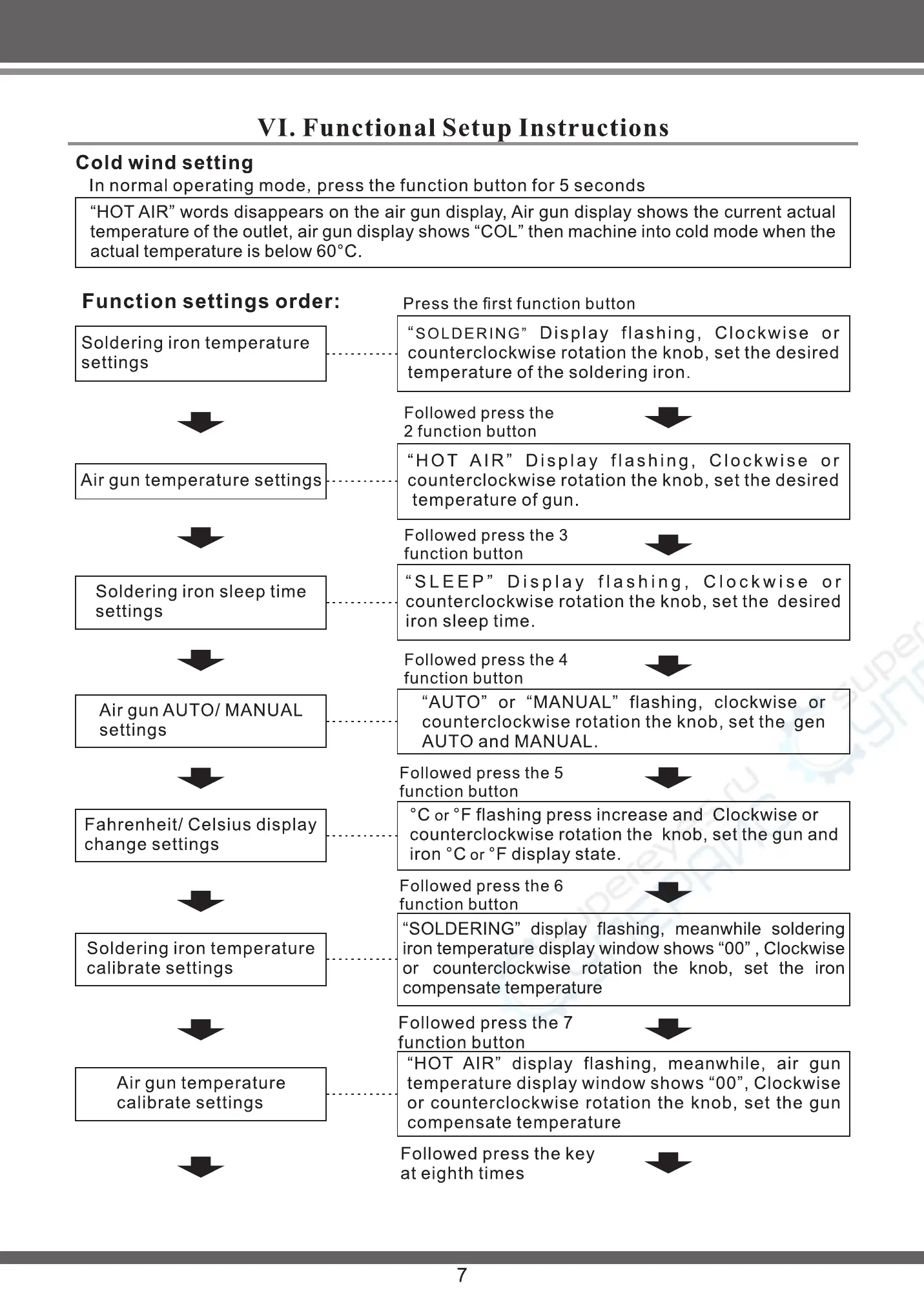
In normal operating mode, press the function button for 5 seconds
"HOT AIR" words disappears on the air gun display, Air gun display shows the current actual
temperature of the outlet, air gun display shows "COL" then machine into cold mode when the
Finish setting
The machine save all of the above setting function
parameters automatically, and according to the
function parameter working.
actual temperature is below 60 oc.
Function settings order:
Soldering iron temperature
settings
Air gun temperature settings
Soldering iron sleep time
settings
Air gun AUTO/ MANUAL
settings
Fahrenheit/ Celsius display
change settings
Soldering iron temperature
calibrate settings
Air gun temperature
calibrate settings
Press the first function button
"SOLDERING" Display flashing,
Clockwise or
counterclockwise rotation the knob, set the desired
temperature of the soldering iron.
Followed press the
2 function button
"HOT AIR" Display flashing,
Clockwise or
counterclockwise rotation the knob, set the desired
temperature of gun.
Followed press the 3
function button
"SLEEP" Display flashing, Clockwise or
counterclockwise rotation the knob, set the desired
iron sleep time.
Followed press the 4
function button
"AUTO" or "MANUAL" flashing, clockwise or
counterclockwise rotation the knob, set the gen
AUTO and MANUAL.
Followed press the 5
function button
oc or OFflashing press increase and Clockwise or
counterclockwise rotation the knob, set the gun and
iron oc or OF display state.
Followed press the 6
function button
"SOLDERING" display flashing, meanwhile soldering
iron temperature display window shows "00" , Clockwise
or counterclockwise rotation the knob, set the iron
compensate temperature
Followed press the 7
function button
"HOT AIR" display flashing, meanwhile, air gun
temperature display window shows "00", Clockwise
or counterclockwise rotation the knob, set the gun
compensate temperature
Followed press the key
at eighth times
7
I. Soldering iron temperature settings
For example, set the iron temperature
to 3800C:
Press the first function button,
SOLDERING" flashing, clockwise rot-
ation the knob from 320 to 380. Stop
operating four seconds, The
SOLDERING" stop flashing, the prog-
ram automatically memory and exit
the function setting, finish settings. If
you want to set the temperature of the
air gun, click the first function button
more before "SOLDERING" display
stops flashing, specific methods,
please see air gun temperature
settings.
2. Air gun temperature settings
For example, set the air gun temper-
ature to 4000C, iron temperature set
complete, press the second function
button, "HOT AIR" flashing, Clockw-
ise or counterclockwise rotation the
knob to temperature of the air gun
from 300 rose to 400, stop the oper-
ation of four seconds, "HOT AIR"
display stops flashing, the program
automatically memory and exit the
function setting, set to complete. If
you want to set the iron sleep time,
click the function button before the
display stops flashing "HOT AIR",
set of specific methods, see iron
sleep time.
SOLDERING Iron temperature
AIR
Counterclockwise
Rotation meiosis
SOLDERING
HOT AIR
Clockwise Addend
Function button
Operation shown in Figure 1
HOT AIR
Gun temperature
AIR
Counterclockwise
Rotation meiosis
SOLDERING
HOT AIR
Clockwise Addend
Function button
Operation shown in Figure 2
8


 To Next Page
 Loading...