
 Need help?
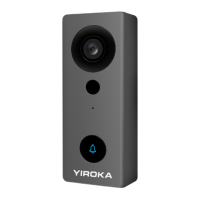
Do you have a question about the Yiroka WF006-718D and is the answer not in the manual?
Details sensor type, resolution, connectivity, and operating conditions.
Describes pairing the video doorbell with a door chime using a learning code.
Explains how to delete existing pairing codes for the door chime.
Details requirements for setting up a 2.4GHz WiFi router for the device.
Outlines the steps to register an account in the Tuya Smart APP.
Guides on adding the device via the app and connecting it to Wi-Fi.
Explains scanning the QR code with the doorbell and confirming connection.
Explains how to access and configure the doorbell's primary functions.
Guides on sharing the device with family and friends via the app.
Details the process of removing the doorbell from the main app interface.
Explains how to remove the doorbell through the device settings menu.
Instructions for revoking device sharing access for a specific user.
Guides on exploring services like voice assistants and cloud storage.
Instructions for setting up the Google Assistant device and connecting it to the network.
Details linking the Tuya Smart app with Google Assistant for voice control.
Instructions for setting up an Alexa device and connecting it to the network.
Details linking the Tuya Smart app with Alexa for voice control.
Covers mounting the back plate using tape or screws.
Explains connecting the power cable and attaching the doorbell.
Enables communication with visitors via the app.
Notifies the user of detected movement.
Allows sharing device access with others.
Records video using SD card or cloud storage.
Provides clear video in low-light conditions.
Covers testing, resetting, and troubleshooting network connectivity.
Addresses issues with adding the device and network connectivity problems.
Discusses issues with receiving push notifications and SD card recognition.
 General
| Brand | Yiroka |
|---|---|
| Model | WF006-718D |
| Category | Accessories |
| Language | English |

 To Next Page