EasyManua.ls Logo

YLI YK-568L - User Manual

YLI YK-568L
3 pages
Print Icon
To Next Page IconTo Next Page
Loading...
tested
Germany
EMC
R
www.yli.cn
We create security
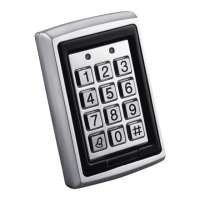
YK-568L is an access controller with proximity card operation and code keypad operation,
supports 500 users, with vandal resistant function.
FEATURE
Model:YK-568L
INTRODUCTION
TECHNICAL DATA
Single Door KeypadW/ Noctilucence&Waterproof
Voltage
12VDC
Distant: 65mm
Adjustment: ASK (125KHz)
Compatible Card: All 26-Bit EM Cards
Built-in Proximity Card Reader
Input Current
Operating Temperature: -31 to 63
Operating Humidity: 0 to 95%
Environmental Parameter
Dimension: 120L*76W*27H(mm)
Weight: 0.55kg
Mechanical Parameter
Standby: 40mA (Not include other devices)
Max: 130mA (Not include other devices)
YK-568L has 2 Mode Common Mode & Secure Mode
A: Common Mode Just 1 code 500 cards),everybody can use this code(500 cards).
For example, in your sales office, there are 20 salesman, and they know each other, if
you install a YK-568L here, you can use the Common Mode, because all your salesman
know this code(500 cards). No need to consider this is secure or not.
B: Secure Mode in the condition of Secure Mode, any code/card can`t open the door.
For example, in holiday(off duty), when YK-568L is in Secure Mode, enter the code or
read the card, can`t open the door.
Change the Mode
When we produce YK-568L, the Mode is Common Mode, If need change Common Mode
to Secure Mode, or change Secure Mode to Common Mode, operate it as below:
1) From Common Mode to Secure Mode Press"secure code" #
2) From Secure Mode to Common Mode Press"secure code" #
Remarks Secure Code when we produce is 3838
P
1
Question and Answer IconNeed help?

Do you have a question about the YLI YK-568L and is the answer not in the manual?

Summary

Introduction

Technical Data

Mechanical Parameters

Specifies dimensions and weight of the access controller.

Proximity Card Reader

Details on read distance, adjustment, and compatible card types.

Voltage and Current

Specifies operating voltage and input current requirements.

Environmental Conditions

Defines operating temperature and humidity ranges.

Features

Operating Modes

Explains Common Mode and Secure Mode for access control.

Mode Switching

Instructions on how to switch between Common and Secure modes.

Operation

Code Management

Procedures for changing program, open door, and secure codes.

Adding User Codes and Cards

Instructions for registering new user codes and proximity cards.

Deleting User Codes and Cards

Procedures for removing existing user codes and proximity cards.

Installation

Wiring Diagram

Fail Secure Electric Lock Wiring

Diagram illustrating the connection for a fail-secure electric lock.

Fail Safe Electric Lock Wiring

Diagram illustrating the connection for a fail-safe electric lock.

Overview

The YK-568L is a single-door keypad with noctilucence and waterproof features, serving as an access controller that supports both proximity card and code keypad operation. It is designed to accommodate up to 500 users and includes vandal-resistant functionality, making it suitable for various access control applications.

Technical Specifications:

  • Mechanical Parameters:
    • Dimensions: 120L x 76W x 27H (mm)
    • Weight: 0.55 kg
  • Built-in Proximity Card Reader:
    • Distant: 65 mm
    • Adjustment: ASK (125KHz)
    • Compatible Card: All 26-Bit EM Cards
  • Voltage: 12VDC
  • Input Current:
    • Standby: 40mA (excluding other devices)
    • Max: 130mA (excluding other devices)
  • Environmental Parameters:
    • Operating Temperature: -31℃ to 63℃
    • Operating Humidity: 0 to 95%

Usage Features:

The YK-568L operates in two distinct modes: Common Mode and Secure Mode, offering flexibility for different security requirements.

  • Common Mode: In this mode, a single code (or 500 cards) can be used by all authorized individuals. For instance, in a sales office where 20 salespeople know each other, the Common Mode allows all of them to use the same code or cards without needing to consider individual security levels. The default Open Door Code is 2580.
  • Secure Mode: This mode enhances security by preventing any code or card from opening the door. It is ideal for situations like holidays or off-duty periods when access should be restricted. For example, if the YK-568L is in Secure Mode, entering a code or reading a card will not open the door.

Changing Modes:

The device is set to Common Mode by default. To switch between modes:

  • From Common Mode to Secure Mode: Press "secure code" → #
  • From Secure Mode to Common Mode: Press "secure code" → # The default Secure Code is 3838.

Code and Card Management:

The YK-568L provides comprehensive features for managing program codes, open door codes, secure codes, and user access (codes and cards). All code and card management operations must be performed in Common Mode.

  • Changing Program Code, Open Door Code, Secure Code:

    • Change Program Code: Press "#" for 2 seconds → Enter Program Code (default: 1234) → 3 → New Program Code → "#" for 2 seconds.
    • Change Open Door Code: Press "#" for 2 seconds → Enter Program Code (default: 1234) → 1 → New Open Door Code → "#" for 2 seconds.
    • Change Secure Code: Press "#" for 2 seconds → Enter Program Code (default: 1234) → 4 → New Secure Code → "#" for 2 seconds.
  • Adding Code (Card):

    • Add Code (1 group): Press "#" for 2 seconds → Enter Program Code → Press 1 → Enter New Code → "#" for 2 seconds.
    • Add Card (500 pcs): Press "#" for 2 seconds → Enter Program Code → Press 7 → Enter 3 digits program number (from 001 to 500) → Read Card → "#" for 2 seconds.
  • Deleting Code (Card):

    • Delete Code (1 group): Press "#" for 2 seconds → Enter Program Code → Press 1 → Enter 0000 → #.
    • Delete Card (500 pcs):
      • Option A: Press "#" for 2 seconds → Enter Program Code → Press 8 → Enter 3 digits program number of this card → #.
      • Option B: Press "#" for 2 seconds → Enter Program Code → Press 8 → 000 → Read this card → Enter Program Code → #.

Installation:

  1. Choose the optimal installation location.
  2. Drill holes according to the provided diagram and specifications.
    • Install using the two holes labeled (A).
    • The hole labeled (B) is for wires.
    • Connect wires to the circuit board through hole (B).
    • Securely fix the back cover.
    • Securely fix the front cover.

Wiring Diagram:

The manual provides diagrams for connecting the YK-568L to both Fail Secure Electric Locks and Fail Safe Electric Locks. These diagrams illustrate the connections for electric lock, power supply, and release button, ensuring proper functionality based on the lock type.

Maintenance Features:

  • Return to Factory Settings: To reset the device to its factory settings and delete all stored data, press "#" for 2 seconds → "Program Code" → "0" → "Program Code" → "#". The default Program Code is 1234.

The YK-568L is a robust and versatile access control solution, offering a balance of security and convenience through its dual operating modes and comprehensive user management capabilities.

YLI YK-568L Specifications

General IconGeneral
BrandYLI
ModelYK-568L
CategoryIP Access Controllers
LanguageEnglish

Related product manuals