
 Need help?
Do you have a question about the YOODA NANO Series and is the answer not in the manual?
Specifies the device controls a single motor.
The device can store up to 20 transmitters.
Details the operational range in outdoor and indoor environments.
Specifies the required power input voltage and frequency.
Indicates the output voltage provided by the control unit.
Specifies the maximum power output capacity of the device.
Provides the physical size specifications of the control unit.
Defines the suitable temperature range for device operation.
Indicates the device's resistance to dust and water ingress.
Specifies optimal distances for mounting the device for best performance.
Guides users through pairing the first remote control with the receiver.
Explains how to reverse the motor's operational direction.
Details the process of adding more remote controls to the receiver.
Outlines the procedure to remove all programmed remote controls.
Explains how to enable impulse mode for motor control.
Details the method for pairing specific key-ring type remotes.
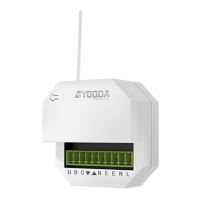
The NANO_1Cf is a single-channel control unit designed for controlling a single motor, compatible with all YOODA brand devices. It operates on a 433 MHz frequency.
The primary function of the NANO_1Cf is to provide remote control capabilities for a single motor. It can be programmed to work with up to 20 transmitters, offering flexibility in controlling the connected motor from various locations. The device supports programming of both standard remote controls with a dedicated P2 button and key-ring remotes, which utilize a simultaneous press of STOP and UP buttons for programming.
The control unit features an "impulse mode" which allows for precise motor control. In this mode, a single push of the UP or DOWN button causes the motor to make a single part of a full turn, ideal for fine adjustments. Holding the UP or DOWN button for 2 seconds will force the motor to run continuously, providing sustained movement. This mode can be toggled on or off by repeating the activation instructions.
The device also allows for changing the motor's work direction, which is a crucial feature for ensuring the motor operates as intended (e.g., for opening/closing blinds or gates). This direction can be reversed through a specific programming sequence involving the remote control.
The radio receiver range is a variable value and can differ from declared values depending on operating conditions. Factors such as building construction and interference from other radio transmitters can affect the actual range.
Installation: Optimal mounting parameters are crucial for the device's performance. The unit should be installed at a minimal length of 1.5 meters from the ground, 0.3 meters from walls and ceilings, and with a minimal length of 0.2 meters between multiple receivers.
Installation of the tubular motor connected to the NANO_1Cf should be performed by specialists with a 1kV or higher SEP-certified electrician's license. The device is designed for indoor use, shielded from unfavorable weather conditions. All cables connecting the power receiver to the electric source must be protected from overload and short-circuit effects using automatic disconnecting devices. The device should be powered by a separate source and protected only with a fast-blow fuse (never a slow-blow fuse). Using an inadequate fuse may void the warranty. Cables with adequate cross-section should be used, with the long-lasting output load capacity table serving as a guide for cable selection.
Programming Transmitters:
Changing Motor Direction: To change the motor's work direction, turn on the power supply or press the programming button. The control unit will make a sound. Press the P2 programming button on the remote control, followed by the DOWN button. The control unit will make a few sounds, indicating the direction has been changed.
Deleting Transmitters: To delete all programmed transmitters, press the P2 programming button on the control unit. The unit will make a sound. Then, press the STOP button on the remote control, followed by the P2 button again. The control unit will make a few sounds, confirming all remotes have been removed.
The NANO_1Cf is designed for indoor use and has an IP20 protection degree, meaning it is protected against solid objects larger than 12.5 mm but has no special protection against water. Therefore, it should be kept away from moisture and harsh weather conditions.
The device's robust design and specified operating temperature range (0°C to 50°C) suggest a low-maintenance profile under normal operating conditions. Regular checks of the power supply and connections are recommended to ensure continued safe and reliable operation. Any issues with range or functionality should prompt an inspection of potential interference sources or a review of the installation parameters. As with any electrical device, professional assistance should be sought for any repairs or complex troubleshooting.
 General
| Brand | YOODA |
|---|---|
| Model | NANO Series |
| Category | Control Unit |
| Language | English |

 To Next Page
