Need help?
Do you have a question about the YOSE POWER L200 and is the answer not in the manual?
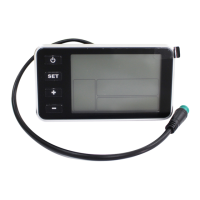
Details the physical components and dimensions of the YOSE POWER L200 display unit.
Outlines the common riding parameters and statistical results supported by the L200 display.
Explains the specific functions assigned to each button on the L200 display unit.
Provides instructions for turning the L200 display unit on and off using the power button.
Describes the layout and elements of the L200 display during riding.
Details how to change assist levels and enter pedestrian mode on the L200 display.
Instructions for controlling the display's light feature.
Procedure to reset trip time, max speed, average speed, and calories burnt.
Instructions for adjusting the wheel size setting in the user menu.
How to switch between different speed units like km/h and mph.
Configuration of the maximum speed limit for the ebike.
Setting the duration for the automatic power-off feature.
Procedure for resetting the L200 display settings to their default values.
Steps for establishing a Bluetooth connection with the display unit.
Adjusting the brightness level of the display's backlight.
 General
| Brand | YOSE POWER |
|---|---|
| Model | L200 |
| Category | Bicycle Accessories |
| Language | English |

 To Next Page