CHARGING THE BATTERIES
WARNING: Lithium Ion (LiIon) and Lithium Polymer (LiPo) baeries are
significantly more volale than alkaline, NiCd or NiMH baeries. All
instrucons and warnings must be followed exactly to prevent property
damage and/or serious injury as the mishandling of LiIon/LiPo baeries
can result in fire. By handling, charging or using the included LiIon/LiPo
baeries you assume all risks associated with them. If you do not agree
with these condions please return the complete product in new, unused
condion to the place of purchase immediately.
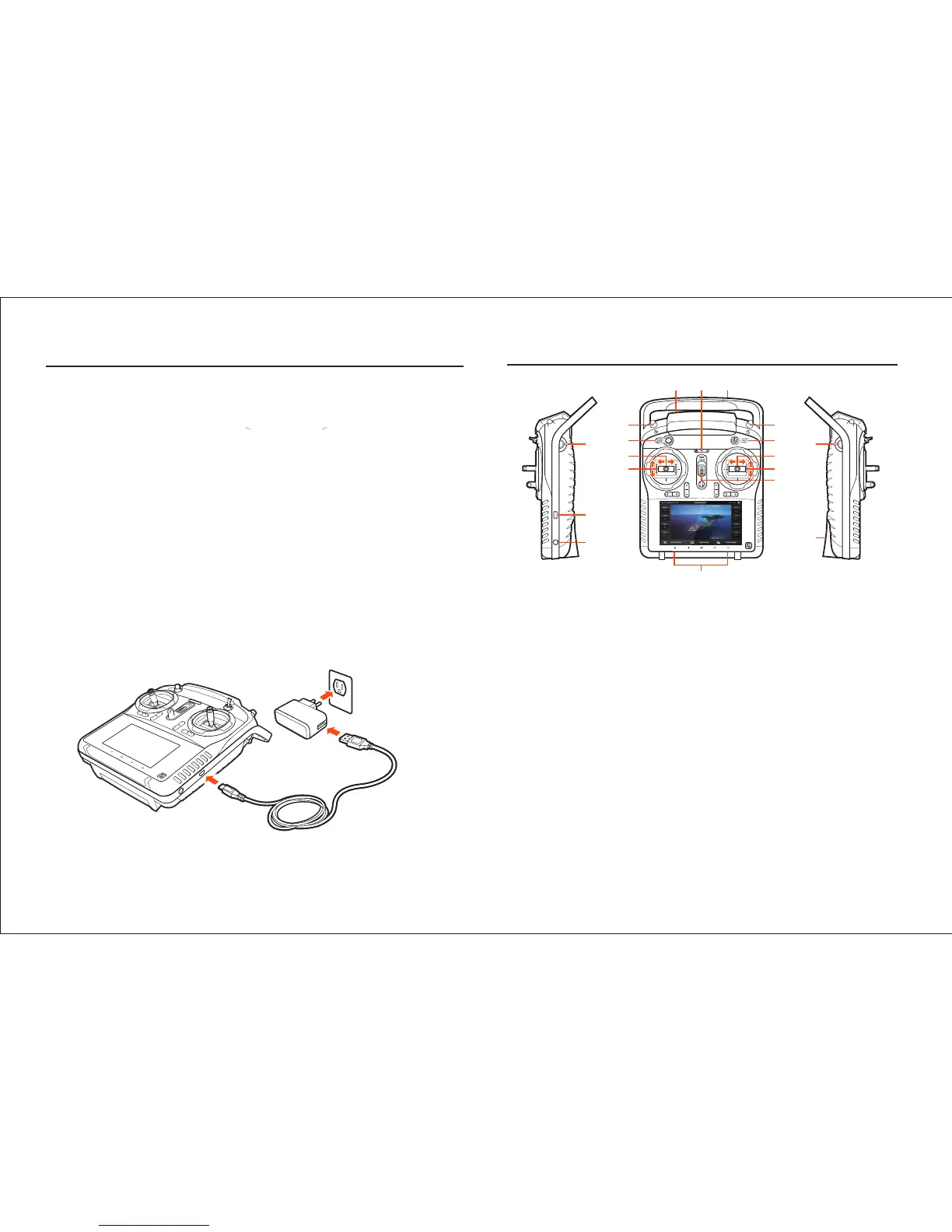
CHARGING THE LI-ION ST10+ BATTERY
You can charge the LiIon baery installed in the ST10+ from a 100-240V
AC outlet using the USB adapter/charger, or from a suitable USB power
source (2.0 amps max), with the USB to micro USB cable. While the ST10+
is powered off connect the cable to the USB adapter/charger, then plug it
into the USB connector/charging port on the right side. Aer approximate-
ly 30-45 seconds the LED indicator for the baery will blink blue while the
baery is charging, and will glow solid blue when the baery is fully
charged. It will take approximately 5.5 hours to charge a fully discharged
(not over-discharged ) baery.
NOTE: The AC plug type will vary depending on the region in which the
product was imported/purchased (AU = Australian; EU = European; UK =
United Kingdom; US = United States).
2
1
2
3
4
5
6
7
8 9 10
11
12
13
14
15
17
18
16
ST10+ OVERVIEW
1 Proporonal Control Rate Slider
2 USB Connector/Charging Port
3 Audio/Earphone Jack
4 Take Sll Photo Buon
5 Start/Stop Motors Buon
6 Rudder/Yaw Control (for Mode 2 and Mode 1)
7 Throle/Altude Control (for Mode 2)
Elevator/Pitch Control (for Mode 1)
8 5.8GHz Antenna (located inside the case)
9 Status Indicators (for ST10+ baery, 5.8GHz WiFi
and GPS)
10 2.4GHz Antenna (located inside the handle)
11 Start/Stop Video Recording Buon
12 Flight Mode Selecon Switch
13 Aileron/Roll Control (Mode 2 and Mode 1)
14 Elevator/Pitch Control (Mode 2)
Throle/Altude Control (Mode 1)
15 Power Switch
16 Volume and Navigaon Touch-Acvated Buons
(Volume Down/Volume Up/Menu/Home/Back)
17 CGO2+ Pitch Angle/Posion Control Slider
18 SD Card Slot (located under the baery)


 To Next Page
 Loading...