1
Z CAM E2 - How to synchronize time code with external device
Z CAM E2 supports LTC (Longitudinal Time Code) and can synchronize the time code with
external time code device through Z CAM Timecode Adapter.
Here we use Ambient NanoLockit as the external time code device, and introduce how
to synchronize Z CAM E2’s time code with it through Timecode Adapter step by step:
Step 1
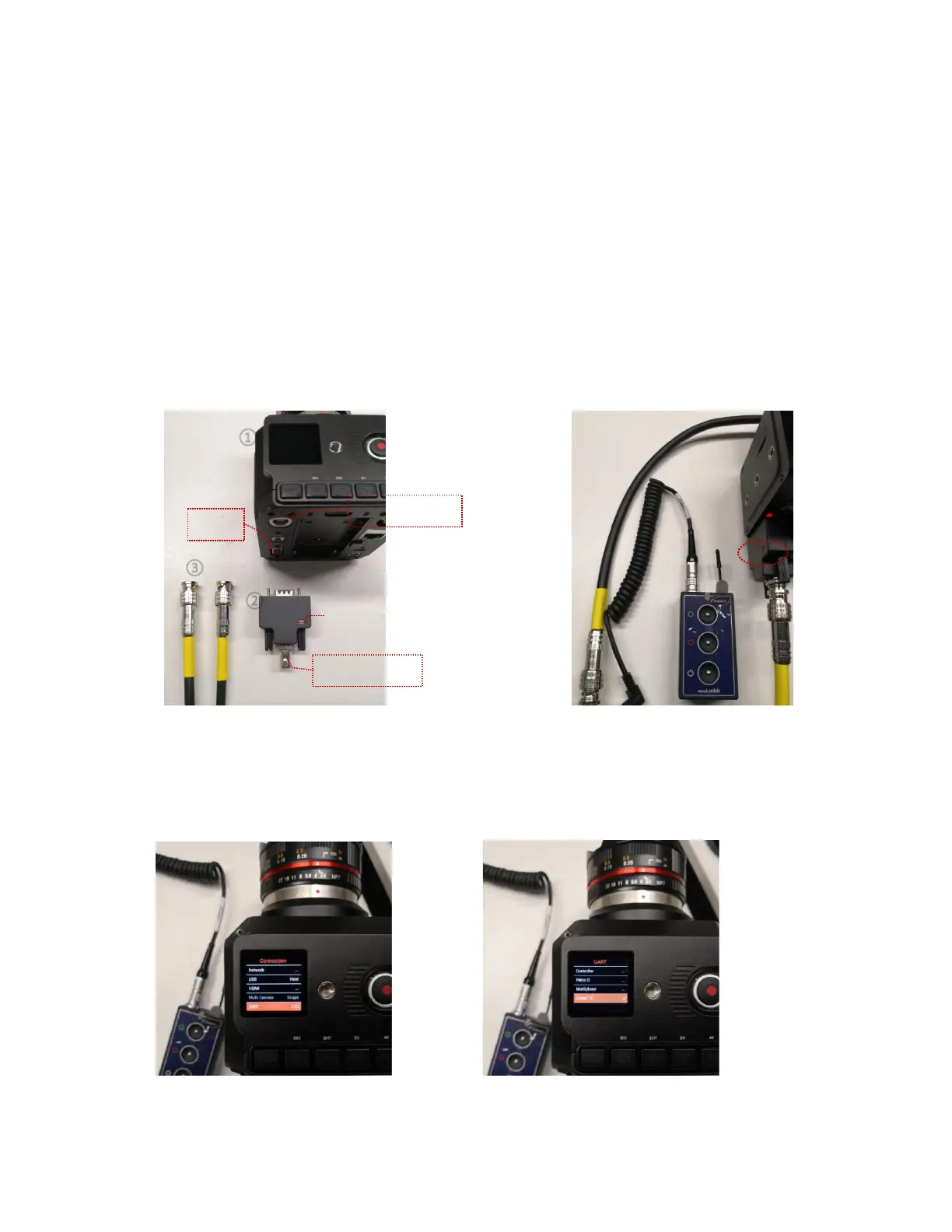
Connect and lock the DB9 connector of the Timecode Adapter to the camera’s COM
port. Then connect the external time code device to the BNC connector of the Timecode
Adapter with BNC cable.
① Z CAM E2 ②Timecode Adapter ③ BNC cable ④ Signal indicator
Step 2
In the UART setting of the camera (MENU > Connection > UART), set it to Linear LTC
Step 3
①
②



 To Next Page