EasyManua.ls Logo

Zagg rugged messenger case - User Manual

Zagg rugged messenger case
3 pages
Print Icon
To Next Page IconTo Next Page
Loading...
Online Manual
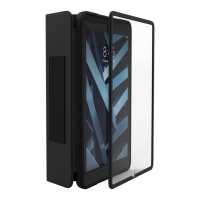
Durable Case with Snap-on Screen Protector
rugged messenger
case
Question and Answer IconNeed help?

Do you have a question about the Zagg rugged messenger case and is the answer not in the manual?

Summary

Getting Started

Inserting Your Device

How to insert your device into the Rugged Messenger Case for a secure fit.

Attaching the Snap-On PET Screen

Instructions for placing and securing the PET screen onto the device within the case.

Using the Stand

Guide on how to fold and position the built-in stand for optimal viewing angles.

Adjusting the Viewing Angle

Explanation of how to use the magnetic kickstand to create multiple viewing positions.

Summary

Getting Started

Inserting Your Device

How to insert your device into the Rugged Messenger Case for a secure fit.

Attaching the Snap-On PET Screen

Instructions for placing and securing the PET screen onto the device within the case.

Using the Stand

Guide on how to fold and position the built-in stand for optimal viewing angles.

Adjusting the Viewing Angle

Explanation of how to use the magnetic kickstand to create multiple viewing positions.

Zagg rugged messenger case Specifications

General IconGeneral
BrandZagg
Modelrugged messenger case
CategoryAccessories
LanguageEnglish

Related product manuals