Electronic Loads -8-
EL300
The EL300 external electronic load is a One-Quadrant-Potentiostat. This means that EL300 is only
able to sink current but cannot source current. Typical applications are discharging experiments at
(rechargeable) batteries and fuel cells. The EL-series potentiostats can be operated in both
potentiostatic and galvanostatic modes, controlled by the Thales software. For low ohmic objects,
galvanostatic mode is recommended. The output panel as well as the input panel are electrically
isolated from ground.
The EL300 is air cooled for operation till 25 A and needs water cooling when loaded with more than 25
A. For water cooling you find an inlet and an outlet at the backside of the EL300.
The EL300 may get damaged if more than 25 A are applied without water cooling!!!
Cell Connections
It is important to know that EL potentiostats SINK current from the device under test (DUT) and
therefore the cell connections must be as short and as thick as possible. Otherwise the
measurements may be faulty and it may even seem that the EL is defective. For this reason, the
standard cable set shipped with the ELs should be shortened as much as possible.
It is also important to connect the DUT with the correct polarity to the EL potentiostat. Whereas typical
one-cell-voltages of 0.8 V or 1.2 V do not damage an EL when being connected with the wrong
polarity, cell stacks can do very well. Therefore, we recommend connecting the sense inputs as
described in section. 1 (Full Cell Configuration). Call the Test Sampling page of the Thales software
and check for the potential polarity by connecting sense cables. It must be negative. Now connect the
power cables according to section. 1 with the potentiostatic/galvanostatic mode switched OFF. The
displayed potential must not change significantly when connecting the power cables.
With the correct polarity the DUT may be connected to the EL potentiostat in one of the following
ways:
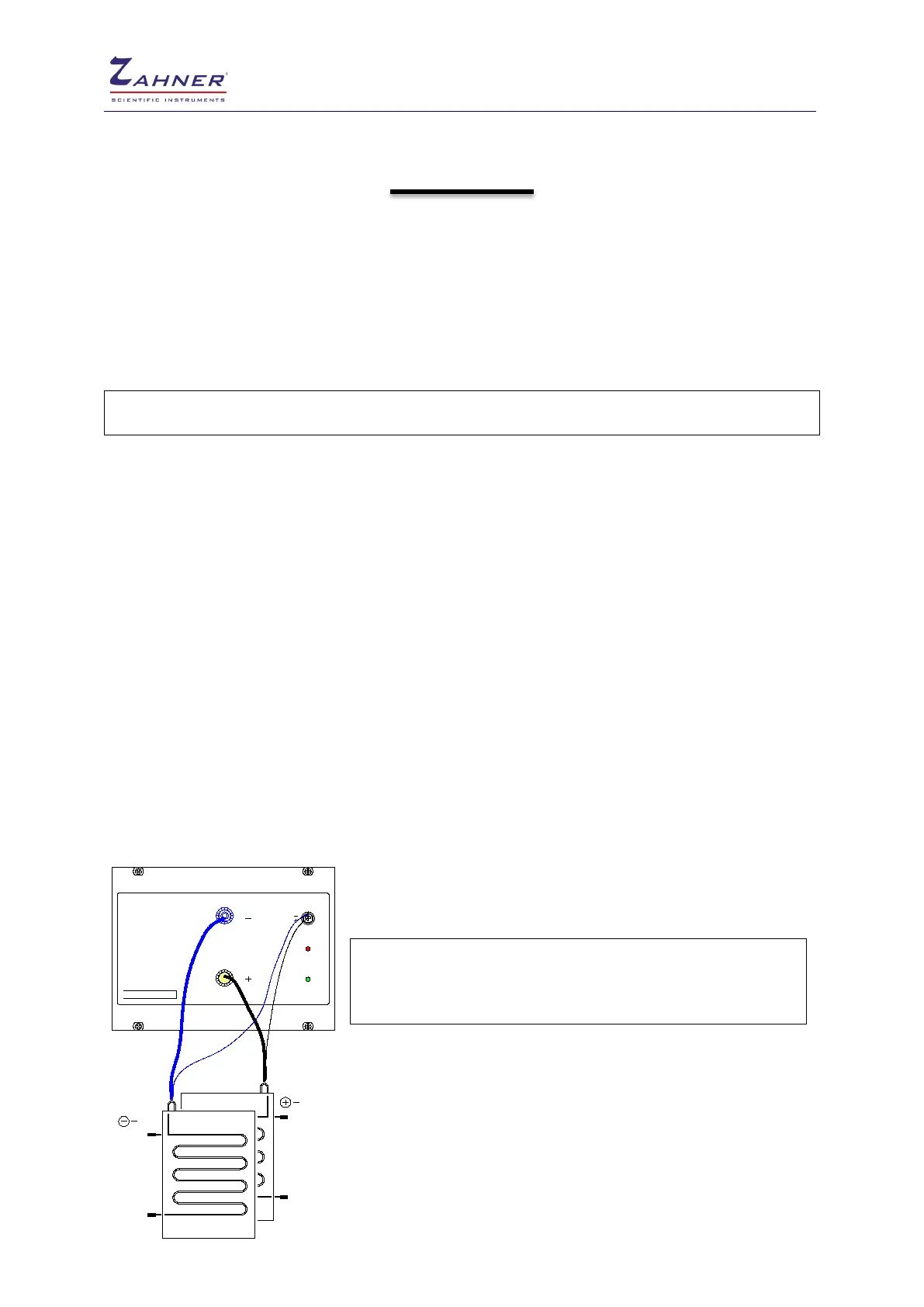
1. Full cell configuration (Standard Kelvin Scheme)
This configuration is used with DUT like (rechargeable) batteries
and fuel cells if a complete cell is to be investigated.
!
The potential will be indicated as negative in EL.
The measured current must be positive I ≥ 0
Always ensure the correct polarity by connecting the sense cables.
Afterwards properly connect the power cables.
The potential will be shown as negative in the Thales software.
ZAHNER
e le k trik
power
EL101
sense
lin e
a ctiv e
anode
pole
pole
cathode



 To Next Page