3
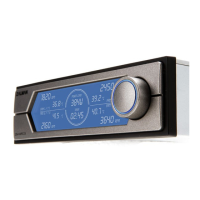
① Power Load Meter : Displays Power Load between 10 ~ 999W.
Readings of 1 ~ 9W are shown as “Lo” and readings of 1000W+ are shown as “Hi.”
② Timer : Timer shows Computer usage time and resets when Computer is turned OFF.
③ RPM Display : RPM is displayed in units of 10RPM. Values of 200RPM and below are shown as “0.”
Values between 201 ~ 6000RPM are supported by the display.
④ Temperature Display : Displays temperatures between -9℃ and +99℃. Temperatures below -10℃ are
shown as “Lo.” The Display will blink temperatures between 80 ~ 99.9℃ and display “Hi”for temperatures
above 99.9℃.
⑤ Fan Channel Display
⑥ Jog Wheel : Jog Wheel is used for adjusting Fan RPM and selecting a Fan Channel. RPM can be set
from 60 to 6000RPM in units of 60RPM.
Front Panel
① Standard Fans (Fan 1~3): 3-Pin fans that support the RPM output function can be connected for use.
PWM Fan : A 4-Pin fan that supports the PWM function can be connected for use.
② Temperature Sensing: Four temperature sensors can be connected.
③ CVS Terminal: Receives the measured values of the CVS.
④ Power Connector: Connects with the PSU’s 4-Pin connector.
Back Panel


 To Next Page
 Loading...