ENGLISH
5
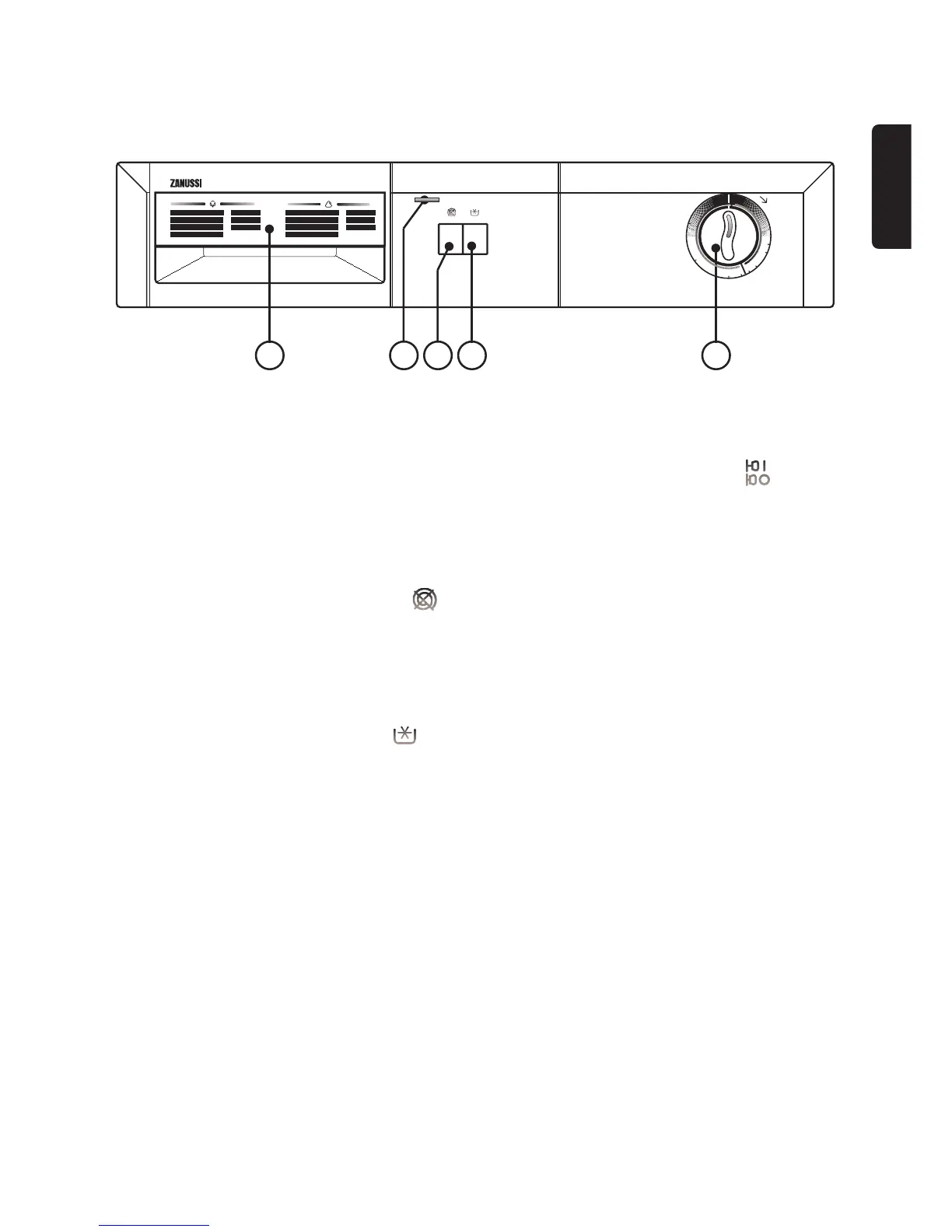
The Control Panel
1 Programme Guide
2 ON/OFF LAMP
It lights when the appliance is operating.
3 “NO SPINNING” BUTTON
Available only for programmes A to H.
Pressing this button before starting the programmes for
cotton and linen all spinnings will be excluded. The
other steps of the program remain unchanged.
4 “COLD WASH” BUTTON
Pressing this button when starting any program it will be
run through with cold water. All other features of the
program as intensity and duration remain unchanged.
Advisable for synthetic and delicate fabrics: curtains,
stores and other not too dirty fabrics.
5 PROGRAM SELECTOR
To select the required program turn the control
clockwise until the marker on the top coincides with the
number of the required program (reference mark on the
control panel). If at any chance you pass by the required
letter NEVER TURN THE CONTROL
ANTICLOCKWISE just continue clockwise until the
required letter is reached again.



 To Next Page