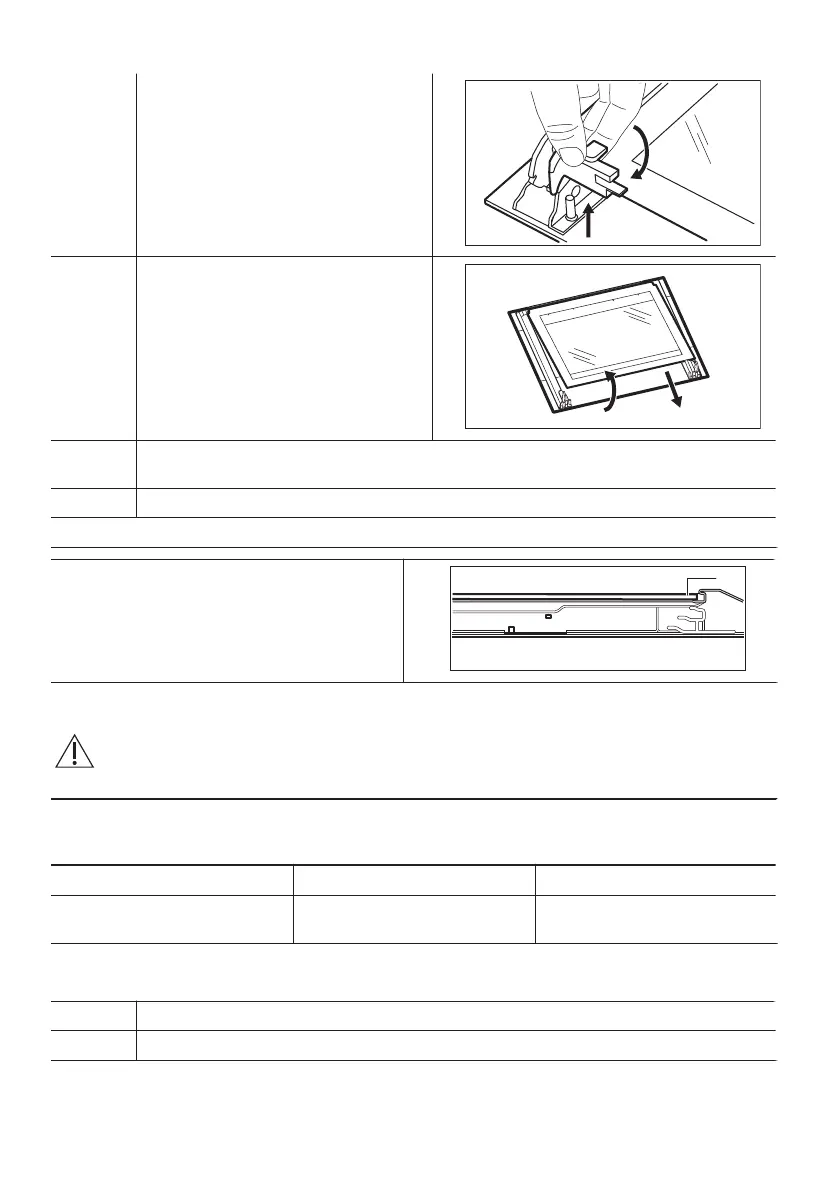
Step 5 Turn the fasteners by 90° and remove
them from their seats.
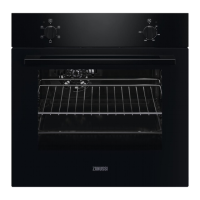
Step 6 First lift carefully and then remove the
glass panel.
Step 7 Clean the glass panels with water and soap. Dry the glass panels carefully. Do not clean
the glass panels in the dishwasher.
Step 8 After cleaning, install the glass panel and the oven door.
If the door is installed correctly, you will hear a click when closing the latches.
When installed correctly the door trim clicks.
Make sure that you install the internal glass
panel in the seats correctly.
HOW TO REPLACE: LAMP
WARNING! Risk of electric shock.
The lamp can be hot.
Before you replace the lamp:
Step 1 Step 2 Step 3
Turn off the oven. Wait until the
oven is cold.
Disconnect the oven from the
mains.
Put a cloth on the bottom of
the cavity.
Back lamp
Step 1 Turn the glass cover to remove it.
Step 2 Clean the glass cover.
18


 To Next Page