QuickStartGuide
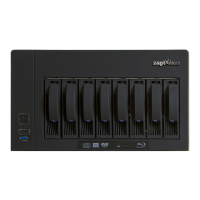
With high performance video processing technology and a rich media center application, the Zappiti
NAS delivers an optimal value for Zappiti users to build up an ideal video library storage and features
a rich entertainment hub. The Zappiti NAS can be used with one or several Zappiti 4K Players. The
Zappiti NAS RIP provides a high performance & high capacity storage solution for home, and
personaluserstoenjoyvideocontentinmultiroom.
The builtin optical disc drive supports fullyautomated bitforbit backup of your Bluray and DVD discs.
Open the tray of the Bluray player. Insert your disc and this is it! Zappiti NAS does everything for you!
There is nothing else to do! Once your disc is ripped and back up in the internal storage of the Zappiti
NAS,itisejectedandyoujusthavetoinsertanotherone.
Startup
1. Please connect a RJ45 network cable (class 6 or 7 recommended) to your local network or directly to
yourrouter/DSLbox,ortoanEthernetswitchitselfconnectedtoyourrouter.
2.Connecttheprovidedpowercable.
WARNING! The other connectors are reserved for Zappiti certified technicians and should only be
usedincaseoffailure.Sopleasedon’tusethem!
3.SwitchONtheON/OFFbuttonlocatedonthebackpanel.
HarddrivesInitialization
Zappititeamwillinitiatetheharddrivesremotelyattherequestoftheuser.
To initialize your hard drives, please use the dedicated Assistance Form located on zappiti.com (see
belowformoreinfo).
Warning!
Your NAS serial number is required for any customer support request. This serial number is
printedonastickerlocatedundertheNASenclosure.
UserSupport
Your Zappiti NAS comes with 1 year premium support. To contact the user support, please use the
dedicatedformlocatedhere:
http://zappiti.com/support


 To Next Page
 Loading...