ZMCBR-H65
3
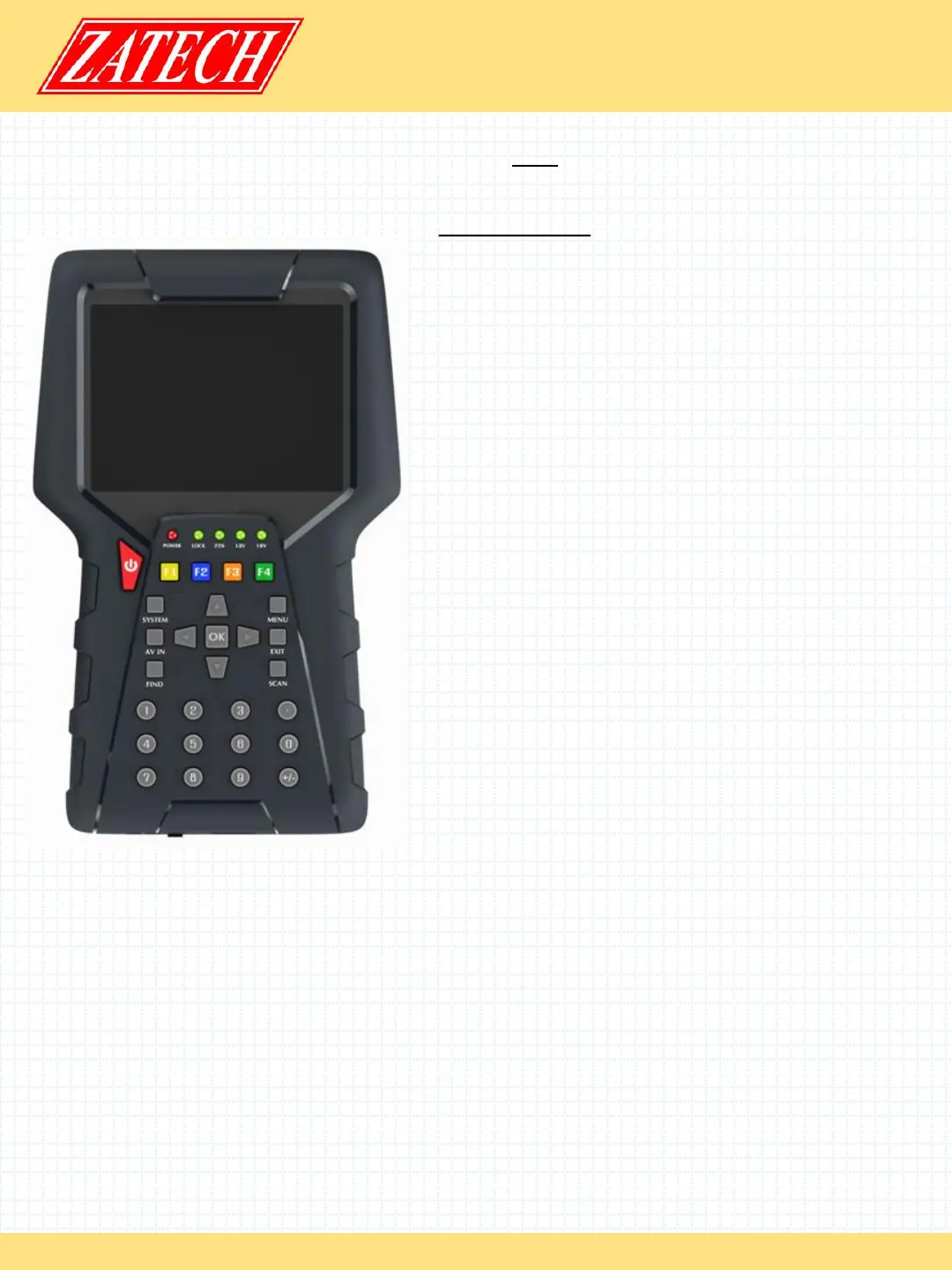
2. Product Overview
DVB S2/ ISDB-T
4. LOCK light:
This light will be on when signal is locked
5. 13V/18V light:
Indicate the 13V/18V
6. Function key:
Made of 4 keys, F1 - F4
7. Arrow key and OK key:
Press the Arrow key to select the right item then
press OK key to confirm
8. SYSTEM key:
Enter the settings menu, you can set all system
parameters products
9. AV IN key:
Use this product as a television
10. FIND key:
Enter the menu of measurement signal, you can
measure the signal about transponder quickly.
11. MENU key:
Enter the main menu
12. EXIT key:
Exit from the present menu and back to the
previous menu
13. SCAN key:
In the S2 model, it is blind scan, in the ISDBT
model ,it is auto search
14. USB Port:
One USB Host Port
15.HDMI Port:
Use HDMI line connect to TV
15.ON/OFF:
Switch the battery on/off
1. POWER key:
Turn the product on/off
2. LCD Screen:
Shows Menus and Programs clearly
3. Power light:
Indicates the power status
Red: the product is power on
Green: the product is power off


 To Next Page
 Loading...