ZMCBR-H65
9
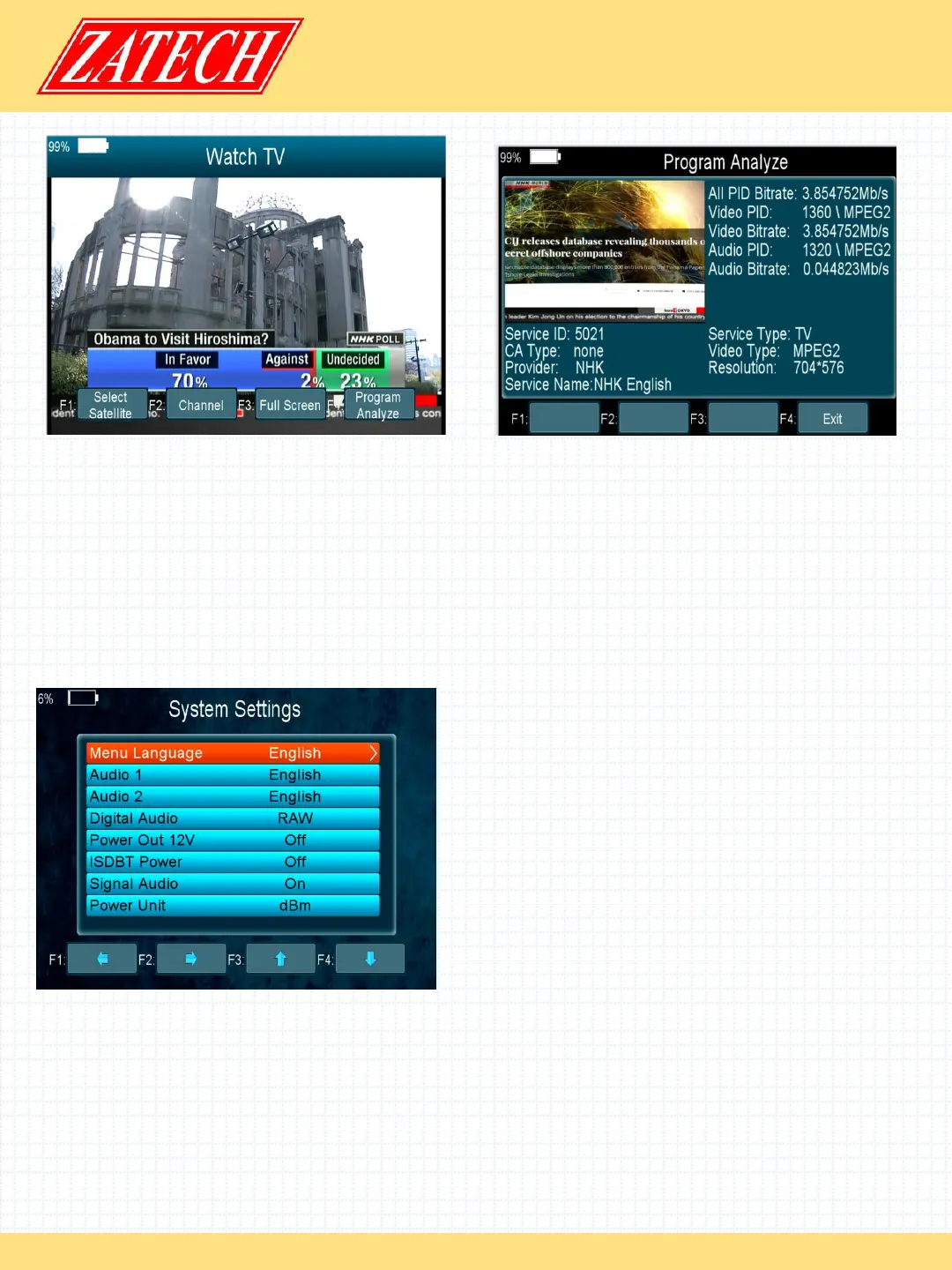
4.4 Watch TV
Main Menu-> Watch TV
Press OK enter the Watch TV menu, in this menu, you can press the F1 button to
select any satellite or press the F2 button to enter the Channel/Radio menu,
press the up/down key jump to next/previous channel.
Press the F3 button to watch Full Screen.
Press the F4 button to analyze program.
4.5 Settings
4.5.1 System
Main Menu-> Settings-> System
In this menu, you can set all the settings
here by pressing the t/ukey.
1. Menu Language: Set the menu
language.
2. Audio1: Set the preferred audio
language.
3. Audio2: Set the sub-prime audio
language.
4. Digital Audio: Select PCM / RAW as default output.
5. Power Out 12V: If you set it on, it will support 12V voltage.
6. DVBT Power: If you set it on, it will provide voltage for T tuner.
7. Signal Audio: If you set “ON”, in the TP Search interface when you highlight a
transponder with signal, it will sound automatically. If you set “OFF”, in the TP Search
interface when you highlight a transponder with signal, it will not sound.
8. Power Unit: Change the power unit.


 To Next Page
 Loading...