ZMCBR-H65
8
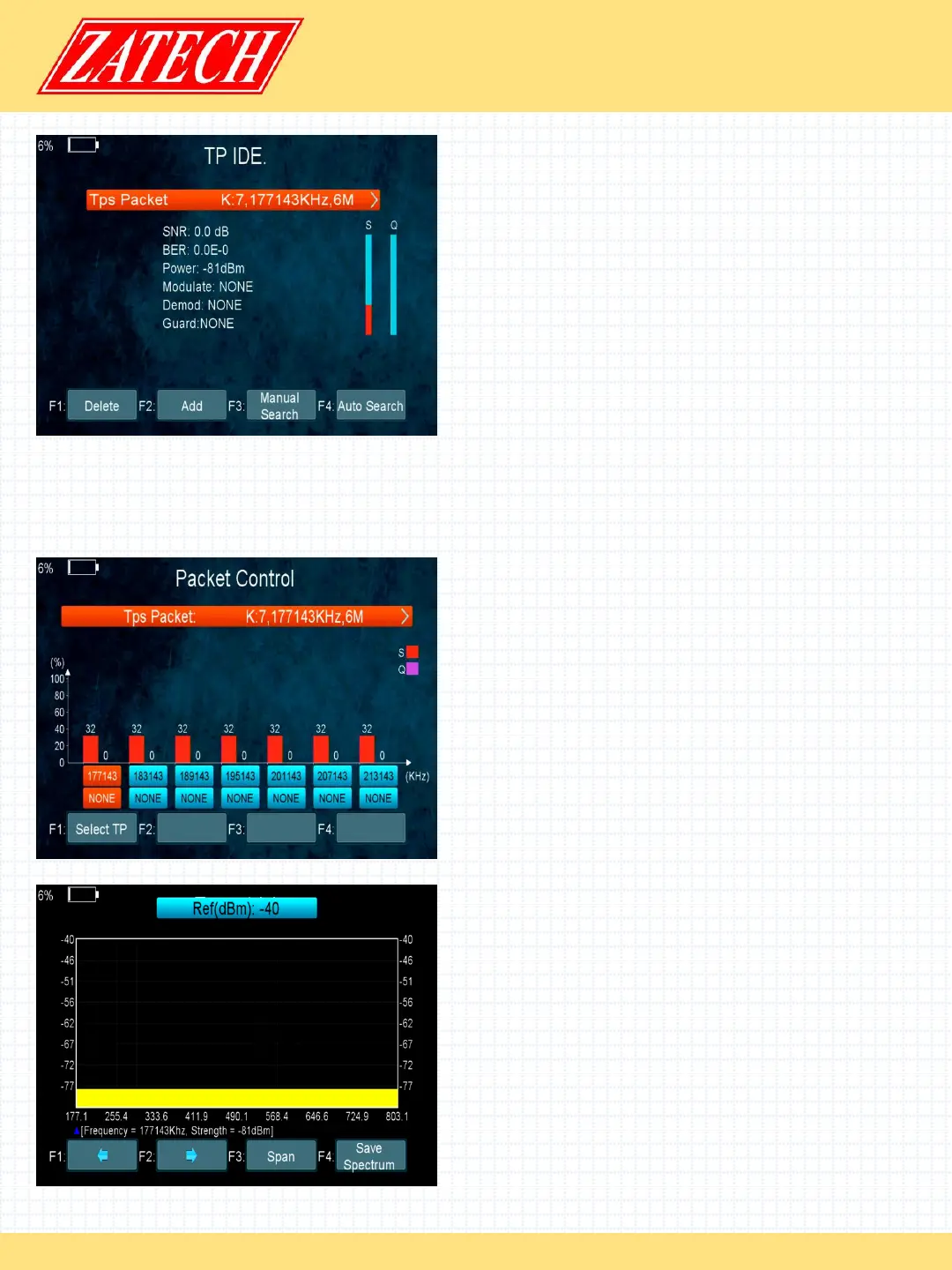
4.3.2 TP IDE
Main Menu-> TERRESTRIAL-> TP IDE.
In this menu, you can know the exact
information about the transponder and you
can also Delete, Add, Manual Search, Auto
Search transponders .
1. SNR: It will show you the Carrier to Noise Ratio of the transponder you selected.
3. BER:Error Correction
5. Power: It will show you the strength of the transponder you selected.
6. Modulate: Modulation efficiency.
4.3.3 Packet Control
Main Menu-> TERRESTRIAL-> Packet Control
In this menu, you can know the strength
and quality of each transponder
4.3.4 Spectrum
Main Menu-> TERRESTRIAL->Spectrum
In this menu, you can know the strength of
all transponders.
1. t/u : Press the t/ukey to change the
transponder.
2. p/q : Press the p/qkey to change the
range of the Y-axis.
3. Span: Press the F3 key to set transponder
of span.
4. Save Spectrum: Press the F4 key to save
the picture of spectrum.


 To Next Page
 Loading...