ZMCBR-H65
7
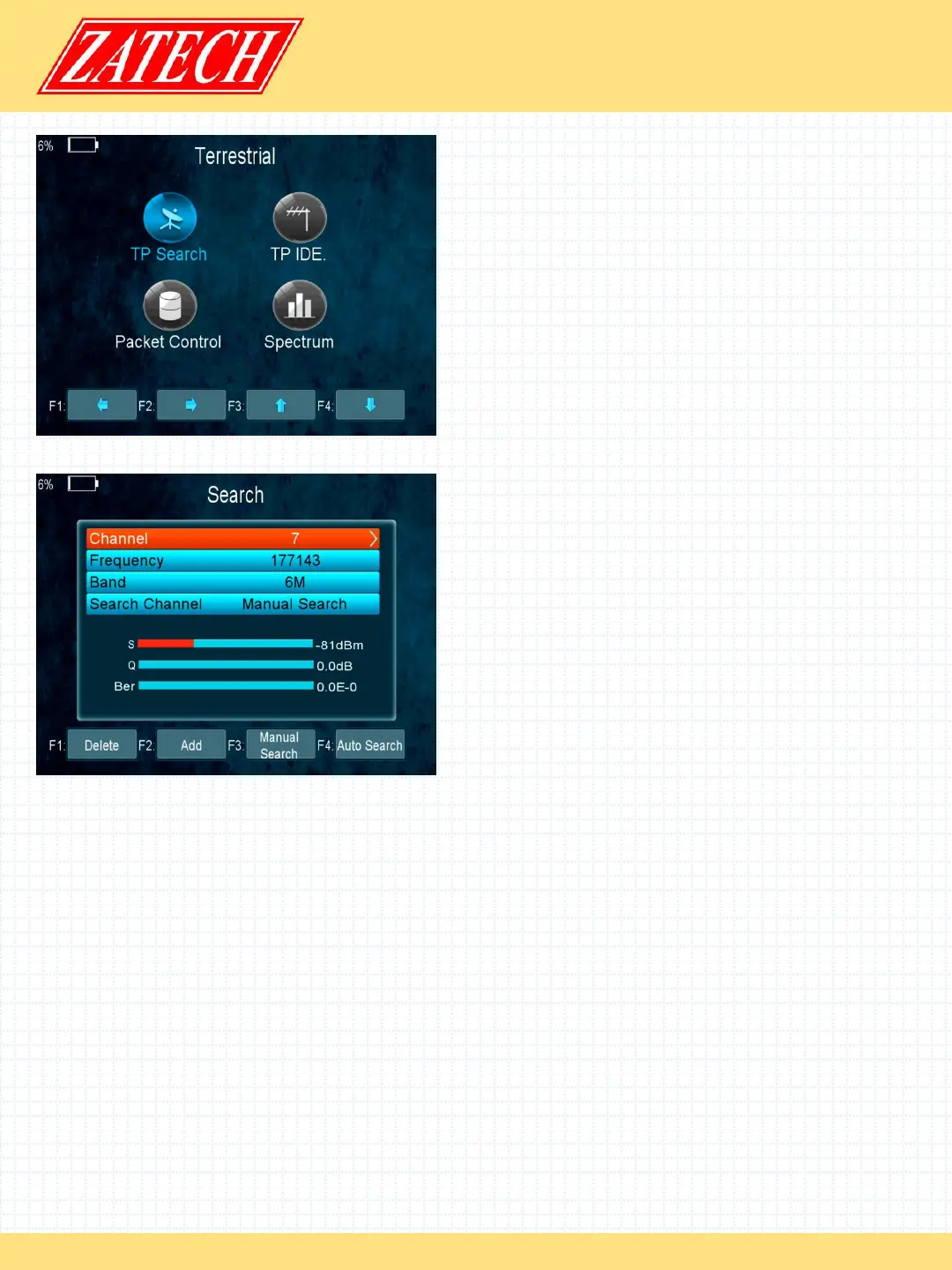
4.3 TERRESTRIAL
Main Menu-> TERRESTRIAL
Press OK enter the terrestrial model
4.3.1 TP Search
Main Menu-> TERRESTRIAL-> TP Search
In this menu, you can Delete, Add, Manual Search,
Auto Search transponders.
- Delete
In this menu, when you highlight the channel item,
you can press the t/u key to choose the transponder
which you want to delete, then press the F1 key to
delete.
- Add
You can add the transponder which you want with the F2 key. Here you can input
new Frequency, Bandwidth. Press the OK key to confirm the setting, then this new
transponder will be added to the Transponder list.
- Search
You can Manual Search the transponder which you want with the F3 key. You will
be asked to confirm whether only search FTA channels or not. If you select “Yes”,
you will only search FTA channels.
- Auto Search
You can search all transponders with the F4 key.


 To Next Page
 Loading...