
 Need help?
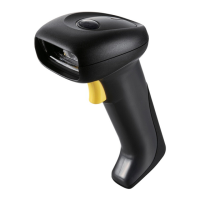
Do you have a question about the ZBA ZB-3062 and is the answer not in the manual?
Compliance statements for FCC, CE, BSMI standards, and operational warnings.
Instructions on aiming and scanning barcodes for effective reading.
Step-by-step guide for configuring scanner settings for optimal performance.
Procedures for installing the scanner using RS232 and USB (HID/Virtual-COM) interfaces.
Guide to programming the scanner by scanning specific barcodes.
Details on setting up the RS232 interface connection and options.
Settings related to scanning output resolution and trigger modes.
Adjusts LED and aimer brightness levels for optimal visibility.
Controls the illumination lights for reading barcodes.
Sets the time before the imager powers down due to inactivity.
Configures a delay before image capture for aiming.
Discusses how heat affects imager performance and potential degradation.
Narrows the imager's field of view to read specific barcodes accurately.
Enables or disables the centering window for barcode reading.
Sets whether output data must conform to an edited sequence.
Enables reading multiple symbols when the trigger is activated.
Notifies the user if a code cannot be read.
Enables or disables decoding of all supported symbologies.
Sets valid reading length for symbologies to reduce misreads.
Configures Codabar check character validation and transmission.
Controls transmission of Codabar start and stop characters.
Enables concatenation of adjacent Codabar symbols.
Controls transmission of Code 39 start and stop characters.
Configures Code 39 check character validation and transmission.
Sets minimum and maximum lengths for Code 39 message data.
Configures Interleaved 2 of 5 check digit validation and transmission.
Sets minimum and maximum lengths for Interleaved 2 of 5 message data.
Sets minimum and maximum lengths for Code 93 message data.
Sets minimum and maximum lengths for Straight 2 of 5 Industrial message data.
Sets minimum and maximum lengths for Straight 2 of 5 IATA message data.
Sets minimum and maximum lengths for Matrix 2 of 5 message data.
Sets whether 1 or 2 check digits are required for Code 11.
Sets minimum and maximum lengths for Code 11 message data.
Controls ISBT 128 concatenation for blood product labeling.
Sets minimum and maximum lengths for Code 128 message data.
Sets the code page for proper character mapping in Code 128.
Configures Telepen output modes for AIM or Original.
Sets minimum and maximum lengths for Telepen message data.
Specifies whether the UPC-A check digit is transmitted.
Controls the transmission of the UPC-A number system digit.
Adds 2 or 5 digits to UPC-A data, and manages addenda requirements.
Expands UPC-E code to UPC-A format.
Sets requirement for UPC-E barcodes with addenda.
Specifies whether the UPC-E0 check digit is transmitted.
Specifies whether the EAN/JAN-13 check digit is transmitted.
Translates EAN-13 Bookland symbols into ISBN format.
Specifies whether the EAN/JAN-8 check digit is transmitted.
Adds 2 or 5 digits to EAN/JAN-8 data, and manages addenda requirements.
Configures MSI check character validation and transmission.
Sets minimum and maximum lengths for MSI message data.
Sets minimum and maximum lengths for Plessey Code message data.
Sets minimum and maximum lengths for GS1 DataBar Expanded message data.
Sets minimum and maximum lengths for PosiCode message data.
Controls Trioptic Code setting, especially for magnetic storage media.
Sets minimum and maximum lengths for Codablock F message data.
Sets minimum and maximum lengths for Code 16K message data.
Sets minimum and maximum lengths for Code 49 message data.
Sets minimum and maximum lengths for PDF417 message data.
Sets minimum and maximum lengths for MicroPDF417 message data.
Decodes EAN UCC Composite symbols with UPC or EAN linear components.
Sets minimum and maximum lengths for EAN UCC Composite message data.
Formats output to emulate UCC/EAN-128 or GS1 DataBar.
Specifies whether the Postnet check digit is transmitted.
Specifies whether the Planet Code check digit is transmitted.
Settings for British, Canadian, Australian, Japanese, and China Post symbologies.
Sets minimum and maximum lengths for QR Code message data.
Sets minimum and maximum lengths for Data Matrix message data.
Sets minimum and maximum lengths for MaxiCode message data.
Sets minimum and maximum lengths for Aztec Code message data.
Enables scanning of Aztec Runes for short license plate messages.
Adds user-defined data before or after scanned barcode data.
Introduces the editor for changing imager output by inserting characters.
Steps to create and program a new data format for scanned barcodes.
Defines templates for matching character strings for OCR reading.
Chart of characters used to define OCR template patterns.
Adds a temporary Code I.D. prefix to all symbologies.
Displays current software revision and product information.
Restores the imager to its factory default settings.
Explains conventions used in menu and query command descriptions.
Defines the syntax for menu and query commands.
Details special characters used to query device settings.
 General
| Brand | ZBA |
|---|---|
| Model | ZB-3062 |
| Category | Barcode Reader |
| Language | English |

 To Next Page

